

This article explains how to convert SoundCloud to MP4 from YouTube using MiniTool Video Converter and viddown.net. First, find a music video related to the SoundCloud on YouTube and copy its link. Then, paste the URL into either tool, analyze the video, select MP4 as the output format, and start converting.
SoundCloud is an online music streaming platform, often referred to as the "YouTube of the music world." The platform also shares music videos on YouTube, effectively blending visual and audio elements.
Like me, some users may want to save these music videos as MP4 files for better offline playback or other purposes. To help with this, I’ve found two SoundCloud to MP4 converters that make the task easy:
- MiniTool Video Converter
- viddown.net
Quick Comparison:
| Comparison | MiniTool Video Converter | viddown.net |
| Type | Desktop tool | Online tool |
| Free to use | Yes | Yes |
| Supported platform | YouTube, Facebook, Twitter, Instagram | YouTube, Facebook, Twitter, Instagram, and Vimeo |
| Supported format | MP4, WebM, MP3, WAV | MP4 |
| Batch download | Yes | No |
How Can I Convert SoundCloud to MP4
Fast Track Steps:
- Open the SoundCloud music to MP4 converter
- Copy the SoundCloud music link from YouTube
- Paste the link and analyze it
- Choose MP4 as the output format
- Save the SoundCloud music as an MP4
- Check the SoundCloud music
As shown above, saving SoundCloud music from YouTube in MP4 format simply requires using a dedicated YTD video downloader, such as MiniTool Video Converter or viddown.net. Below is how you can use these tools to convert SoundCloud music into MP4 format.
Option 1: MiniTool Video Converter (Offline)
MiniTool Video Converter is a Windows-based video downloading tool. I chose this tool because it can save video not only from YT but also from platforms like Instagram, TikTok, Twitter, and Facebook.
What I like most about this application is that it allows for the batch downloading of up to 10 videos, saving them in either MP4 or WebM format, which is a huge time-saver. Furthermore, MiniTool Video Converter can also extract subtitles from YouTube videos. Here are the detailed steps on how to save SoundCloud music videos as MP4 from YouTube with MiniTool Video Converter.
 MiniTool Video Converter
-
 Download YT videos for offline playback.
- Save Instagram Reels to watch privately.
- Get online TikTok clips for remake or combination.
- Download Facebook and X videos easily.

1. Download and install MiniTool Video Converter
Click the button above to download and install MiniTool Video Converter.
2. Copy the SoundCloud music link
Go to YouTube and find SoundCloud's official account. Then, find the music you want to save as an MP4 and copy its link from the address bar.
3. Analyze the SoundCloud music link
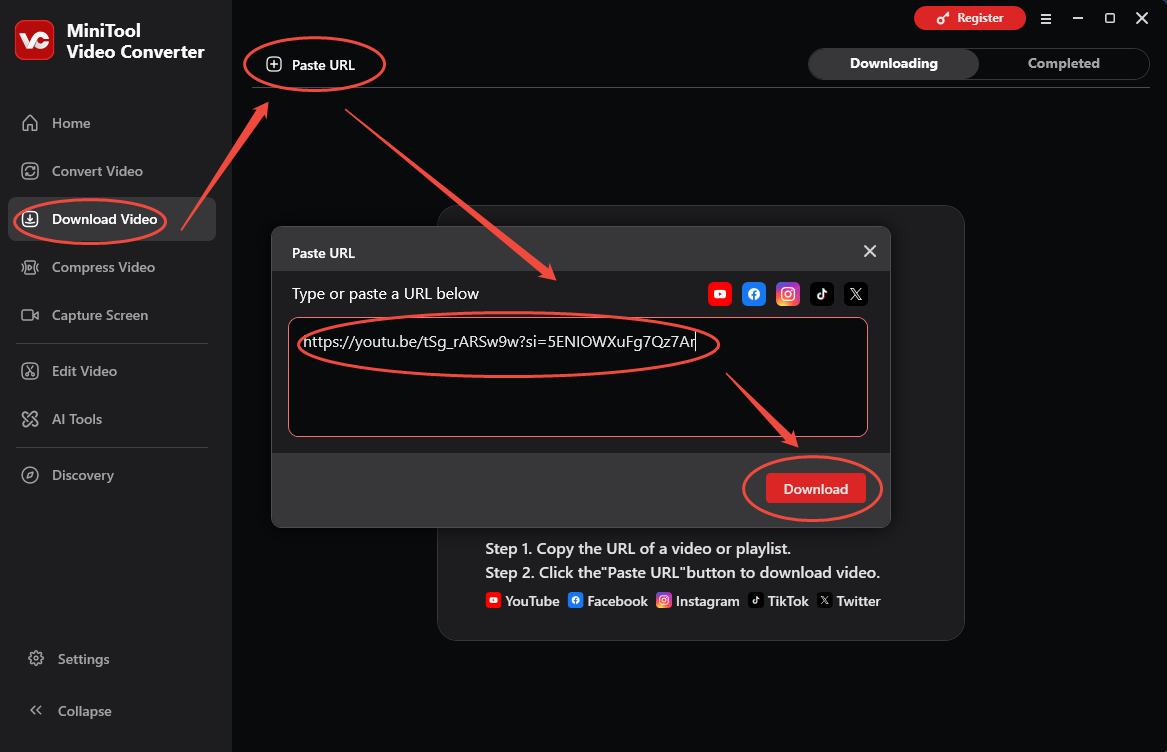
Launch MiniTool Video Converter and go to the Download Video section. Then, click the Paste URL option and paste the copied music link into the box. Next, click the Download button to analyze the video link.
4. Save the SoundCloud music as an MP4
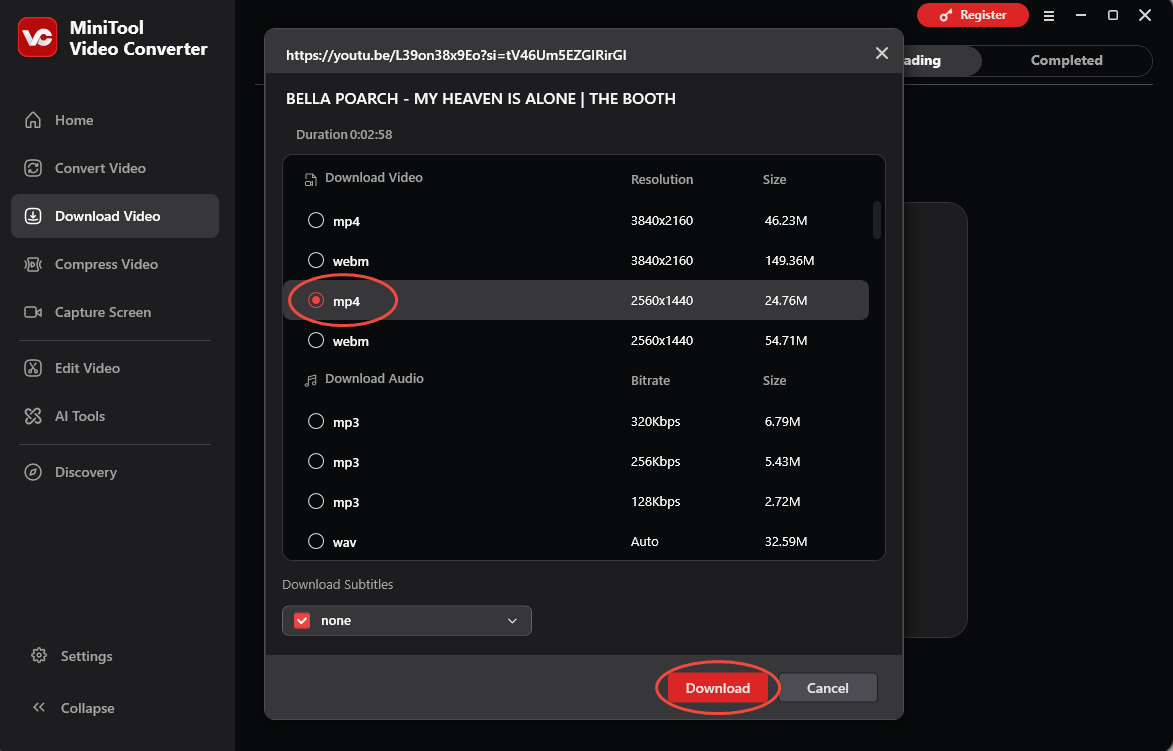
In the new interface, choose the MP4 format as the output format under the Download Video tab. Then, click the Download button again to save the SoundCloud music.
5. Check the SoundCloud Music
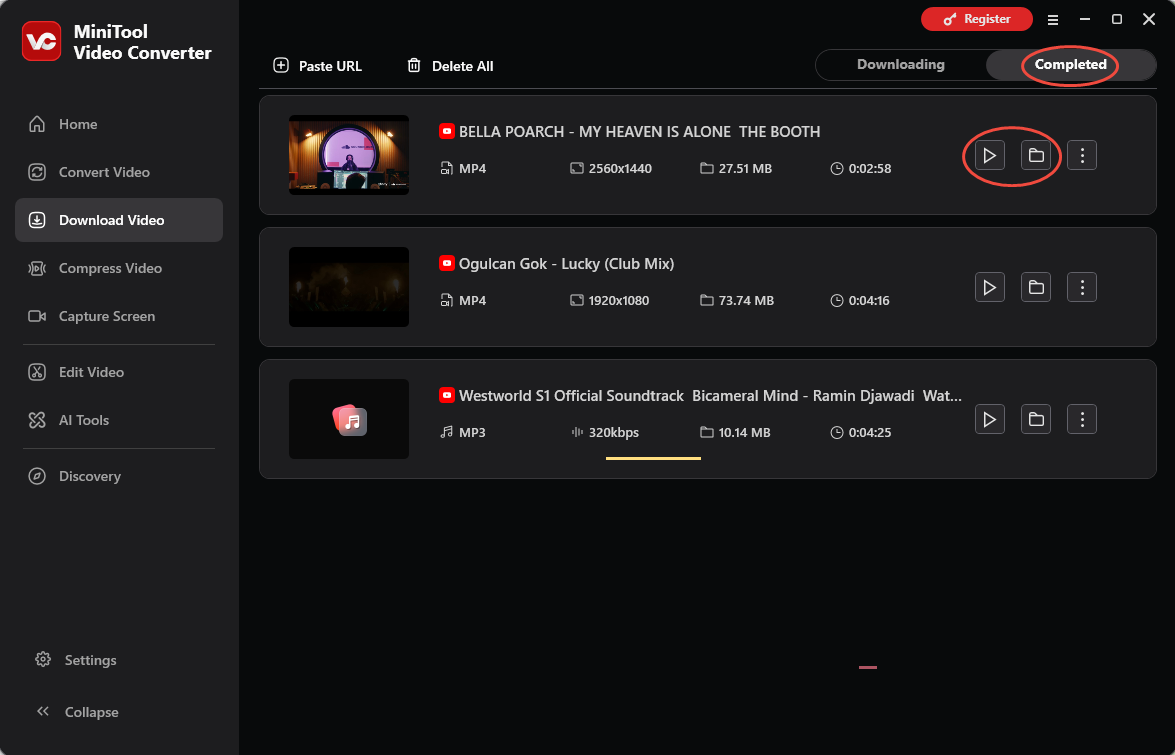
When the download ends, the tool will automatically switch to the Completed tab. Then, click the Play icon to listen to the SoundCloud music or click the Folder icon to locate it on the computer.

Option 2: viddown.net (Online)
When I want to save time and complete SoundCloud-to-MP4 conversions quickly, I typically use an online tool. viddown.net is my top recommendation; it’s completely free and requires no registration or account login.
Moreover, viddown.net can also be used to save YT videos, as well as to download content from Instagram, Twitter, Facebook, TikTok, and Vimeo. Another reason I chose this online tool is its excellent compatibility, allowing it to work seamlessly across a wide range of platforms and devices.
Below is a step-by-step guide to convert SoundCloud music to MP4 from YouTube using viddown.net.
1. Visit viddown.net
Go to the viddown.net website.
2. Copy the SoundCloud music link from YouTube
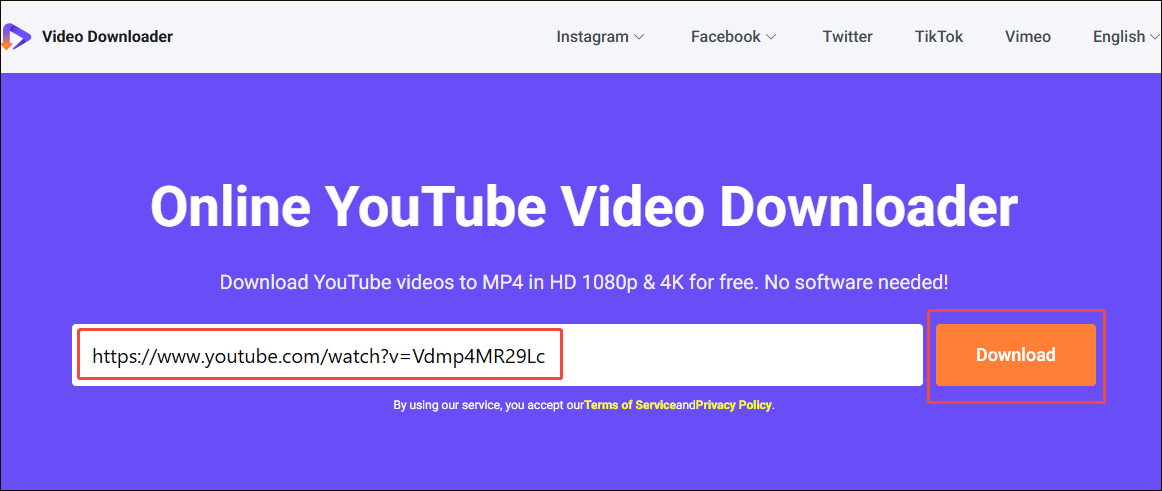
3. Analyze the SoundCloud music link
Go back to viddown.net. Then, paste the copied SoundCloud music link into the box. Next, click the Download button to analyze the link.
4. Save the SoundCloud music as an MP4
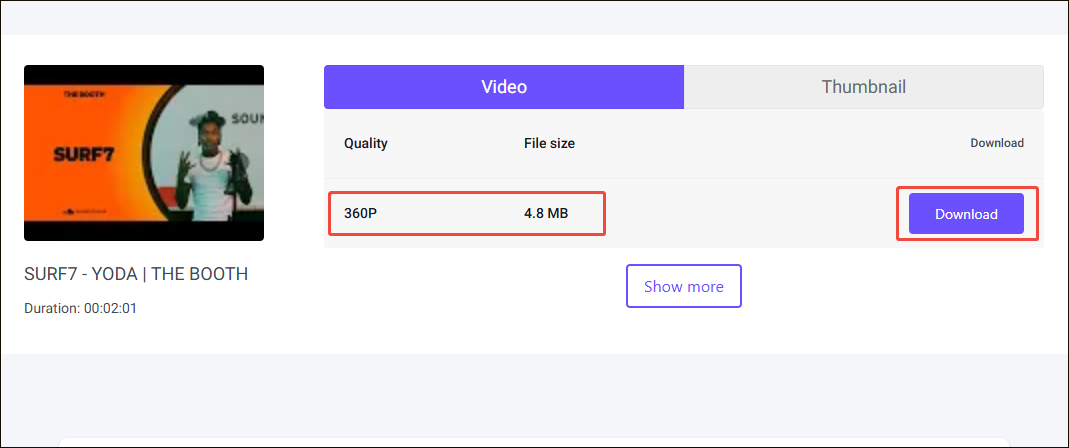
Then, select a suitable quality and file size and click the Download button to save the SoundCloud music as an MP4. Finally, check it in the Downloads folder on the computer.
With the 2 tools above, it is easy to save SoundCloud music to MP4 from YouTube. Both approaches have their own advantages; you can choose the one that best suits your specific use case.

Final Words
How to convert SoundCloud to MP4 from YouTube? Both MiniTool Video Converter and viddown.net provide practical ways to do this task easily. Now, choose one software and follow the steps above to save the SoundCloud music to MP4.
If you encounter problems while using MiniTool Video Converter, please send an email to support@minitool.com for assistance.
People Also Ask
About The Author

Position: Columnist
Jade is an experienced multimedia tech writer who has authored hundreds of guides on screen recording, video editing, and software troubleshooting. Dedicated to bridging the gap between complex technical concepts and user-friendly solutions, she specializes in providing clear, actionable advice.