

This article has offered 2 quick steps to convert YouTube to M4R, including saving YouTube videos with the video downloader and converting the YouTube videos to M4R.
The M4R file extension is an iTunes ringtone file, which is created by Apple iTunes. It can be transferred to the iPhone to use custom ringtones. Recently, I found a lot of amazing music videos on YouTube and wanted to use them as ringtones on my iPhone. Hence, I have been looking for methods for YouTube to M4R conversion.
After reading a lot of articles, I have grasped the 2 steps to extract M4R audio from YouTube. Next, I will share the methods with you.

Step 1. How to Save YouTube Videos
- Input the YouTube URL.
- Select the output format.
- Save the YouTube videos.
MiniTool Video Converter is an easy-to-use 4K YouTube video downloader that supports batch downloads. With it, you can save up to 10 YouTube videos simultaneously. Meanwhile, this tool is also a watermark-free video downloader that supports multiple popular video platforms, including Facebook, Instagram, TikTok, and X.
1. Get MiniTool Video Converter
 MiniTool Video Converter
-
 Download YT videos for offline playback.
 - Save Instagram Reels to watch privately.
- Get online TikTok clips for remake or combination.
- Download Facebook and X videos easily.

Click the download button above to download and install MiniTool Video Converter on the PC.
2. Copy YouTube URL
Go to YouTube and find the video you want to save. Then, copy its URL from the address bar.
3. Analyze the YouTube Link
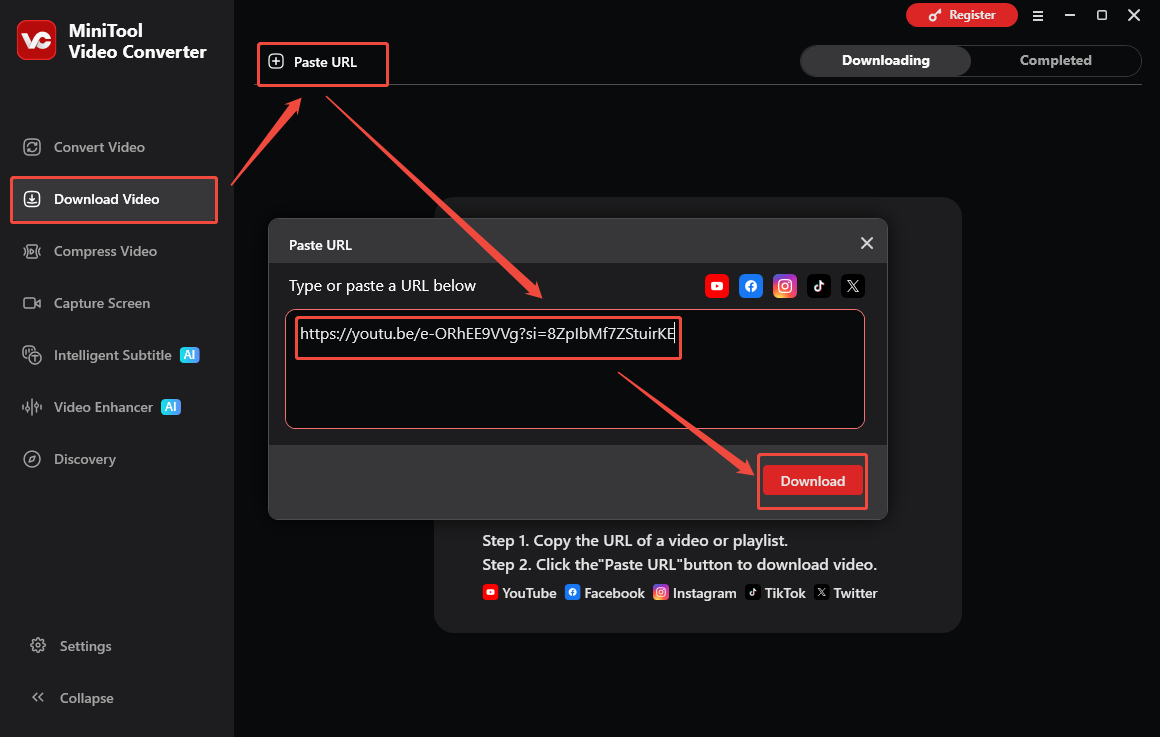
Run MiniTool Video Converter and switch to the Download Video section. There, click the upper-left Paste URL option and paste the YouTube link. Next, click the Download option to begin the link analysis process.
4. Select an Output Format and Start Download
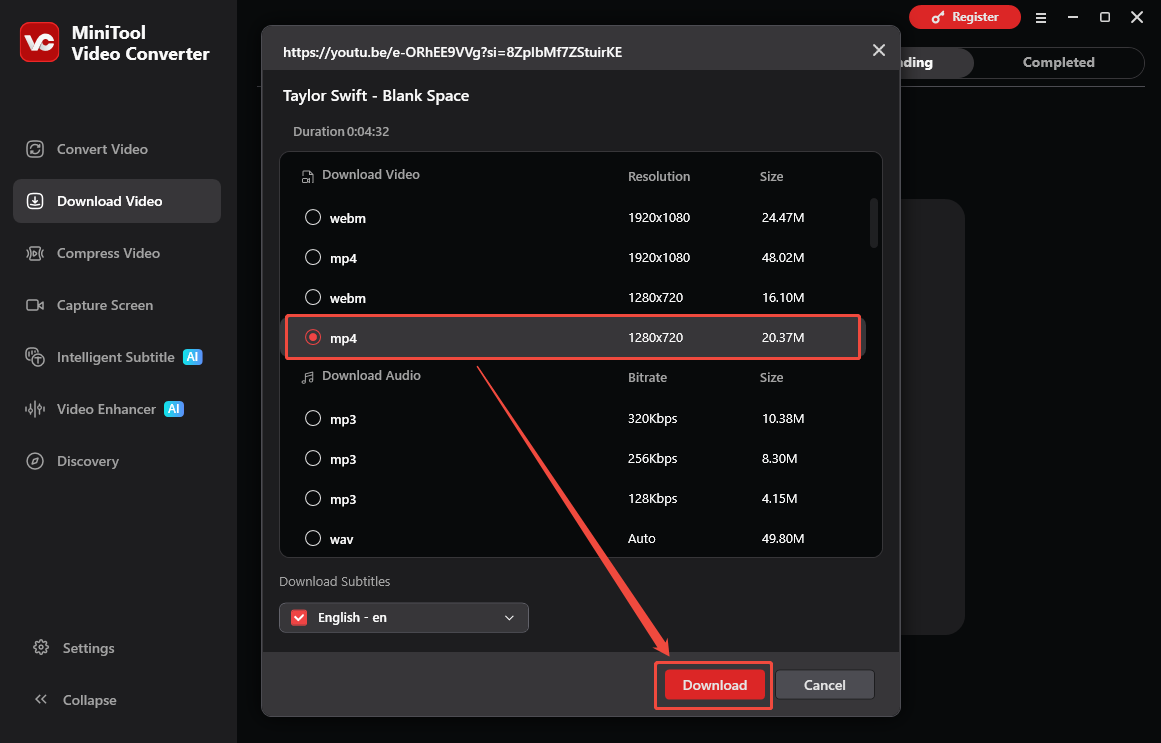
Once the link analysis completes, there will be a pop-up output format window. Then, select a desired output format and click the Download option to start the download process.
5. Check the Output File
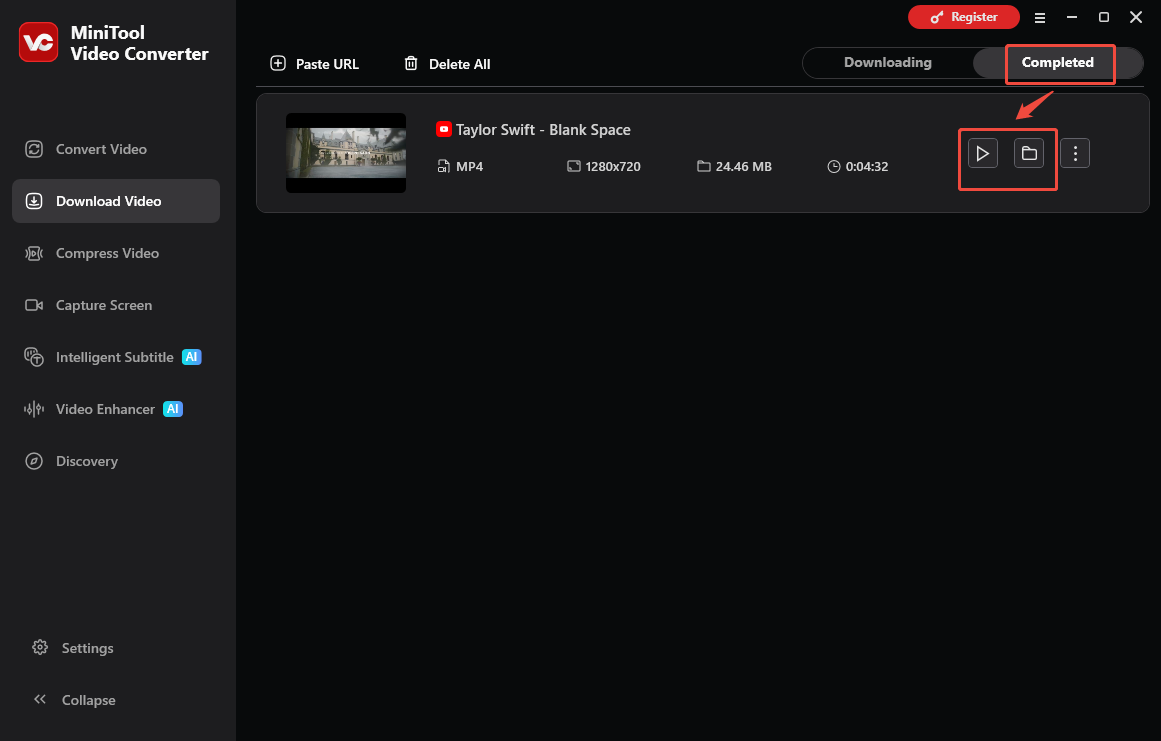
When the download process ends, this program will automatically switch to the Completed section. Then, click on the Play icon to view the output file. Or, click on the Folder icon to locate the output video.
With this YouTube video saver, it is effortless to get YouTube videos.

Step 2. How to Convert YouTube to M4R
- Import the YouTube video.
- Set M4R as the output format.
- Start the conversion process.
After downloading the YouTube video, you can convert YouTube to M4R. The following are 2 robust YouTube video to M4R converters. I will introduce them one by one.
1. Zamzar
Zamzar is a useful YouTube to M4R online converter. It has been published for more than a decade. The biggest advantage of this online converter is the easy-to-use interface. Here is how to use Zamzar to convert YouTube to M4R.
1: Go to Zamzar and choose Add Files to add the downloaded YouTube video file.

2: Click Convert To to select the M4R format and click the Convert Now option.
3: Then, it will start the conversion process. You just need to wait for it. After that, you can click the Download button to save the M4R file on your device.
Main Features
- It supports more than 1200 file formats.
- It can work with any operating system.
- The uploaded file can be as large as 150 MB.
- It had a remarkable conversion speed.
2. Convertio
Convertio is also a great YouTube to M4R converter. It can convert your YouTube files to M4R format at a fast speed. The converter supports adding files from multiple sources such as local PC, Dropbox, Google Drive, and URL.
The converted file can be either downloaded from the program interface or can also be saved directly to Google Drive or Dropbox. The converter is compatible with Windows and Mac systems. Follow the steps to convert YouTube to M4R using Convertio:
1: Go to https://convertio.co/mp4-m4r/.
2: Click Choose Files to upload your YouTube files.
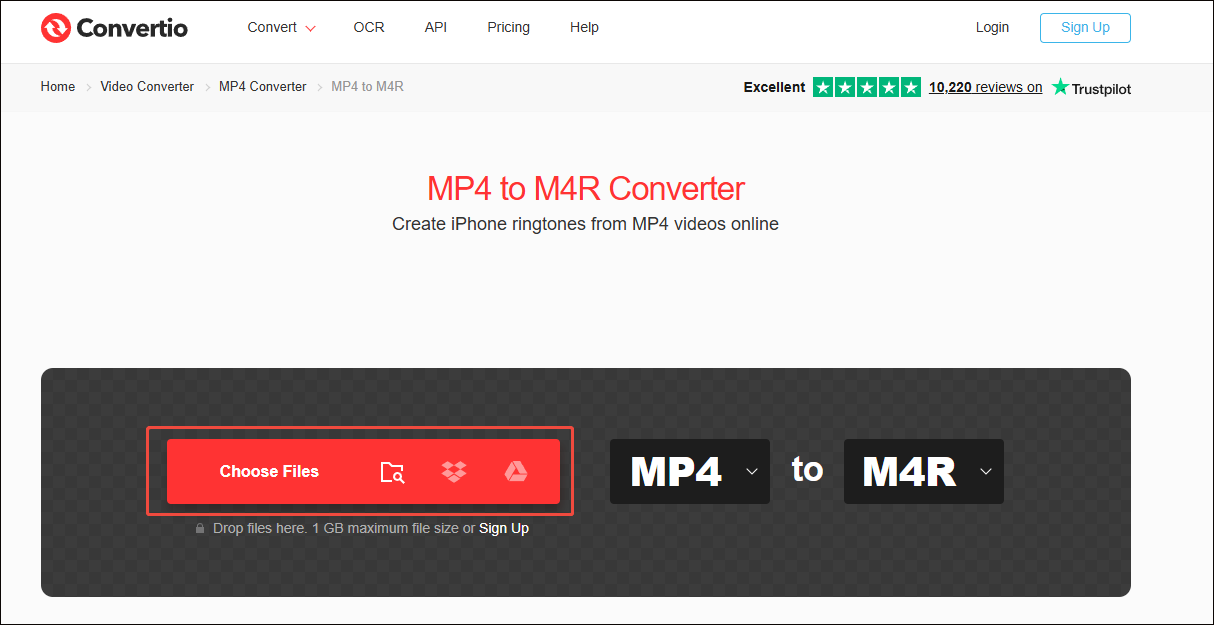
3: Click Convert to start the conversion.
Main Features
- It can finish the conversions in under 1-2 minutes.
- More than 300 different file formats are supported.
- All conversions are performed in the cloud and will not use any capacity from your computer.
- All uploaded and converted files will be deleted after 24 hours.
To Wrap Things Up
There isn't a direct YouTube to M4R converter on the Internet. Fortunately, this article has shown you how to extract M4R audio from YouTube in 2 simple steps. Just follow them to get the ringtones you want. If there are any problems when using MiniTool Video Converter, just send an email to support@minitool.com for further assistance.