

This article shows you how to select MP3Studio alternatives from 4 aspects, including watermarks, interface design, download speed, and multiple-platform support. Meanwhile, it recommends a top-grade alternative to MP3Studio: MiniTool Video Converter.
As an experienced user of MP3Studio, I have used MP3Studio to save various MP3 or MP4 files from platforms such as YouTube, Facebook, and Instagram. I really love its high downloading speed and high-resolution (4K) support.
However, recently, I found that I couldn’t use MP3Studio to save YouTube content for offline watching or listening. I checked if YouTube not working leads to this problem. Finally, there is no YouTube error, but I can’t find the reason for the problem.
To ensure that I can accomplish the YouTube download, I decided to find robust MP3Studio alternatives. After a lot of investigations, I found a great tool. In the following content, I will tell you how to choose a top-grade software to replace MP3Studio and walk you through one of the most fabulous alternatives to MP3Studio: MiniTool Video Converter.
How to Select a Powerful Alternative to MP3Studio
Next, I will list the factors to consider when choosing a program that can replace MP3Studio.
Factor 1. A Watermark-Free Nature
It is advisable to select MP3Studio alternatives that won’t automatically embed the watermarks into the output videos. This way, there is no need to remove the watermarks by paying for the upgrade or cropping the output videos. In other words, if I select an application without any watermarks, I can accomplish the download more efficiently.
Factor 2. An Intuitive Interface
Never miss MP3Studio alternatives with a well-organized interface. The more understandable the interface, the fewer times it requires users to learn how to use this tool. In this situation, I can have more time to handle my video/audio download.
Factor 3. A High Download Speed
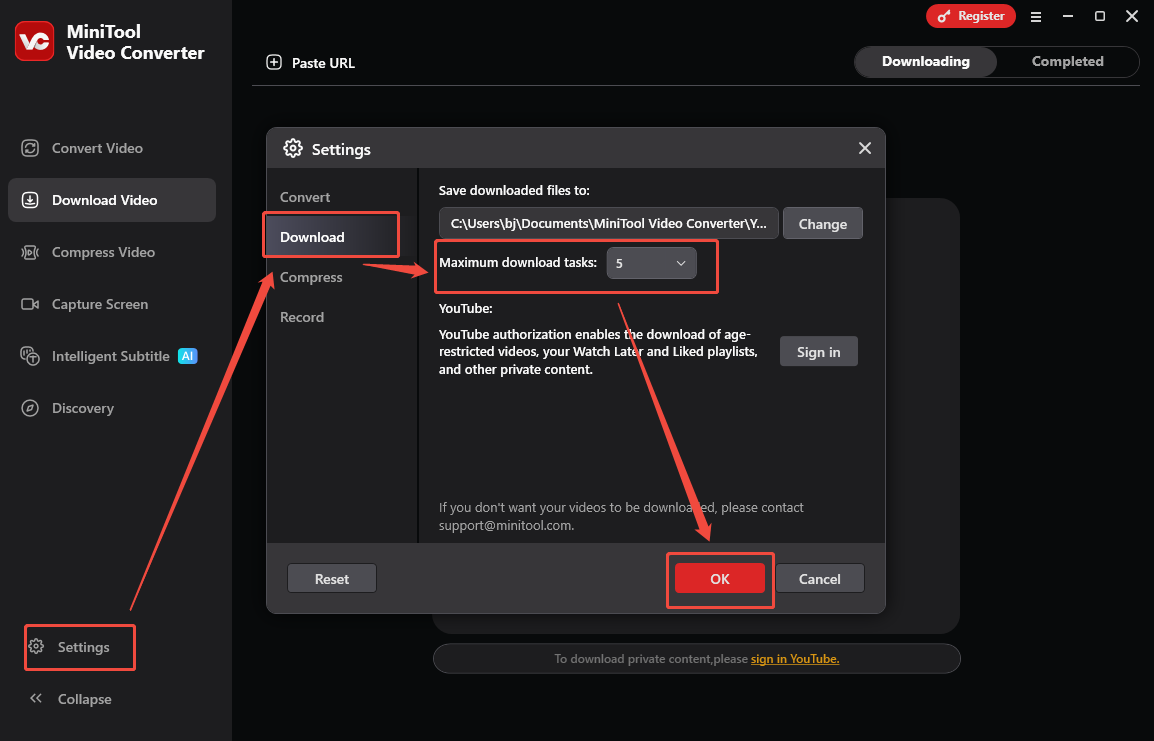
It is suggested to select an alternative to MP3Studio with a high download speed. This way, more time can be saved for other affairs. Specifically, when choosing a program, check whether it supports batch download. If it is, that can be great. In this background, everyone can save multiple files simultaneously as quickly as possible.
Factor 4. Strong Support for Different Platforms
When looking for a downloader like MP3Studio, pay attention to its support for the media platforms. It is suggested to try a tool supporting more platforms, instead of only YouTube or Facebook. In this context, there is no need to download additional software for saving videos/audio from different platforms.
The Best MP3Studio Alternative
Based on the suggestions above, I have selected one of the best MP3Studio alternatives: MiniTool Video Converter.
What Is MiniTool Video Converter
MiniTool Video Converter is a 4K YouTube video/audio downloader with an intuitive interface. I really love its multiple output resolutions. Meanwhile, MiniTool Video Converter supports batch download. I have used this program to save up to 10 YouTube files at the same time.
More than a YouTube to MP3 converter, MiniTool Video Converter also supports other output formats, including MP4, WEBM, and WAV. Plus, it also enables me to save Facebook, Twitter, TikTok, and Instagram videos without any watermarks.
How to Convert YouTube to MP3 with MiniTool Video Converter
Below are the detailed instructions on how to save MP3 audio from YouTube using MiniTool Video Converter.
Step 1. Download and Install MiniTool Video Converter
MiniTool Video ConverterClick to Download100%Clean & Safe
Download MiniTool Video Converter by clicking on the download button above. Then, follow the on-screen prompts to install this alternative to MP3Studio. Then, launch MiniTool Video Converter.
Step 2. Copy the YouTube URL
Go to the YouTube website and find the content you want to save. Then, copy the YouTube link from the address bar.
Step 3. Analyze the YouTube Link
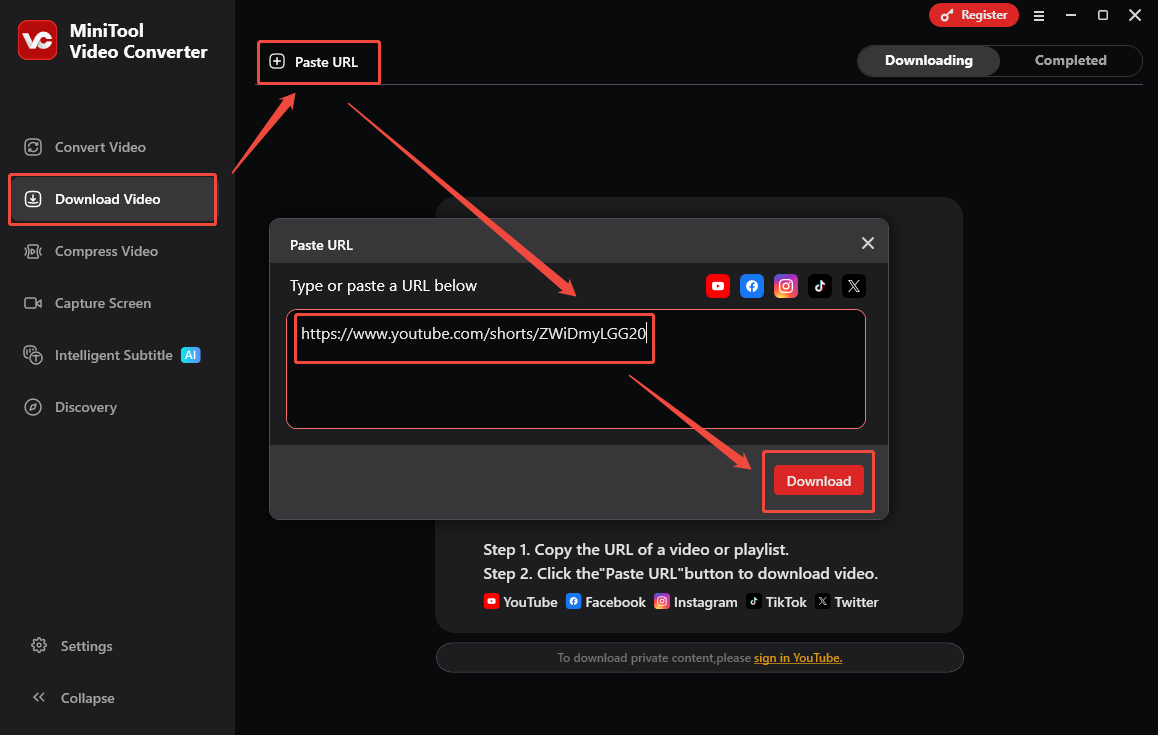
Go back to the interface of MiniTool Video Converter and navigate to the Download Video section. There, click on the upper-left Paste URL option to open the URL box. Then, paste the copied link into the box. Next, click on the bottom-right Download option to start the link analysis process.
Step 4. Set MP3 as the Output Format and Begin Download
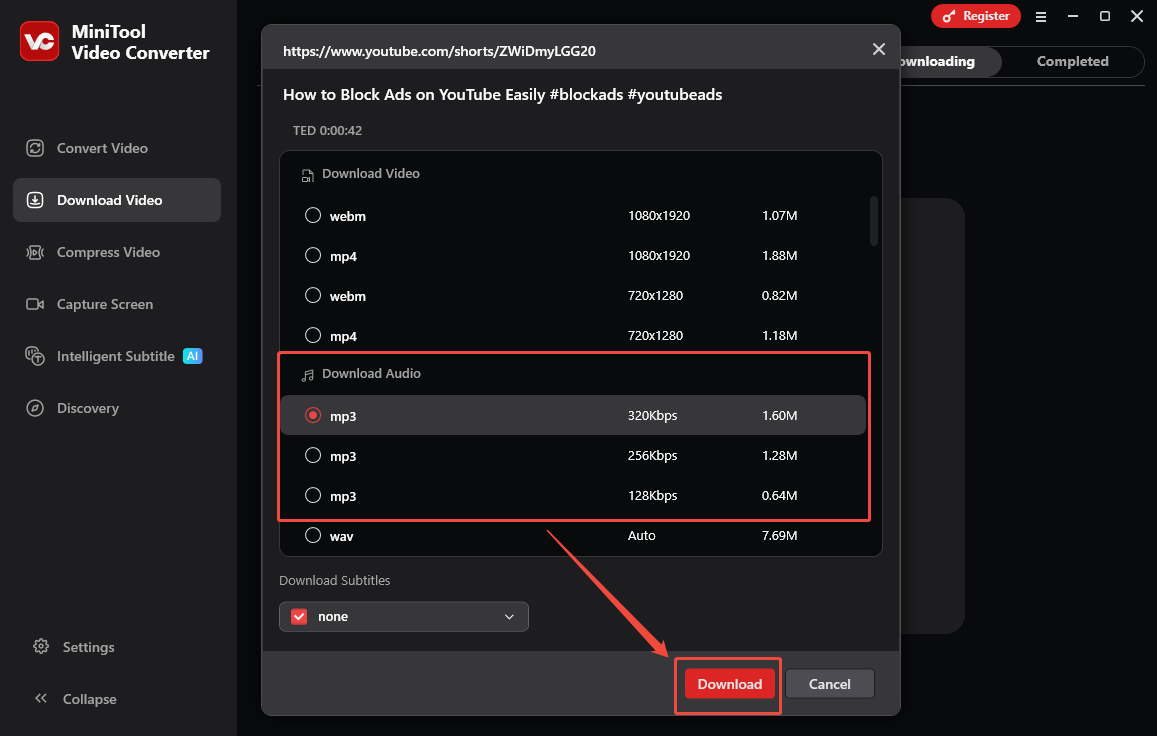
Once the link analysis completes, an output format window will appear. Then, switch to the Download Audio section. There, select an MP3 output format with the specific bitrates. Finally, click on the Download option to start the download process.
Step 5. Check the Output Audio
When the download process ends, this MP3Studio alternative will automatically switch to the Completed section. There, click on the Play icon to listen to the saved audio. To locate the output audio, click on the Folder icon.
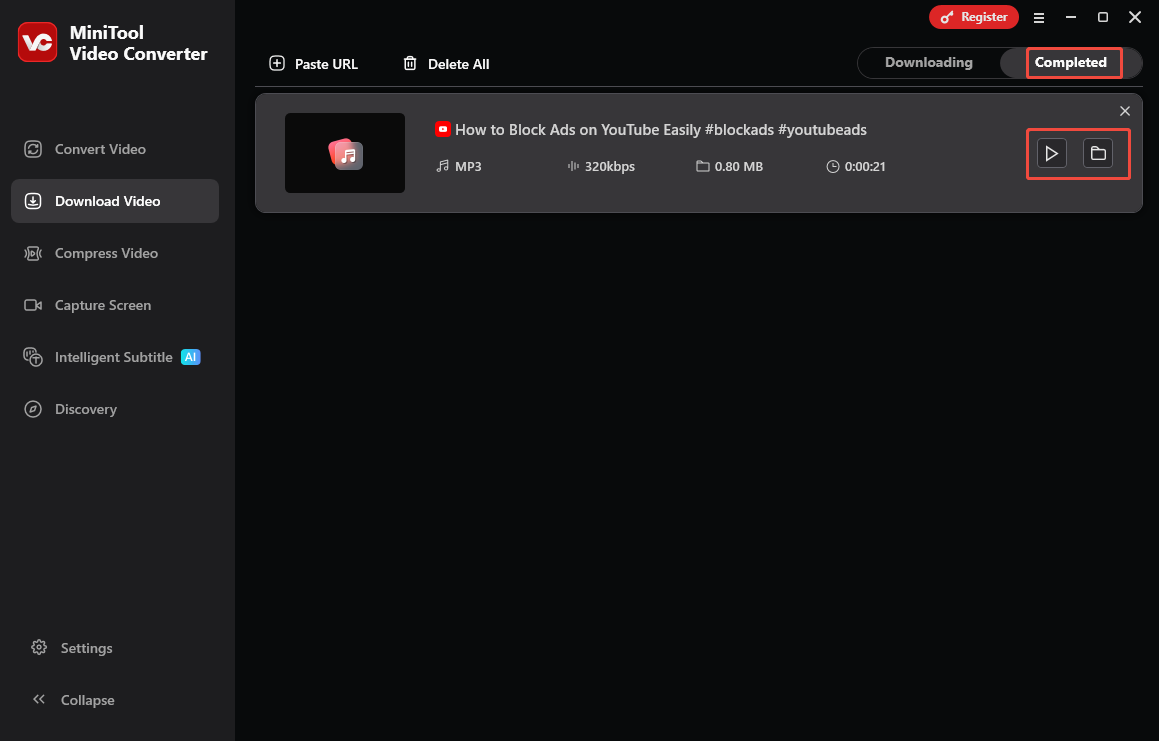
With the above-detailed steps, it is a piece of cake to get YouTube MP3 audio. More than a YouTube to MP3 Converter, MiniTool Video Converter is also a one-stop solution for screen recording, video conversion, video compression, and video transcription.
To Wrap Things Up
Although there are many MP3Studio alternatives on the internet, it is recommended to choose the watermark-free one with a user-friendly interface, a high download speed, and strong support for multiple platforms.
Given this, MiniTool Video Converter is an ideal choice for you. Provided that there is a need for an online downloader, try viddown.net. However, it doesn’t support YouTube downloads.
If there are any problems when using MiniTool Video Converter, please ask for help by sending an email to support@minitool.com.