

The YouTube Shorts collaboration feature allows creators to work together to produce interactive split-screen videos. This article explains how to use this feature to enhance your channel. Additionally, you'll learn how to use the download tool MiniTool Video Converter to watch these collaborative videos offline.
What Is YouTube Shorts Collaboration
YouTube Shorts collaboration feature allows creators to co-produce short-form video content. These videos typically display content from both creators in a split-screen format.
Once published, the YouTube Shorts algorithm recommends the video to the audiences of all collaborating creators and displays each collaborator's name, profile picture, and subscribe button below the video. This helps increase the video's visibility and promotes channel growth.
In addition, creators can use this feature to produce a variety of content, including challenge videos, reaction videos, and cross-platform promotional videos. Please note, however, that videos must not exceed 60 seconds in length.

Practical Tips for Finding Collaboration Partners
While the YouTube Shorts collaboration feature can increase video visibility by expanding your audience, this depends on choosing the right creators. Therefore, this section provides a guide on how to effectively select partners for your reference.
#1 Consistent and Complementary Content Style
Consistency or complementarity in content style is key to making collaborative videos feel cohesive. Therefore, when searching for creators to collaborate with, you should pay close attention to their content style. This is an important step in ensuring your content reaches your partner’s audience.
#2 Alignment with the Target Audience
To maximize the reach of your videos, make sure your partner’s target audience aligns with your channel’s audience. This will help ensure that viewers are more interested in watching the collaborative videos.
#3 Consistent Traffic
Consistent traffic from partners can help drive growth in the view count of collaborative videos. You can use YouTube influencer marketing platforms like StatuSphere and Aspire to find influencer creators with a steady audience.
How to Collab on YouTube Shorts
Creators can invite other creators to collaborate when uploading YouTube Shorts. Here is the step-by-step guide for your reference:
Step 1: Go to YouTube Studio
Open your browser and go to YouTube Studio.
Step 2: Upload Your YouTube Shorts
1. Click on the Create button in the top-right corner of the Dashboard. Then, select the Upload videos option in the new pop-up window.
2. Choose a file from your computer that you want to upload to YouTube.
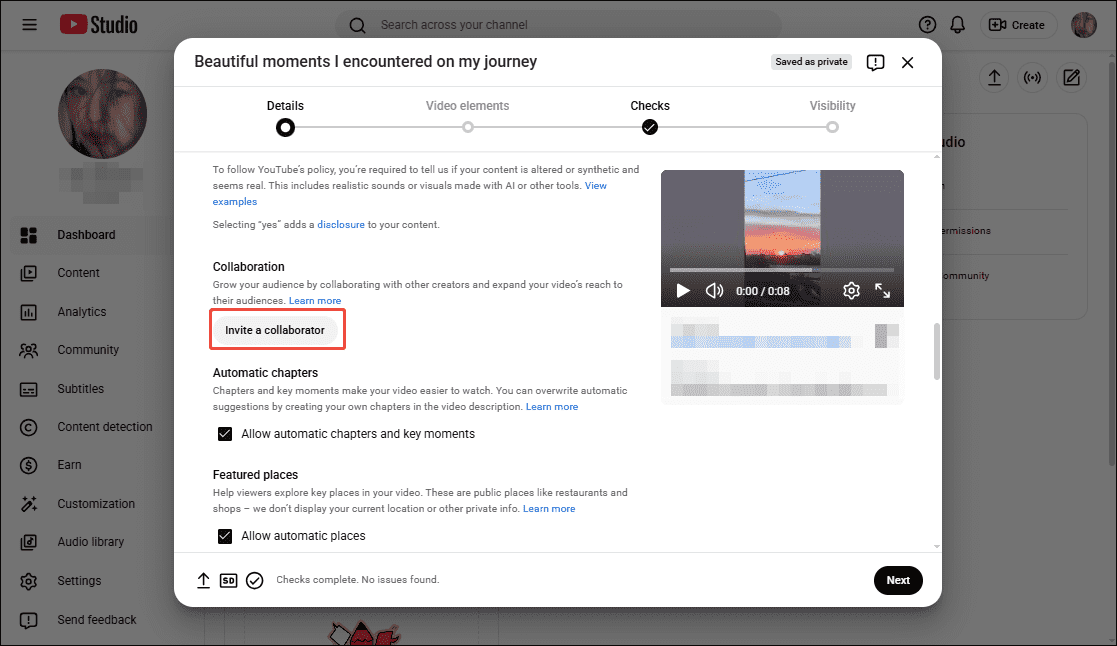
3. In the Details section, click on Show more and scroll down to the Collaboration section.
4. Click the Invite a collaborator option, then you can search for the creator you want to collaborate with in the search box.
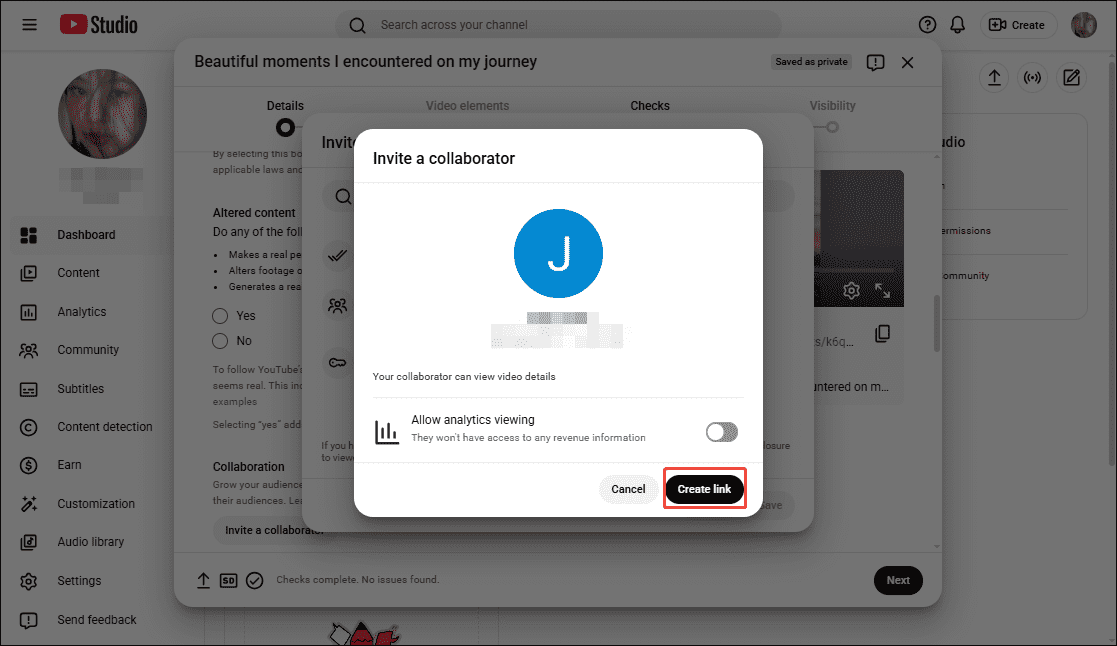
5. After selecting the creator, click on the Create link option on the page that appears. Finally, you can share the link with him or her.
Bonus: How to Watch YouTube Shorts Collaboration Videos Offline
If you want to watch YouTube Shorts offline, don’t miss out on MiniTool Video Converter, a free download tool I always use. In my experience, I’ve found that it lets me quickly and easily download videos from YouTube, Instagram, Facebook, and TikTok.
Plus, when downloading videos, MiniTool Video Converter lets me choose whether to save subtitles as needed. Here are the steps I’ve summarized after using the software; you can follow them to download YouTube Shorts.
Step 1: Download and Install MiniTool Video Converter
Click on the button below to download and install the latest version of MiniTool Video Converter on your PC.
MiniTool uTube DownloaderClick to Download100%Clean & Safe
Step 2: Get and Analyze YouTube Video’s URL
1. Go to the YouTube website and copy the YouTube Shorts collaboration video’s link from the address bar.
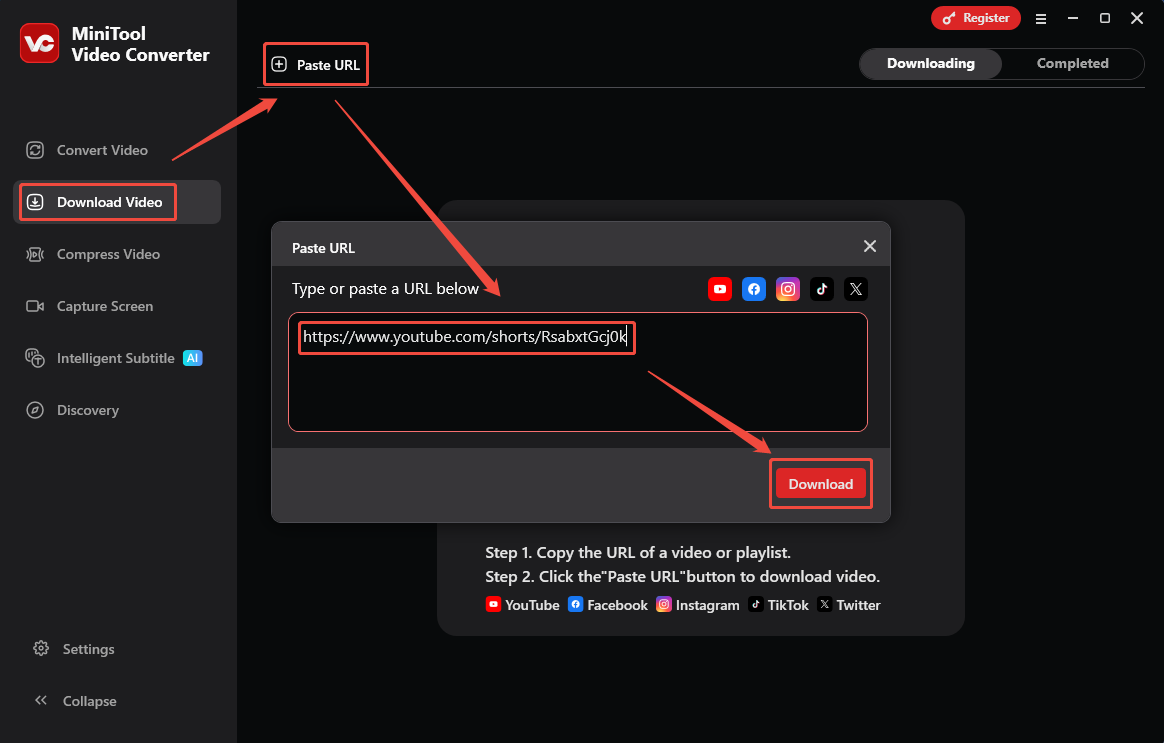
2. Launch MiniTool Video Converter and switch to the Download Video module in the left-hand menu bar.
3. Click on Paste URL and paste the copied URL into the box, then click on Download to analyze it.
Step 3: Download the YouTube Shorts Video
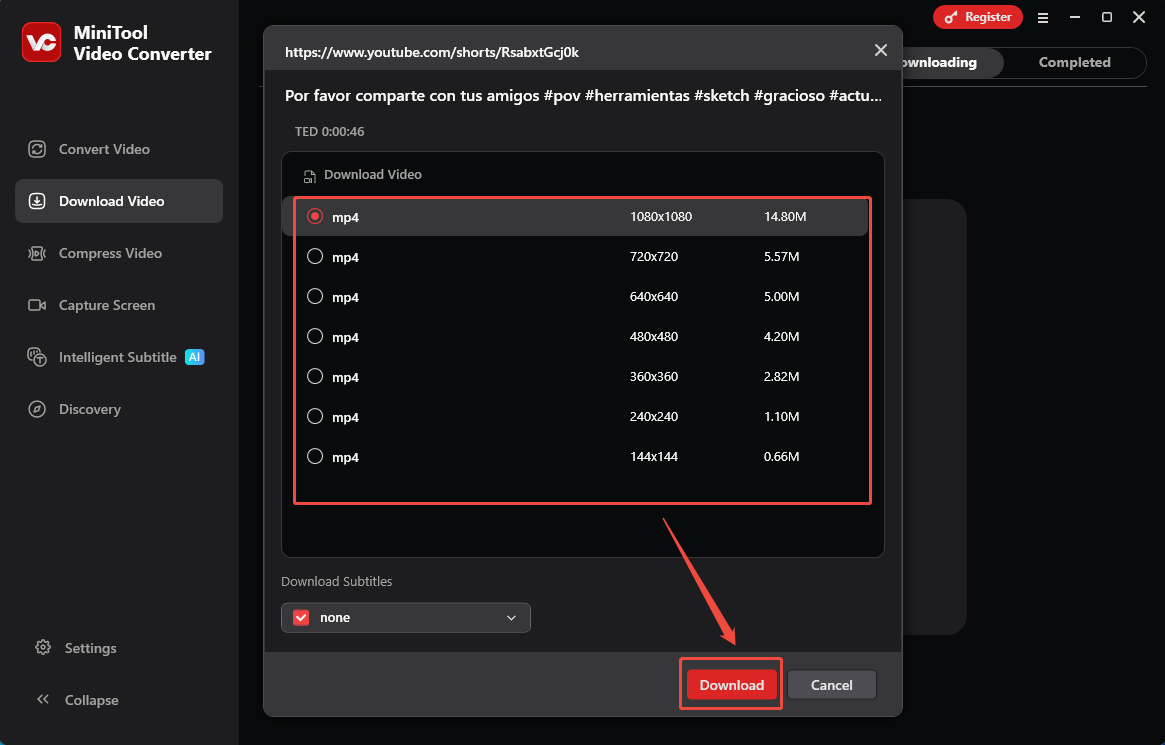
1. In the new pop-up window, choose the format and resolution for the video, then click on Download again to save the YouTube Shorts.
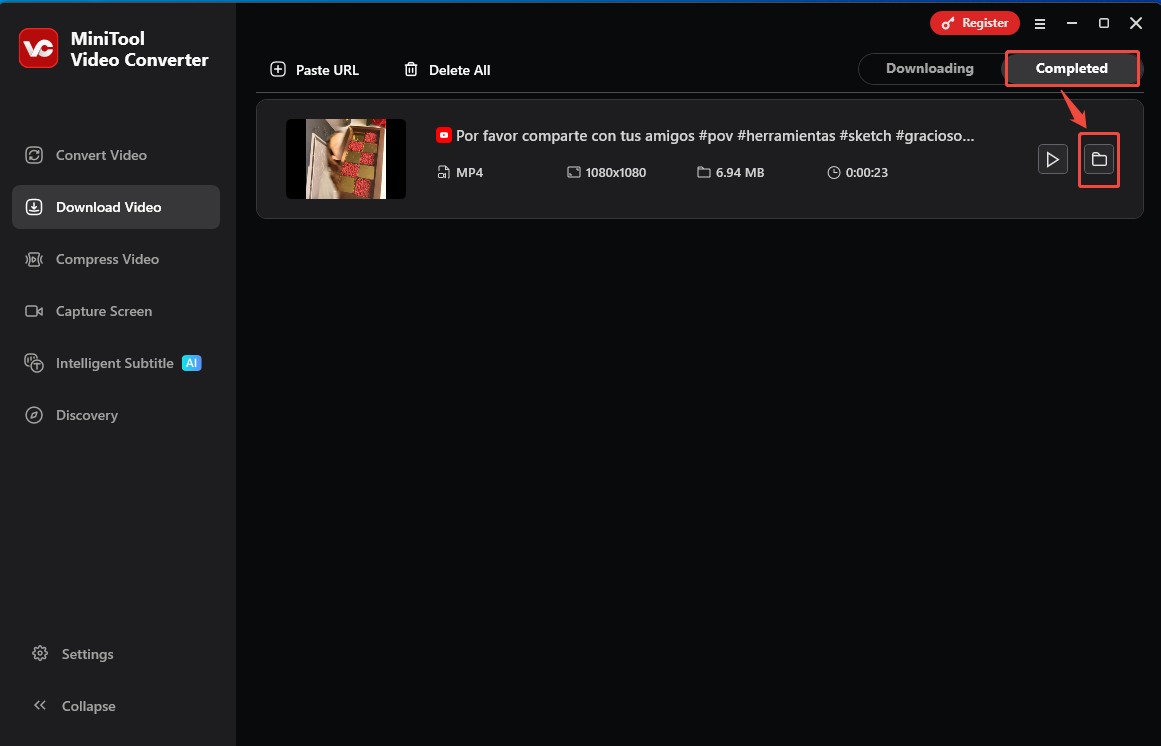
2. Finally, when the downloading is complete, you can click the folder icon under the Completed module to locate the downloaded YouTube Shorts collaboration video.
Final Words
YouTube Shorts collaboration is an excellent tool for expanding your audience. The creator collaboration guide provided in this article will help you make the most of this feature. Additionally, if you want to watch YouTube Shorts offline, don’t forget to use MiniTool Video Converter.
About The Author

Position: Columnist
Jade is an experienced multimedia tech writer who has authored hundreds of guides on screen recording, video editing, and software troubleshooting. Dedicated to bridging the gap between complex technical concepts and user-friendly solutions, she specializes in providing clear, actionable advice.