This article explains why people download Instagram audio and addresses whether it's possible to download Instagram audio. Additionally, we provide five efficient Instagram audio download tools, such as MiniTool Video Converter, along with detailed instructions, to help you easily extract audio from Instagram videos.

Instagram is a photo and short video social networking service platform available on Windows 10, Android, and iOS systems. It enables users to share photos and short videos publicly or restrict visibility to followers, while also allowing users to locate and browse different types of media content through hashtags.

Why You Download Instagram Audio

People download audio from Instagram for a variety of reasons. Perhaps you simply want to save high-quality audio for offline playback, or embed it into videos for editing, and so on. Below, we’ll explore the common motivations behind this phenomenon.

Offline Playback and Sharing

Instagram users share a wealth of high-quality audio content in videos, such as podcasts and songs. Users save their favorite Instagram audio to their devices for offline listening anytime and to share with friends who don’t have Instagram accounts.

Edit Outside the Instagram

Although Instagram provides users with built-in video clipping and music editing features, these tools sometimes fail to meet the specific needs of certain users. As a result, many users prefer to save Instagram audio from other users’ videos and utilize more professional desktop software for in-depth editing.

Expand Personal Clip Library

Downloading Instagram audio allows users to expand their editing material library, which can be re-edited and shared across more social media platforms.

Facebook Audio Download: How to Save Audio from Facebook Videos

How to download audio from Facebook videos and Messenger? Here is a step-by-step guide to Facebook audio download on your PC and mobile.

Read More

Can You Download Audio from Instagram Videos

Can you directly save audio from Instagram? The answer is no. To protect the copyright of licensed music on its platform, the Instagram app does not provide a built-in audio save button. While users can save audio within the app, this does not meet the need for offline listening or editing audio outside the app.

However, there are now numerous third-party download tools available to help you extract audio from Instagram videos. Below, we’ve carefully curated five highly efficient Instagram audio download tools for you. For more detailed information, please read on.

Tips:
Download audio from Instagram videos solely for legitimate purposes and never use them for commercial purposes.

How to Save Audio on Instagram

In this section, you’ll not only discover five easy-to-use and professional Instagram audio downloaders, but also easily master how to download Instagram audio to your device through step-by-step guides. Now, let’s get straight to the point.

2 Instagram Audio Download Tools for Windows

Below are two carefully selected desktop Instagram audio download tools on Windows for your consideration.

#1 MiniTool Video Converter

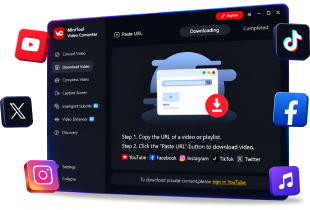
MiniTool Video Converter is a free and reliable Instagram audio downloader that ensures a clean installation process free of ads or bundled software. Beyond that, it also serves as a powerful video downloader, which supports saving Instagram Reels and Stories, YouTube long videos, TikTok videos, as well as videos from Facebook and Twitter.

More importantly, MiniTool Video Converter’s user-friendly interface allows you to download audio in just a few simple steps. Notably, it supports downloading up to 10 audio or video files simultaneously, saving you valuable time.

Now, you can follow the detailed steps to download audio from Instagram videos with MiniTool Video Converter.

Step 1: Download and install MiniTool Video Converter

Click on the button below to download and install the latest version of MiniTool Video Converter on your computer.

MiniTool Video ConverterClick to Download100%Clean & Safe

Step 2: Copy the link of the Instagram video

1. Go to the official website of Instagram on your PC and find the audio you want to download from the Instagram video.

2. Click the Share icon in the bottom-right corner of the video, then select Copy link in the pop-up window. Alternatively, you can copy the Instagram video link directly from the address bar.

Step 3: Analyze the link of the Instagram video

1. Launch MiniTool Video Converter on your computer and click on Download Video in the left-hand menu bar.

2. Click on Paste URL, then paste the copied link into the pop-up address bar and click on Download to analyze it.
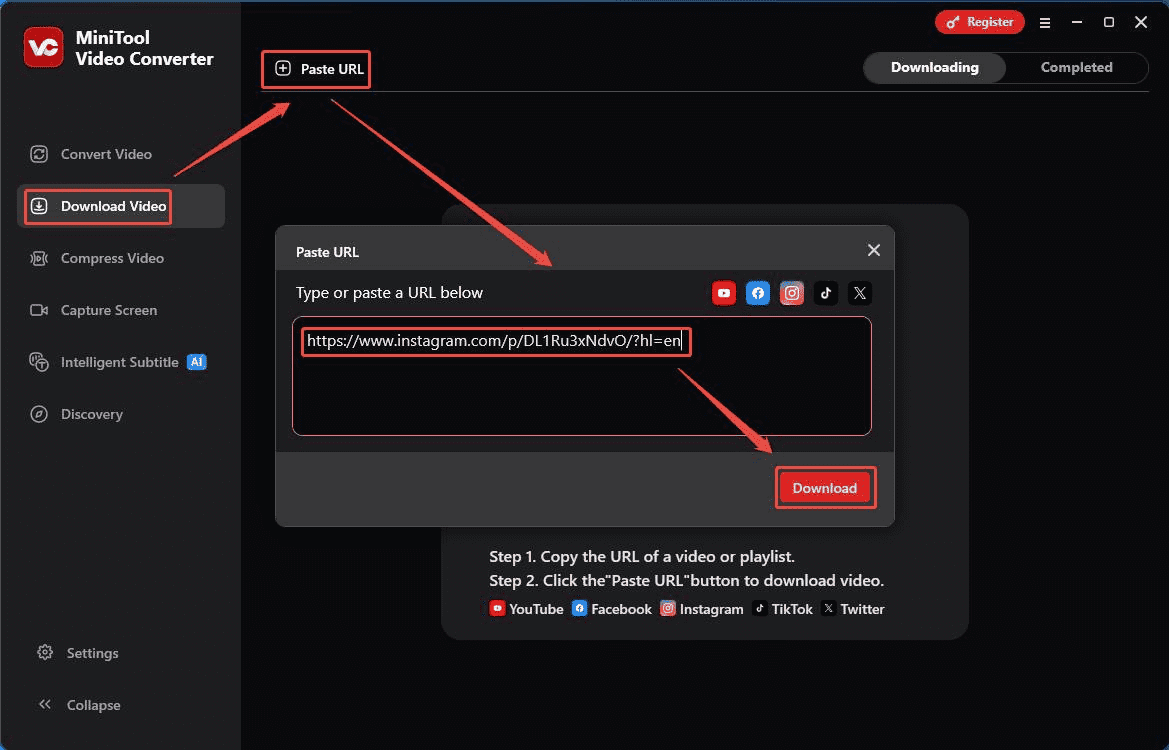
Click on Download Video > Paste URL, paste the copied URL of the Instagram video into the box, then click on Download to analyze it in MiniTool Video Converter

Step 4: Download audio from the Instagram video

1. To download Instagram audio, please select the output format under Download Audio in the new pop-up window.

2. Then, click on Download again to save the audio from the Instagram video.
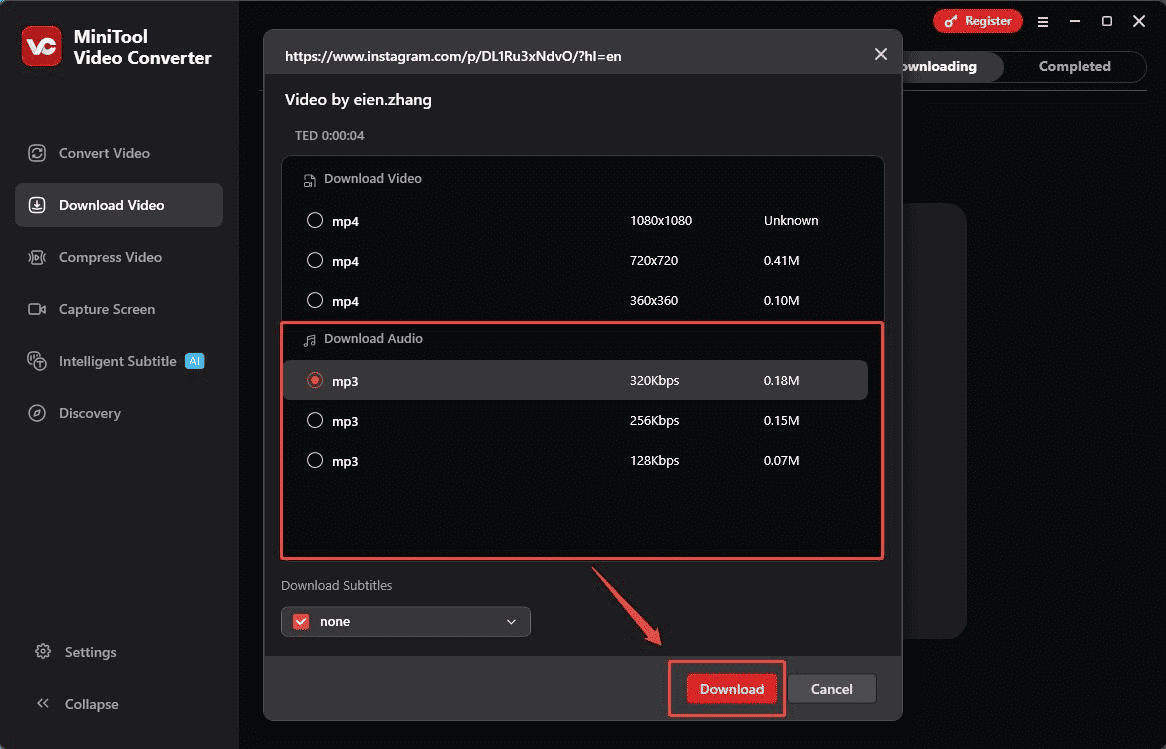
Choose the output format under Download Audio and click on Download to save the Instagram audio in MiniTool Video Converter

Step 5: Locate the downloaded Instagram audio

1. When the download completes, you will be automatically redirected to Completed, where you can view all the downloaded audio files.

2. Click on the folder icon to locate the downloaded Instagram audio.
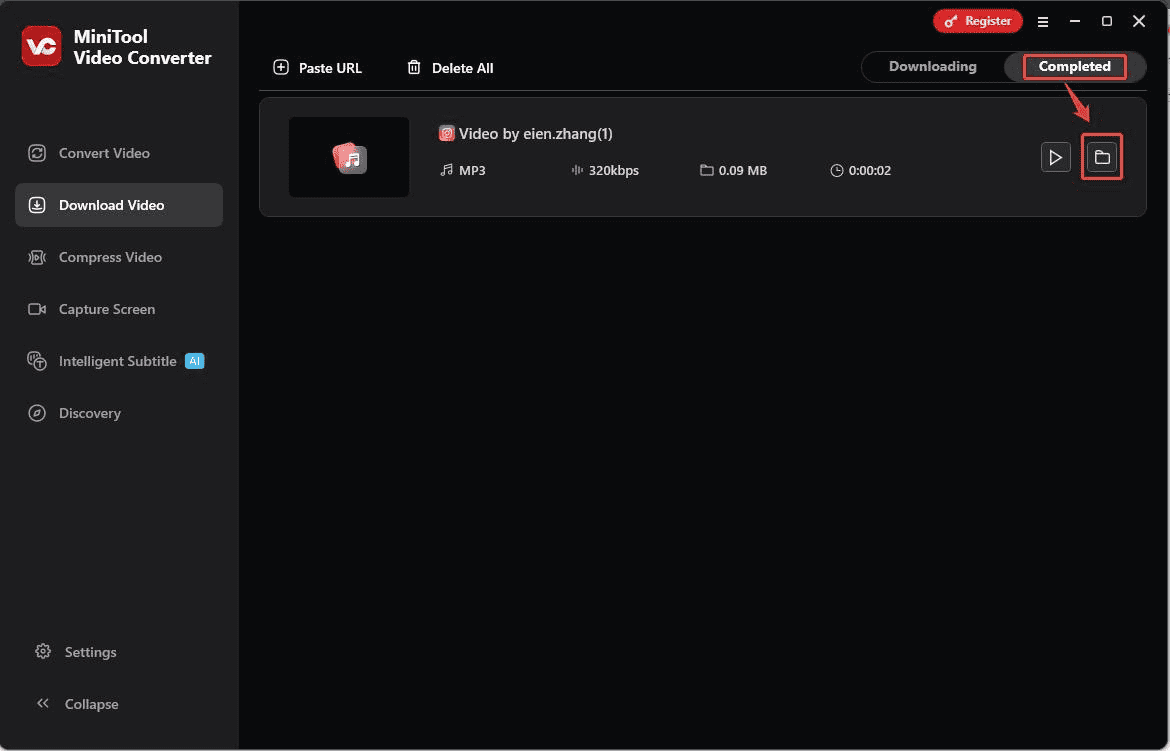
Click on the folder icon to locate the downloaded Instagram audio in MiniTool Video Converter

In short, once you’ve mastered the steps above, downloading Instagram audio with MiniTool Video Converter becomes simple and efficient. Besides, I highly recommend exploring the software’s four other robust features: video compression, video conversion, screen recording, and intelligent subtitles.

Among these, the screen recording and video conversion functions serve as alternative methods for downloading audio from Instagram. You can simply record the Instagram video using the screen recording feature, then convert it to MP3 format with the video conversion feature.

MiniTool Video Converter is a robust download tool for Windows, which can save either audio or video from Instagram. If you frequently download Instagram audio and video, consider using it.Click to Tweet

#2 SnapDownloader

SnapDownloader is another high-performance Windows downloader to extract audio from Instagram videos, specifically tailored for users seeking efficient download modes. Beyond audio extraction, it supports downloading Instagram Reels, YouTube playlists, TikTok videos, and videos from other main platforms, outputting content in high-definition formats such as 1080p and 4K.

More importantly, SnapDownloader also features a scheduled download function, helping users efficiently avoid peak network hours and download videos quickly. You need to preset the start time for your download task, and the system will automatically initiate the download at the specified time, notifying you promptly upon completion.

In addition to its core download functionality, SnapDownloader also allows you to freely trim downloaded video or audio clips using its built-in editor. Please note that SnapDownloader offers only a 48-hour free trial period. To continue using the service normally, you must upgrade to a membership.

You can follow the detailed steps below to experience SnapDownloader and then decide whether to upgrade.

Step 1: Download and install SnapDownloader

Visit the official SnapDownloader website to download and install the software on your computer.

Step 2: Copy the URL of the Instagram video

Step 3: Analyze the copied URL

1. Open SnapDownloader on your PC and click on Search in the top menu bar.

2. Paste the copied URL into the search box, then the system will automatically analyze the link.

Click on Search, paste the copied URL of the Instagram video into the search box to analyze it in SnapDownloader

Step 4: Save the Instagram audio

Since you’re downloading Instagram audio, please select the Audio option. Then, click on Download to save the Instagram audio quickly on your PC.

Choose the Audio option and click on Download to save the Instagram audio in SnapDownloader

In short, both MiniTool Video Converter and SnapDownloader are excellent choices for downloading Instagram audio. However, MiniTool Video Converter comes out on top overall because it remains completely free throughout the entire process.

3 Online Instagram Audio Download Tools

If you want to download Instagram audio without installing any software, using an online Instagram audio download tool is a great option. Here are three free online audio download tools for Instagram. You can choose one or more based on your needs.

#1 FastVideoSave.Net

As its name suggests, FastVideoSave.Net is an online download tool that allows you to quickly download Instagram videos, audio, Reels, Stories, and photos for free with no download limits. It supports exporting content in MP4, MP3, and JPG formats. All downloaded Instagram audio, video, and photos are completely watermark-free

In addition, FastVideoSave.Net is compatible with most devices, from computers and tablets to smartphones. Notably, using FastVideoSave.Net does not require logging into an Instagram account, ensuring users do not disclose any personal information throughout the process.

Please note that FastVideoSave.Net displays a small number of ads to support its service maintenance and development. If you don’t mind this, follow these steps to download Instagram audio:

Step 1: Copy the Instagram video link

1. Go to the Instagram website and find the audio you want to download from the Instagram video.

2. Copy the Instagram video link from the address bar.

Step 2: Analyze the link of the Instagram video

1. Go to FastVideoSave.Net website and click on Audio in the menu bar at the top of the page.

2. Then paste the copied link into the address bar and click on Download to enter the download interface.

Click on Audio and paste the copied Instagram video link into the address bar, then click on Download to enter the download interface in FastVideoSave.Net

Step 3: Download the Instagram audio

In the new pop-up interface, click Download Audio to save the audio from the Instagram video. When the downloading process ends, you can locate the downloaded Instagram audio in the Downloads folder on your browser.

Click on Download Audio to save Instagram audio in FastVideoSave.Net

#2 AudioDropper.com

AudioDropper.com is a convenient and user-friendly Instagram audio download tool that runs smoothly on any device, including phones, tablets, and desktop computers. It supports extracting and saving audio from Instagram Reels and Stories with seamless operation and lightning-fast speed.

Notably, AudioDropper.com is a 100% completely free platform that prioritizes your security above all else. You can download high-quality Instagram audio without needing to register any personal information.

Now, follow the step-by-step guide below to download Instagram audio with AudioDropper.com.

Step 1: Copy the Instagram video link

Step 2: Download the Instagram audio with AudioDropper.com

1. Go to the website of AudioDropper and paste the copied Instagram video link into the address bar, then click on the Download icon to analyze it.

Paste the copied link of the Instagram video into the box and click on the Download icon to enter the download interface in AudioDropper.com

2. In the new pop-up page, you can click the Play icon to preview the Instagram audio you want to download. After verifying the information is correct, click on Download Audio to save the Instagram audio.

Click the Play icon to preview the Instagram video, then click on Download Audio to save the Instagram audio in AudioDropper.com

3. When the downloading process ends, you can check the downloaded Instagram audio in the Downloads folder on your browser.

#3 ReelSave.App

ReelSave.App is also a free audio download tool compatible with Windows, macOS, and Android systems. Its powerful download capabilities not only support downloading Instagram audio but also can save Instagram Reels, videos, and images, as well as Facebook videos and public posts. Notably, all downloaded content is completely watermark-free.

As an easy-to-use download tool, ReelSave.App operates in the same way as the previous two online Instagram audio downloaders. Simply paste the Instagram video link into the downloader to quickly and smoothly download the Instagram audio to your device. Below is a brief guide on how to operate it.

Step 1: Copy the URL of the Instagram audio

Step 2: Download the Instagram audio

1. Visit the official ReelSave.App website and click the Audio option in the top-right corner of the homepage to enter Instagram audio download mode.

2. Paste the copied URL of the Instagram video into the address box, then click the Download icon to analyze the URL.

Choose the Audio mode and paste the copied URL of the Instagram video into the box, then click the Download icon to analyze the URL in ReelSave.App

3. In the new pop-up page, click on Download Audio to quickly save the Instagram audio on your device.

In short, these three online Instagram audio downloaders are remarkably similar in functionality. All you need is the audio link you wish to download, and you can complete the process in just a few simple steps without needing to install any software.

Must-Know Instagram Link Download Tools & Steps to Use

Can’t save videos on Instagram directly? Check out 5 Instagram link download tools for Windows and online in this post.

Read More

To Wrap Things Up

Instagram continuously updates and shares trending background music, songs, and other audio content. Many users wish to download this audio content for offline playback, editing, or to enrich their personal edit library.

Although the Instagram app itself does not offer a feature to download Instagram audio, numerous third-party downloaders currently provide this functionality for your use. This article introduces five Instagram audio download tools available on the market, along with detailed usage guides.

After thoroughly reviewing the information above, you can carefully select the most suitable tool based on your specific needs. If you encounter any issues or have suggestions while trying out MiniTool Video Converter, then feel free to email us via [email protected] or send me a message on X for assistance.

  • linkedin
  • reddit