

This article summarizes 4 workable methods to download TikTok video easily and quickly. To get watermark-free TikTok videos, MiniTool Video Converter or Online Video Downloader on viddown.net can be an ideal choice. The general steps include copying the TikTok URL, pasting it into the video downloader, and starting the download process.
To view various interesting TikTok videos offline, I need to find a method to download TikTok videos. However, there are so many third-party downloaders on the Internet. To find the easiest-to-use and most reliable tools, I have tested many downloaders. Finally, I found 2 top-grade TikTok video downloaders. Next, I will introduce them to you.
Is It Legal to Download TikTok Videos?
Is it legal to download TikTok videos? As we know, TikTok offers a built-in download feature, but not all videos can be downloaded. It’s legal to save downloadable TikTok videos for personal use. On the other hand, redistributing someone else’s content without permission, particularly for commercial purposes, may violate copyright laws or TikTok’s community guidelines.
It’s essential to always respect the creator’s rights. If you plan to download a video for anything beyond personal use, especially for reposting or content creation, be sure to get permission and give proper credit to the original creator.
![TikTok HD Download: 2 Powerful Tools Worth a Try [2026 Update]](https://images.minitool.com/youtubedownload.minitool.com/images/uploads/2025/06/tiktok-hd-download-thumbnail.png)
How to Download TikTok Video Using TikTok’s Built-in Option (with Watermark)
The easiest way to save TikTok video is to download it directly from TikTok to your device if the creator has allowed downloads. TikTok offers a built-in download feature for many public videos.
#Through the TikTok app:
Step 1. Open the TikTok app on your iOS or Android device.
Step 2. Find the video you want to save.
Step 3. Tap the Share button (an arrow icon) on the right side of the screen.
Step 4. Select Save video from the menu.
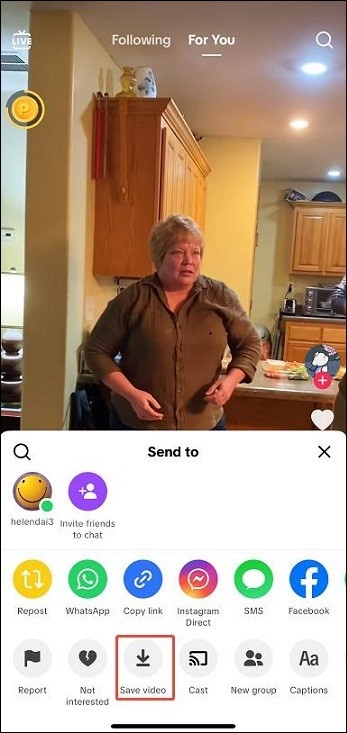
Step 5. The video will be downloaded to your device’s gallery or camera roll.
#Through TikTok’s website:
Step 1. Visit TikTok on your browser.
Step 2. Locate the wanted video and right-click it.
Step 3. Choose Download video from the menu.
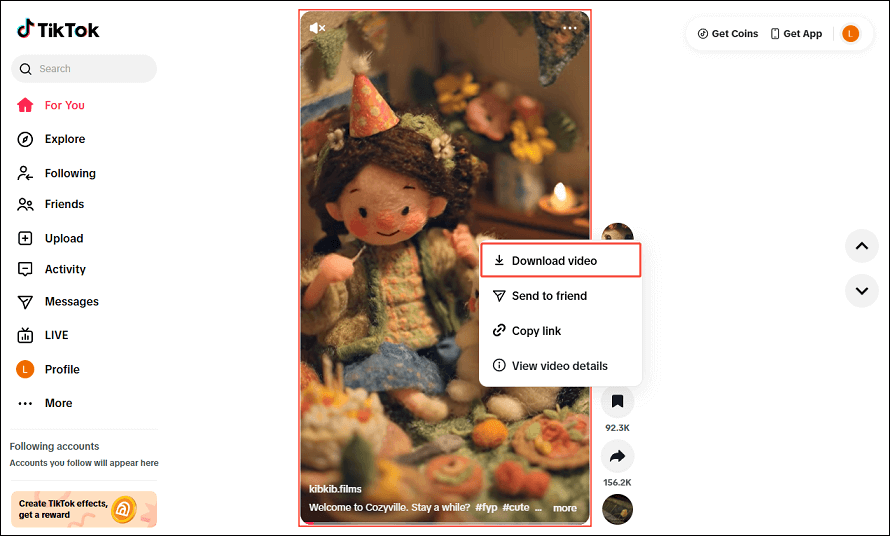
However, the downloaded video includes the TikTok watermark and the creator’s username. Additionally, some users may disable the download option for their content in settings, so this method may not work for every video. To bypass these limitations, try the next method!
How to Download TikTok Video with an Offline Tool (Without Watermark)
- Copy and paste the TikTok URL.
- Set an output format.
- Start the download process.
Wondering how to download TikTok videos on PC without any watermark? MiniTool Video Converter can help! It enables you to save online videos from several trending social media platforms, including TikTok, YouTube, Facebook, Instagram, and X.
Furthermore, MiniTool Video Converter is free to use and doesn’t contain any ads or watermarks. Plus, with it, you can download videos in up to 4K or 8K resolution, provided that the source video supports it. Also, MiniTool Video Converter allows you to download multiple videos from a playlist in bulk, and up to 10 videos can be saved at the same time.
Here’s how to download TikTok videos without watermark with MiniTool Video Converter:
Step 1. Download and install the best TikTok video downloader on your PC.
MiniTool Video ConverterClick to Download100%Clean & Safe
Step 2. Once installed, open the app and navigate to the Video Download module.
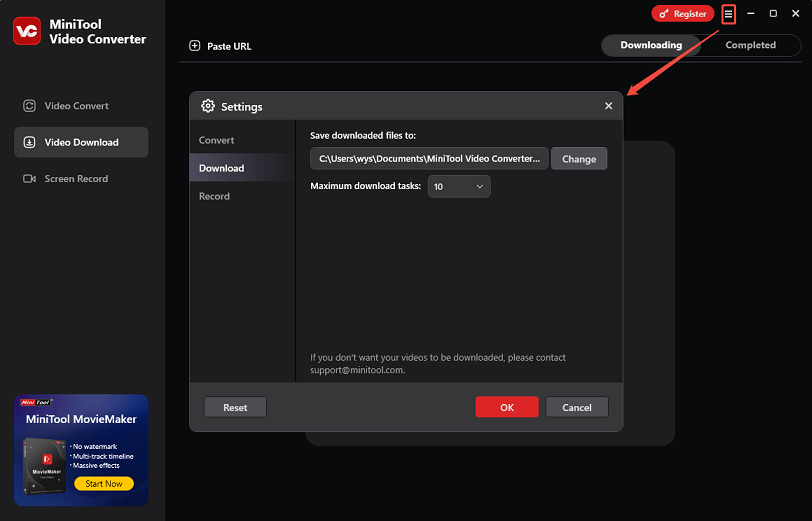
Step 3. Before you begin the download process, you can customize the save folder for the videos. To do this, click the more icon in the top right corner, then go to Settings > Download. Remember to click OK to save your changes.
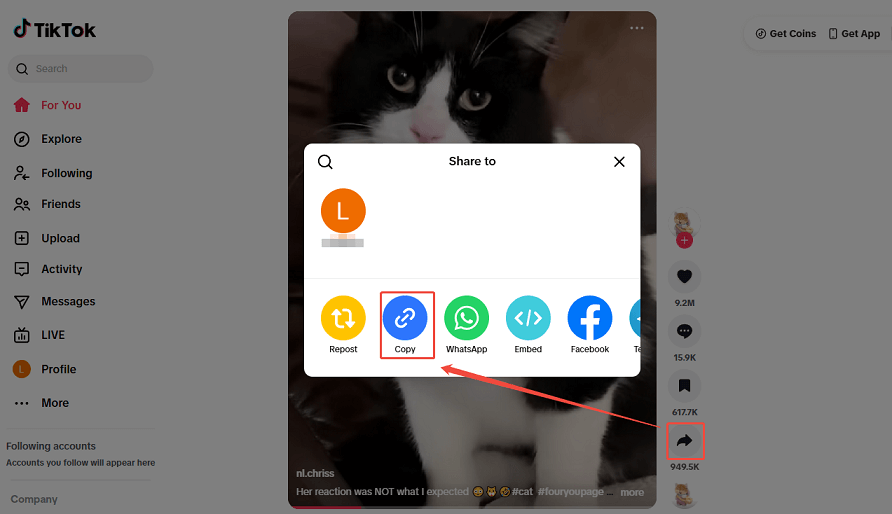
Step 4. Go to TikTok to find the video you’d like to save. Click the Share icon on the right side of the screen, then click Copy to get the video URL.
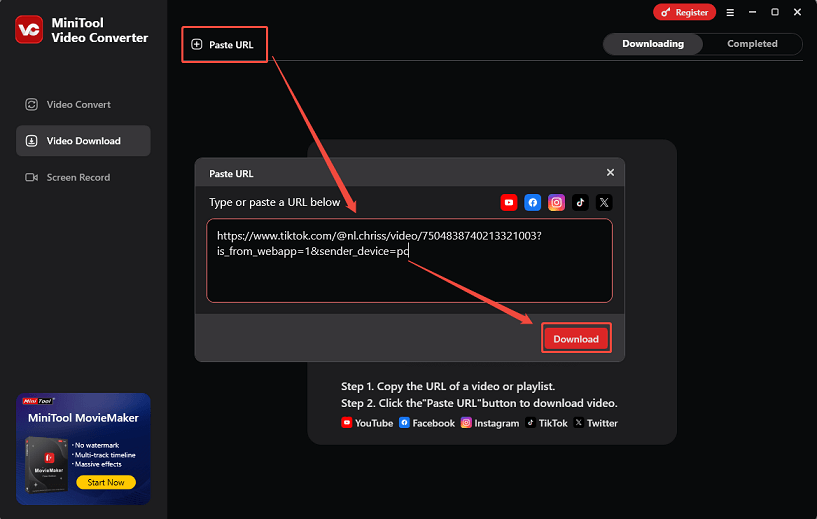
Step 5. Return to MiniTool Video Converter, click the Paste URL button. In the pop-up small window, paste the TikTok video URL into the shown box and click on Download.
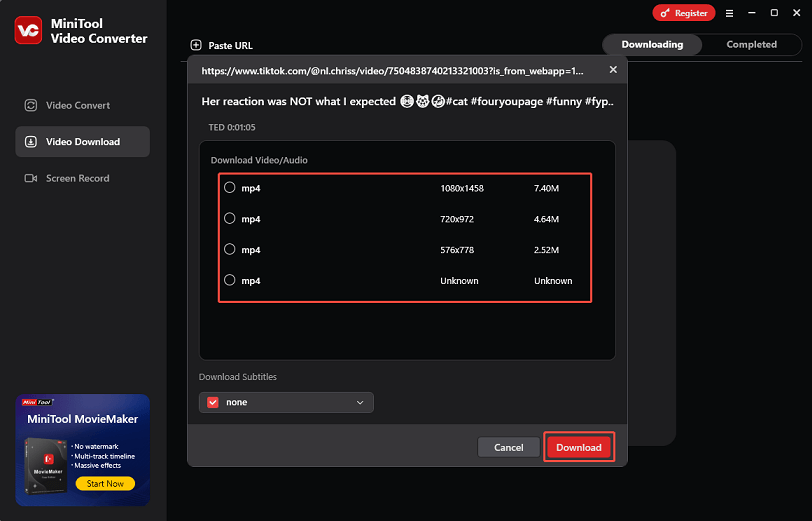
Step 6. Select the desired output format and resolution, and click the Download button to start saving the TikTok video.
Step 7. When the download is complete, you can go to the Completed section to play the video directly or locate the downloaded file.
Such an amazing application, right? Click the button below to experience it now!
MiniTool Video ConverterClick to Download100%Clean & Safe
How to Download TikTok Video with an Online Tool (Without Watermark)
- Copy and paste the TikTok link.
- Choose the output format.
- Begin the download tasks.
If you don’t want to download or install any software, the first online TikTok video downloader I’d like to recommend is viddown.net. I often use it to download online videos from TikTok, YouTube, Facebook, Instagram, X, and Vimeo. No matter what kind of content you want to save, the download process can be completed in just a few clicks, and no watermark will be left on the output video.
Viddown.net is completely free and clean, with no subscription required and no intrusive ads. No sign-up is necessary either. To download TikTok videos with this online tool, follow the steps below:
Step 1. Visit viddown.net on your browser.
Step 2. Copy the link to the desired TikTok video.
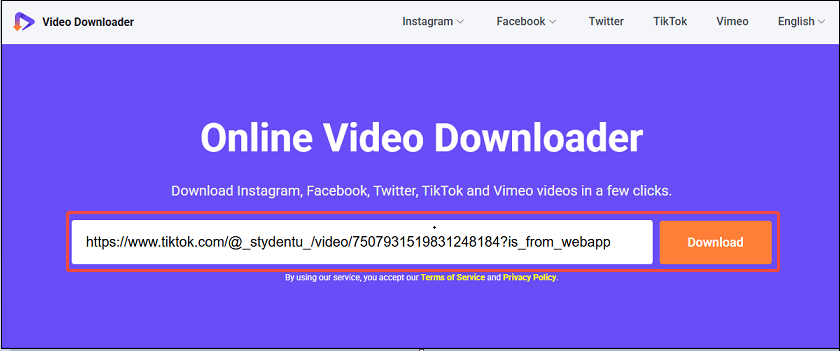
Step 3. Paste the TikTok video link into the input box and click on the Download button next to it.
Step 4. It will then show you downloadable options. Select the one you want and click the corresponding Download button.
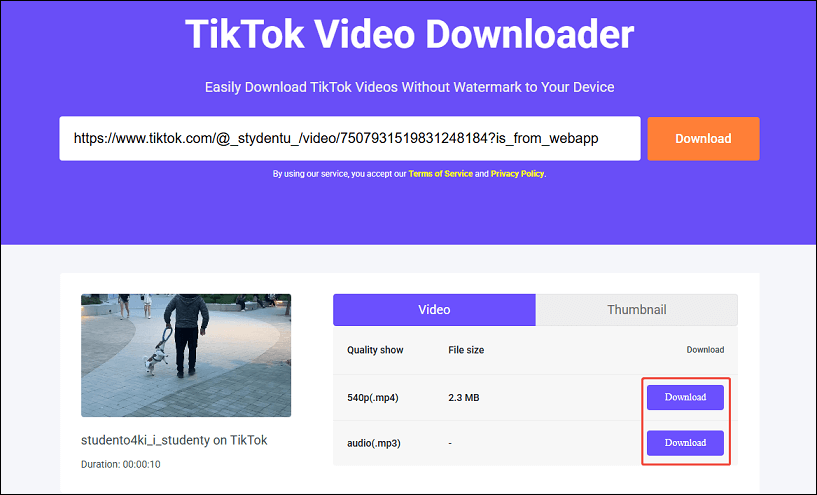
By the way, you can switch to the Thumbnail tab to grab the thumbnail of the target video. Multiple resolution options are provided.
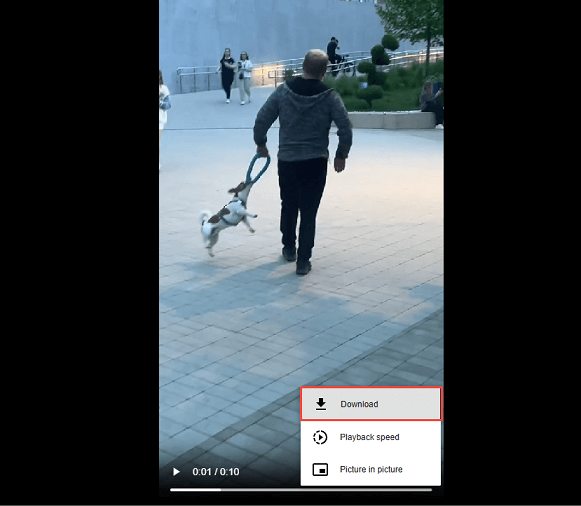
Step 5. If the video plays in a new tab, click the three-dot icon in the lower right corner and choose Download from the menu.
How to Save TikTok Video via Screen Recording (Last Resort)
If a TikTok video can’t be downloaded due to privacy settings, screen recording can be an alternative solution. It enables you to capture what is happening on your screen, enabling you to record the TikTok video while it is playing. Note that the screen recording may not be as high quality as the source video and may include background noise or other distractions.
Both Android and iOS now offer a built-in screen recording feature. Also, you can utilize a screen recorder like MiniTool Video Converter to record the TikTok video on the computer.
Here’s how to do it:
On iPhone:
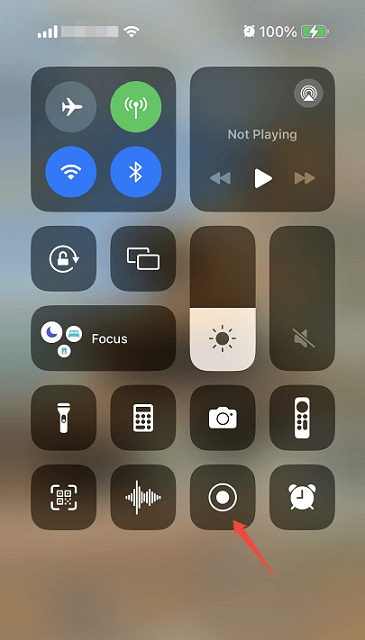
Step 1. Enable screen recording from your iPhone’s Control Center settings.
Step 2. Swipe down from the top right corner of your screen and tap the record icon (a solid circle inside another circle). You’ll see a 3-second countdown, then your iPhone starts recording.
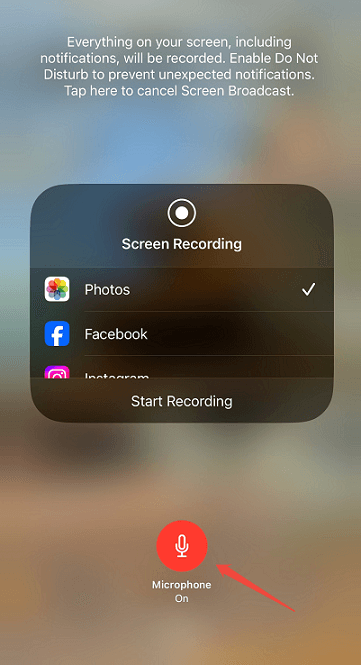
Step 3. Open the TikTok app and play the TikTok video you want to record.
Step 4. Tap the red bar at the top left of your screen and tap on Stop to confirm.
The video will be saved automatically to your Photos app.
On Android:
Step 1. Swipe down from the top of the screen to access the Quick Settings panel.
Step 2. Tap Screen Recorder or Screen Recording.
Step 3. Start recording, and a countdown (usually 3 seconds) will begin.
Step 4. Launch TikTok and play the video you want to capture.
Step 5. Tap the Stop button on the floating screen recorder bar.
On computer:
MiniTool Video Converter is a versatile application that supports video downloading, video conversion, and screen recording. Therefore, you can also use it to record the TikTok video you want to save on your computer. Record now using the following steps:
Step 1. Get MiniTool Video Converter if you haven’t installed it before. Then, launch the app.
MiniTool Video ConverterClick to Download100%Clean & Safe
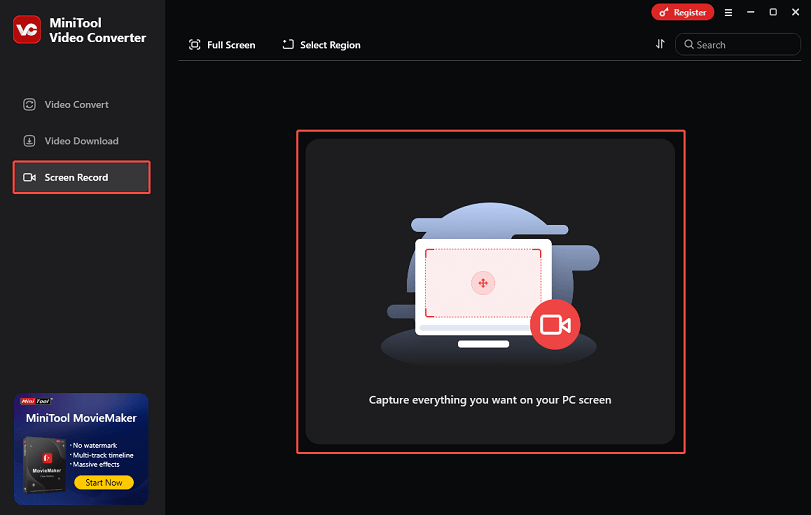
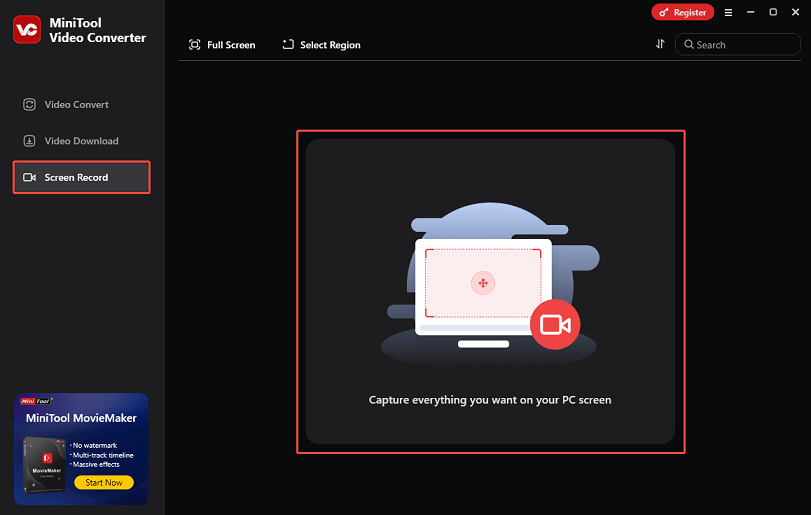
Step 2. Switch to the Screen Record tab on the left-hand menu and click anywhere within the square area to initiate the Screen Recorder.
Step 3. In the pop-up window, you can record in full screen or a selected area, and choose whether to record your microphone and system audio. Plus, click the Settings icon to customize more settings.
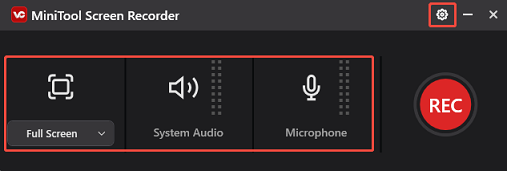
Step 4. Click the red REC button, and there will be a three-second countdown. At the same time, go to TikTok to play the video you want to save.
Step5. When the video ends, press F6 to stop recording.
Looking for ways to download your favorite TikTok videos? This article can help!Click to Tweet
Final Words
To download TikTok video using third-party tools, MiniTool Video Converter and Online Video Downloader on viddown.net are great choices. Both tools offer high-quality downloads without watermarks or intrusive ads, and they ensure fast performance. If you have any questions or suggestions while using MiniTool Video Converter, just ask for help by sending an email to support@minitool.com.
FAQs
1. Log in to your TikTok account and go to your profile.
2. Select the Settings and Privacy option.
3. Choose Privacy and go to the Downloads section.
4. Turn off the Video downloads option.