

How to download Facebook video HD effortlessly? This post offers 2 workable methods, including using MiniTool Video Converter or Online Video Downloader on viddown.net. The detailed steps include copying the Facebook video link, pasting it into the tool, choosing HD as the output resolution, and starting the download process.
Recently, I wanted to download Facebook video HD for offline watching. Undoubtedly, there are a lot of Facebook downloaders on the Internet. However, some of them may contain malware and are unsafe to use. After a lot of investigation, I have found 2 reliable tools to help me finish the download tasks. Next, I will share them with you.
How to Download Facebook Video HD (Offline Method)
- Copy and paste the Facebook URL.
- Configure the output format and resolution.
- Begin the download tasks.
As for me, the most commonly used video downloader for Facebook HD is MiniTool Video Converter. It is a Facebook downloader with an intuitive interface. As a video downloader, MiniTool Video Converter enables you to save HD videos from Facebook in MP4 format. Videos from YouTube, Instagram, TikTok, and Twitter are available, too.
Here’s how to download video from Facebook in HD with MiniTool Video Converter
1. Download MiniTool Video Converter by clicking the button below, and install it by following the prompts.
MiniTool Video ConverterClick to Download100%Clean & Safe
2. Open this application and switch to Video Download.
3. Navigate to Facebook and copy the wanted video link from the address bar.
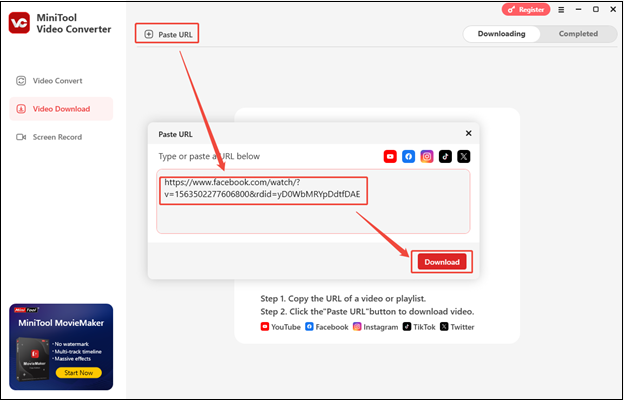
4. Return to MiniTool Video Converter, click on Paste URL, paste the copied link into the given box, and click on Download.
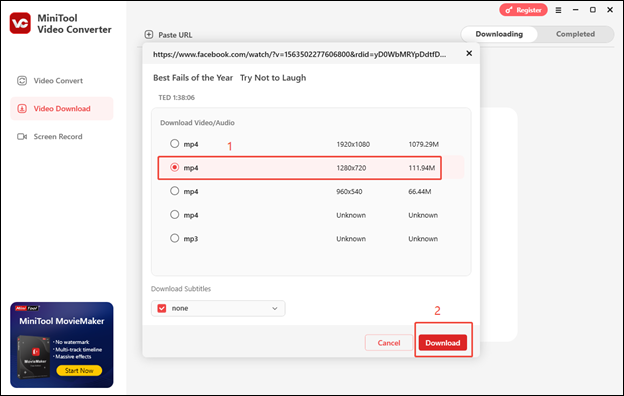
5. Wait for the video link to be analyzed, choose HD Facebook format, and click on Download.
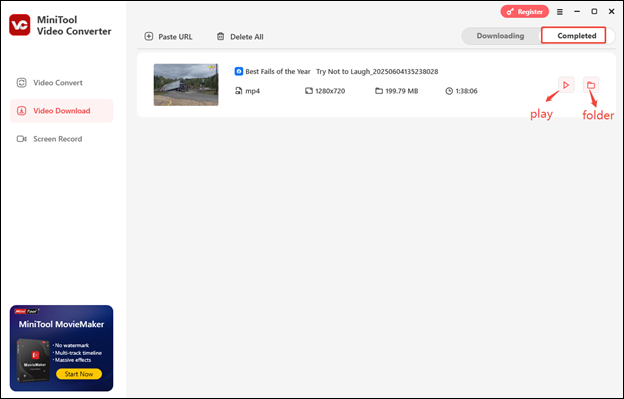
6. Once downloaded, you can check the video in the Completed tab. Click the play icon to play the video, or click the folder icon to locate the save folder of the downloaded video.
More importantly, MiniTool Video Converter allows for download up to 10 Facebook videos at the same time.
MiniTool Video Converter can help download Facebook video HD easily!Click to Tweet
How to Download Facebook Video HD (Online Method)
- Copy and paste the Facebook video link.
- Set the output resolution and format.
- Start the download process.
Viddown.net is an online video downloader and doesn’t require downloading or installing any software on your device. Plus, it’s totally free and enables you to save numerous videos without watermarks. You can not only download Facebook video HD online but also Facebook Reels and thumbnails for free. AWhat makes viddown.net versatile is that it also allows users to download videos from YouTube, Vimeo, Instagram, Twitter, and TikTok.
Don’t underestimate the compatibility of this tool! It works across most common browsers (Chrome, Edge, Firefox, Opera, Safari) and allows video downloads on all devices (desktops, laptops, tablets, smartphones).
Here’s how to save Facebook videos HD with viddown.net
1. Go to Facebook and copy the video link.
2. Use one of the browsers to visit https://www.viddown.net/, paste the video link into the box, and click on Download.
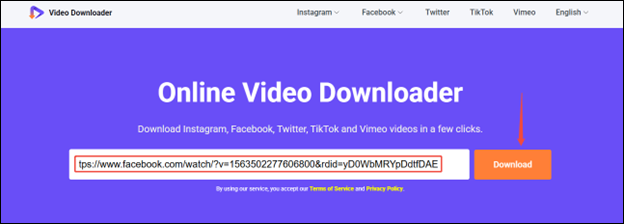
3. Find the HD option and click on the corresponding Download button to start downloading the video.
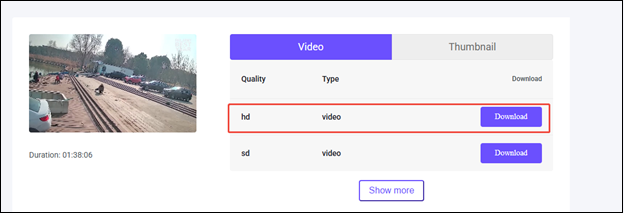
4. You will find the downloaded HD Facebook video in Downloads on your browser.
In short, Online Video Downloader on viddown.net is an ideal choice for you.
Bottom Line
All in all, this post shows you 2 strong and versatile tools to download Facebook video HD, including MiniTool Video Converter (Offline) and viddown.net (Online). If you have any questions or suggestions when you use MiniTool Video Converter, just send an email to support@minitool.com and we’ll reply to you as soon as possible.