

This article recommends 2 reliable video downloaders to fix YT Saver not working, including MiniTool Video Converter and the Online Video Downloader on viddown.net. The general steps to use these YT Saver alternatives include inputting the YouTube URL, choosing the output format, and starting the download process.
YT Saver is one of the most popular downloaders to save videos from YouTube. It is pretty straightforward to use and requires only the URL to download the videos. However, I was always bothered by YT Saver not working. After reading lots of articles, I have found the reasons for this problem and grasped how to fix the YT Saver issue.
Why Is YT Saver Not Working
Here are the 4 main reasons for YT Saver not working.
Unstable Internet
The smooth operation of YT Saver requires a stable Internet connection. Hence, if the Internet connection is poor, it is more likely to encounter YT Saver not working.
The Copied URL Is Wrong
An invalid video URL is also a trigger of the YT Saver error. To save the videos, the right video link is indispensable. Hence, if you copied the wrong link, YT Saver can't fetch the media files via the video link.
The Video Is Protected
Due to Digital Rights Management, YT Saver can bypass the limitation to get a protected video from the server, which finally leads to YT Saver not working.
The Trial Version Limitation
The trial version of YT Saver only provides you with 3 downloads and 1 playlist with limited output formats. Hence, if you want to save more than 3 videos, you have to pay for the upgrade.
How to Fix YT Saver Not Working
- Copy the YouTube URL.
- Select the output format.
- Start the download process.
Here are 2 quick methods to fix the YT Saver issue, including using MiniTool Video Converter and viddown.net.
Method 1. Using MiniTool Video Converter
MiniTool Video Converter is a great YT Saver alternative that supports different platforms, including YouTube, Instagram, TikTok, Twitter, and Facebook. With MiniTool Video Converter, it is effortless to save up to 10 YouTube videos simultaneously. In addition, all these downloaded videos don’t contain any watermarks.
1. Download and Install MiniTool Video Converter
Download and install MiniTool Video Converter. Then, open the YouTube downloader.
2. Copy YouTube URL
Visit the YouTube website and play the desired video. Then, copy the video link from the address bar.
3. Analyze the YouTube URL
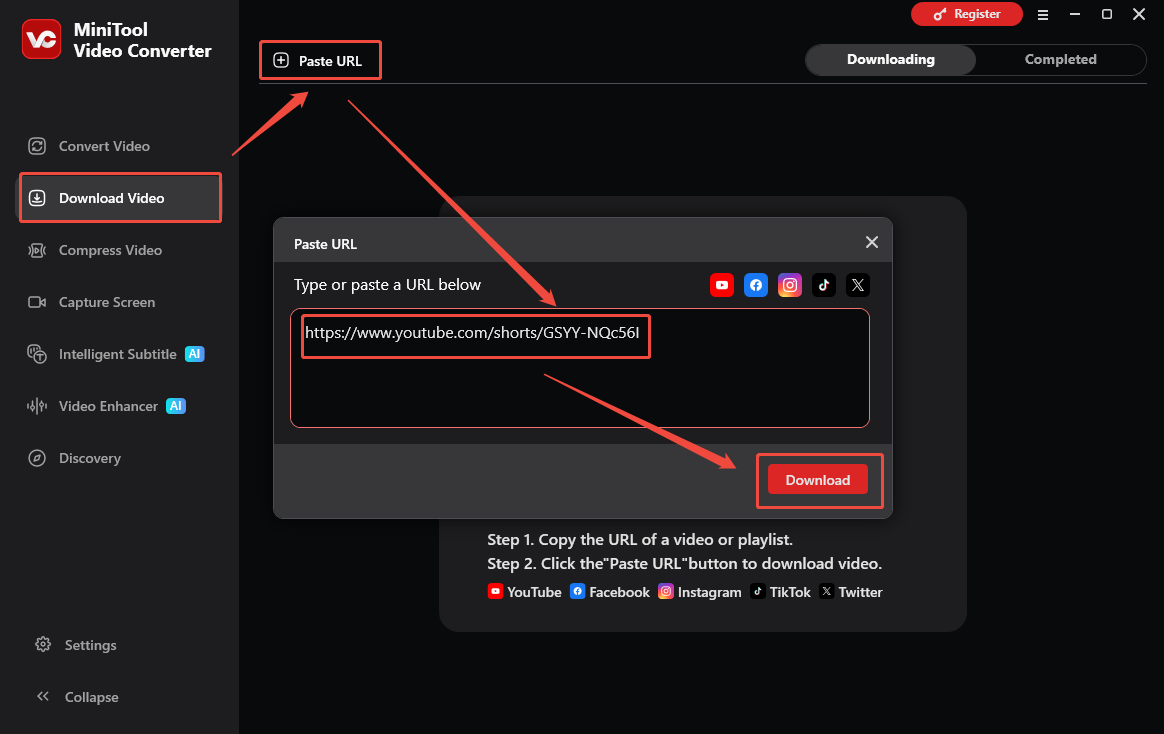
Navigate to the Download Video section of MiniTool Video Converter. Then, click the Paste URL option. Then, paste the link into the URL box. Next, click on the Download option to start the link analysis process.
4. Set Output Format and Start Download
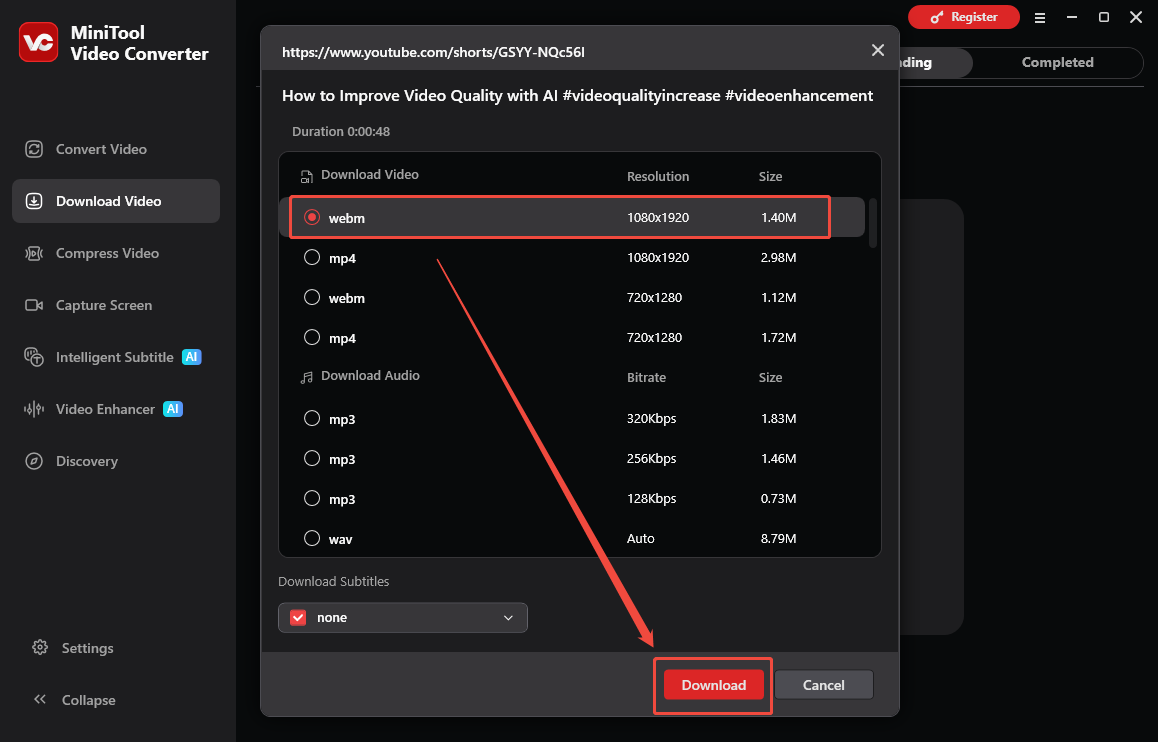
Choose the desired output format. Then, click on the Download option to begin the download process.
5. Check the Output Video
When the download process ends, this YT Saver alternative will switch to the Completed section. To view the output video, click on the Play icon. To locate the output file, click the Folder icon.
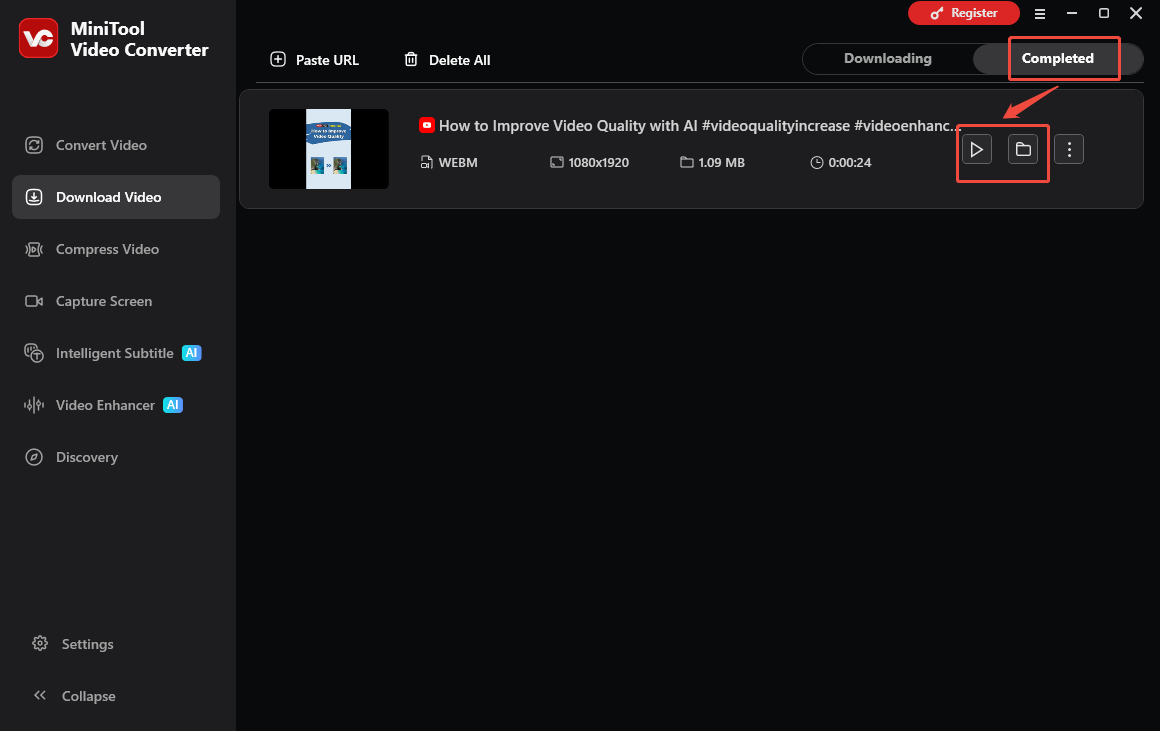
MiniTool Video Converter is an ideal alternative to YT Saver.
Method 2. Using Online Video Downloader on viddown.net
If you want to try online YouTube video downloaders, greatly recommend a handy tool I always use – Online Video Downloader on viddown.net. It is free, fast, clean, and has no installation. Whether you use a desktop browser or a mobile browser app, you can also quickly download videos from most major websites like YouTube, Facebook, Twitter, TikTok, Instagram, and Vimeo without watermarks.
1. Go to YouTube, find the video you want to download, and copy the video link.
2. Head to Online Video Downloader on viddown.net with your browser, paste the copied video link into the address bar, and click on Download.
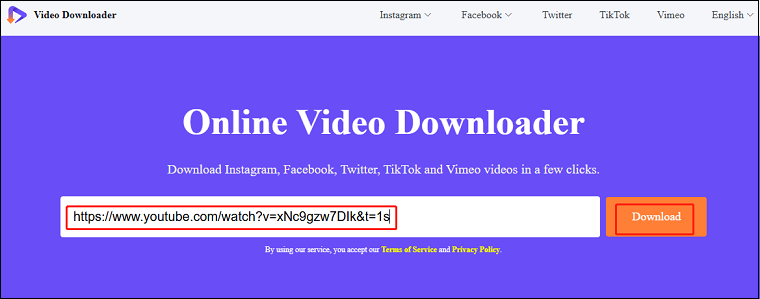
3. In the new interface, the tool will analyze the link and display the video’s thumbnail, title, and duration, as well as all the downloadable options. Press the Download button to download the YouTube video.
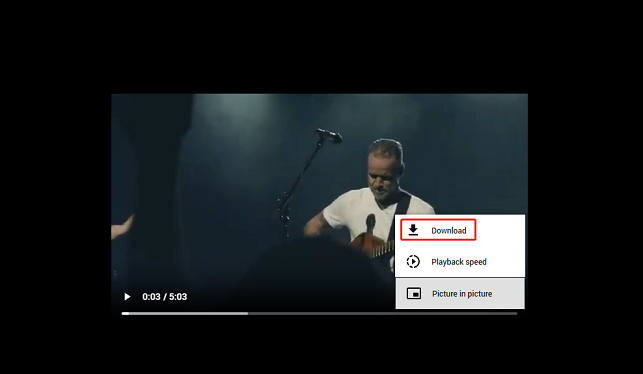
4. If it doesn’t start downloading immediately but plays in another video player, click the three-dot icon in the lower right corner of the player and select Download from the menu. You can find the downloaded video on Downloads of your browser.

Final Words
Many factors, such as the unstable Internet connection, wrong video URL, free trial limitation, and more will lead to TY Saver not working. To continue saving YouTube videos without hassle, never miss these 2 top-great alternatives: MiniTool Video Converter (Offline) and viddown.net (Online). If you have any questions while using the offline alternative, please contact support@minitool.com to ask for help.
People Also Ask
1. Close background applications: Close any unnecessary apps that might be using your internet connection.
2. Change your Wi-Fi channel: Manually changing your Wi-Fi channel can help reduce interference.
3. Restart router: Rebooting your router can help cool down its memory and install updates.
4. Update the router’s firmware: Updating your router’s firmware can help ensure optimal performance.
5. Use an ethernet cable: A wired connection is generally faster and more stable than Wi-Fi, especially if you want to transfer large files or stream video.
6. Clear your cache: Clearing your cache and cookies can help your browser process information more quickly.
For Standard:
1-month plan: $9.95
1-year plan: $25.95
Lifetime plan: $39.95
Family plan: $59.95 (2-5 PCs)
For Pro:
1-month plan: $19.95
1-year plan: $49.95
Lifetime plan: $89.95
Family plan: $139.95 (2-5PCs)