

This article recommends 2 remarkable Twitter video downloader high quality, including an offline tool and Online Video Downloader. Just copy the Twitter link and paste it into the tool. Then set the output resolution and start the download process. If the video quality is low, just go to the Video Enhancer section of MiniTool Video Converter to improve it.
Recently, I wanted to save some Twitter videos for offline watching. However, I found that the quality of the saved videos is low. To fix that issue, I did a lot of research on the Internet to find a Twitter video downloader high quality.
Finally, I found a method to get high-quality Twitter videos. It embodies 2 steps, including downloading Twitter videos and then improving the video quality with a video enhancer. In the following paragraphs, I will share my findings with you.

Step 1. How to Get Videos from X
- Input the X video URL.
- Select the output format.
- Save the X video.
Before improving the video quality of Twitter videos, it is necessary to get videos from X first. Here, I highly recommend 2 reliable options, including MiniTool Video Converter and Online Video Downloader.
Option 1. MiniTool Video Converter
MiniTool Video Converter is an easy-to-use video downloader that supports various platforms, including X, YouTube, Facebook, TikTok, and Instagram. I love its watermark-free nature. Before downloading Twitter videos, I have used MiniTool Video Converter to save 4K YouTube videos and Instagram videos without any watermarks.
Meanwhile, since MiniTool Video Converter supports batch download, I can use it to save up to 10 Twitter videos simultaneously. Plus, this program allows me to save the X videos in highly compatible formats, including MP4, WEBM, MP3, and WAV.
How to Save Twitter Video with MiniTool Video Converter
Below are detailed instructions for saving a Twitter video using MiniTool Video Converter.
Step 1. Download and Install MiniTool Video Converter
 MiniTool Video Converter
-
 Download YT videos for offline playback.
 - Save Instagram Reels to watch privately.
- Get online TikTok clips for remake or combination.
- Download Facebook and X videos easily.

Click on the download button to download and install MiniTool Video Converter on the PC. Then, run this application.
Step 2. Copy the Twitter Link
Go to the Twitter website and view the Twitter content that you want to get. Then, copy the Twitter URL from the address bar.
Step 3. Analyze the Twitter Link
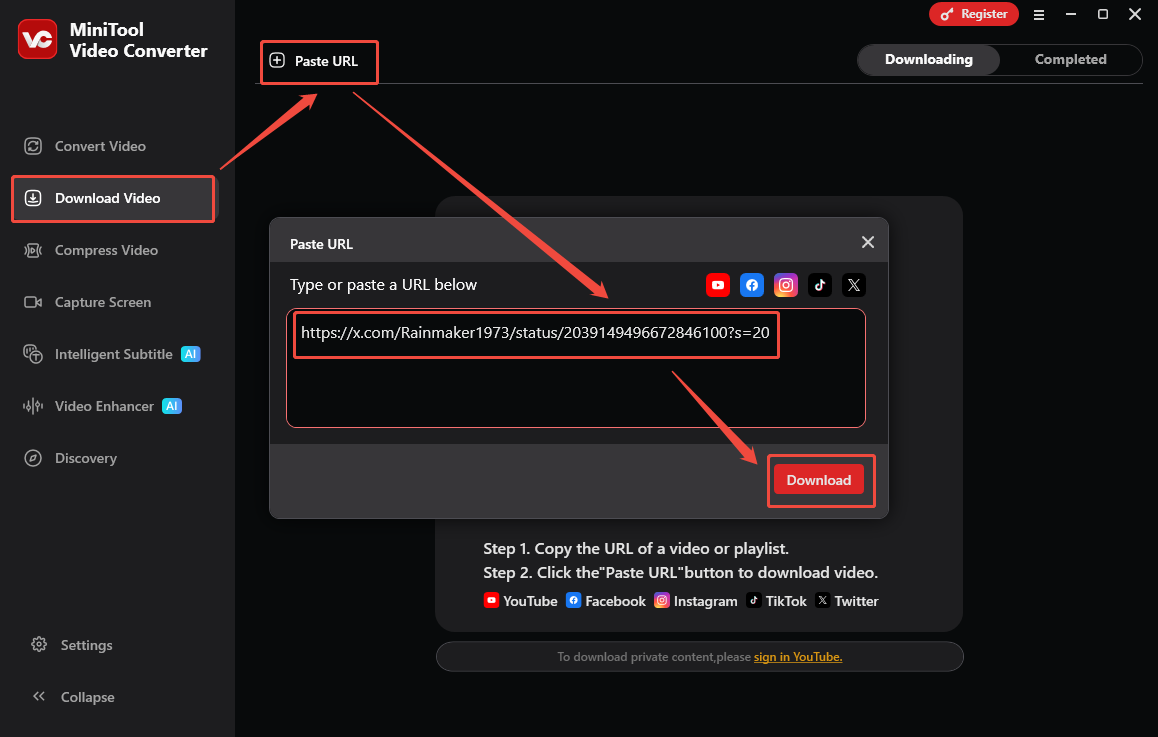
Go back to the interface of MiniTool Video Converter. Then, switch to the Download Video section. There, click on the upper-left Paste URL option to open the URL box. Next, click on the Download option to begin the link analysis process.
Step 4. Set the Output Format and Start Download
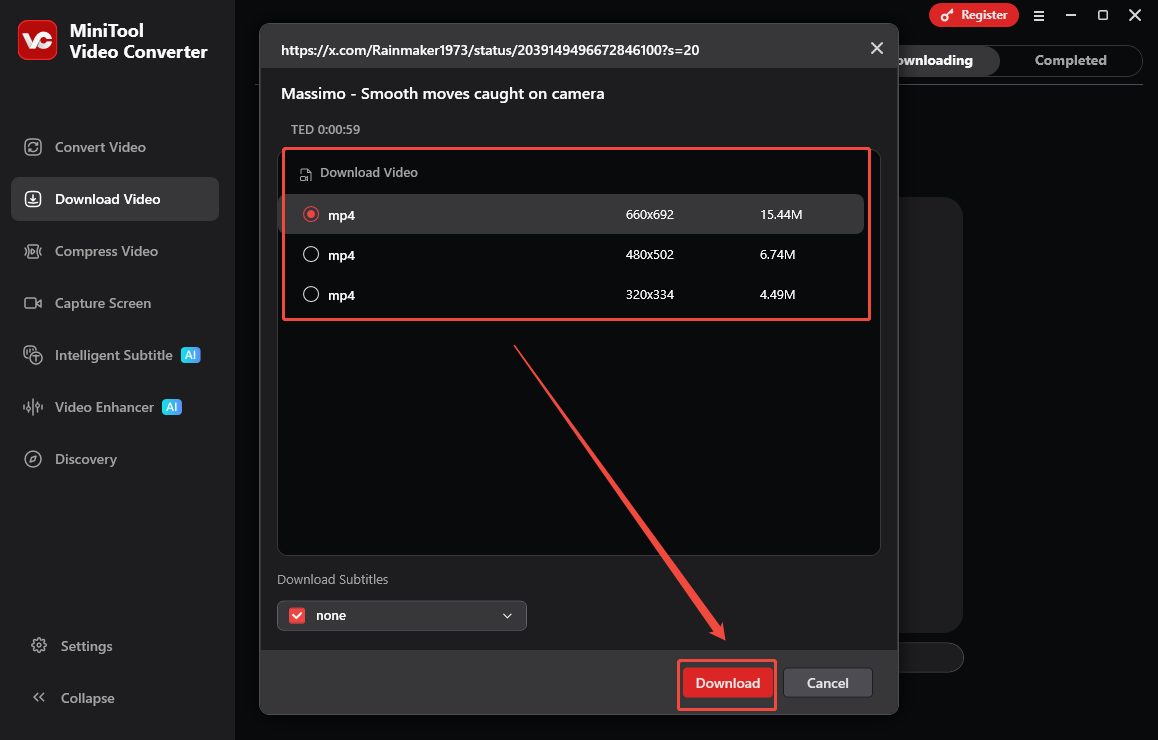
Once the link analysis process ends, an output format window will appear. Then, under the Download Video section, choose the video format you want, and click on the Download option to start the download process.
Step 5. Check the Output Video
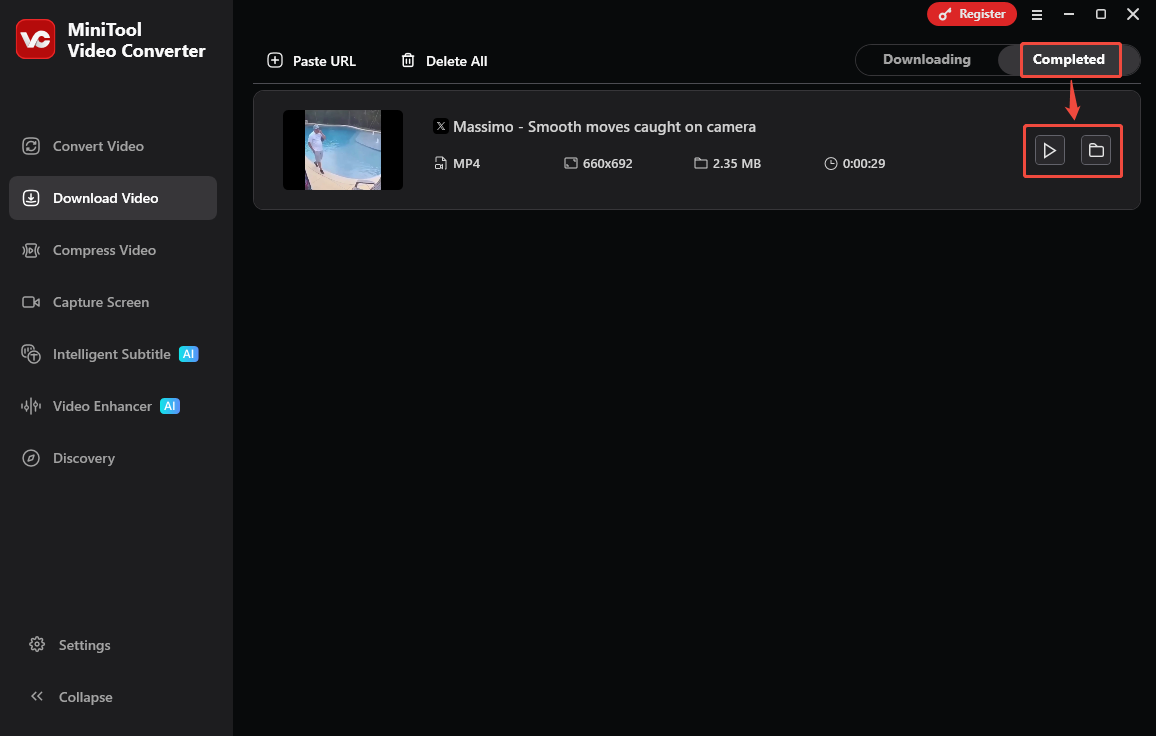
When the video download completes, this X video downloader high quality will automatically switch to the Completed section. There, click on the Play icon to view the output file. To locate it, click on the Folder icon.
To download Twitter video high quality, MiniTool Video Converter is an ideal choice.Click to Tweet
With the above-detailed steps, it is effortless to get the output Twitter video. More importantly, MiniTool Video Converter is also a one-stop solution for video conversion, video compression, video transcription, and video enhancement.
Option 2. Online Video Downloader
For those who want an online Twitter video downloader, I highly recommend Online Video Downloader. It is 100% clean and free. Furthermore, this tool has great compatibility. I can use it on various web browsers, including Firefox, Edge, Chrome, Opera, Brave, and more.
Step 1. Copy the Twitter Video Link
Go to the Twitter website and log in to your account. Then, find the Twitter video you want to save and copy the video URL from the address bar.
Step 2. Analyze the Twitter Video URL
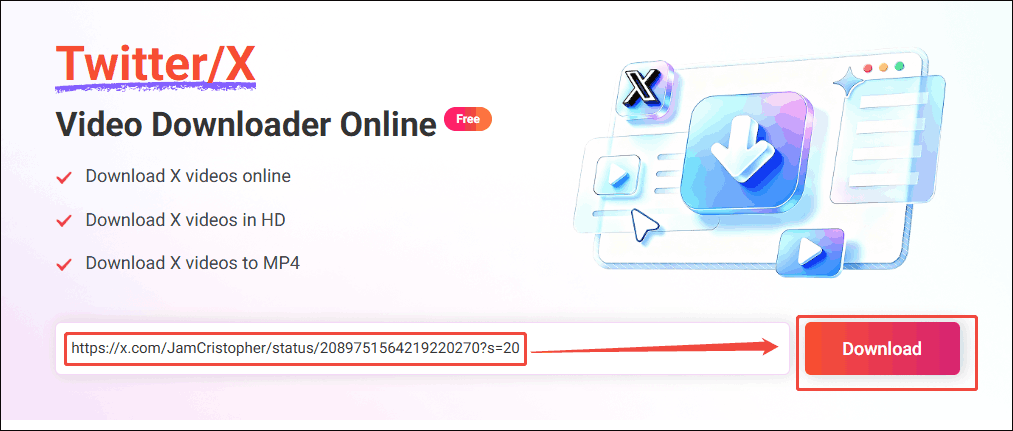
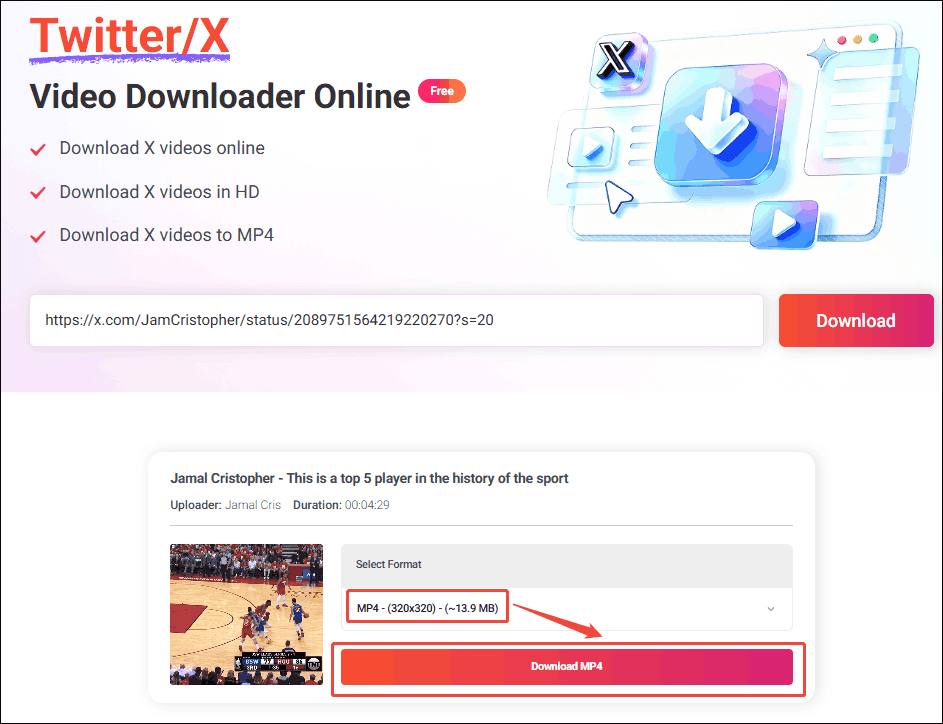
Go to the interface of the online X video saver. There, paste the link into the URL box and click on the Download option to start the link analysis process.
Step 3. Configure the Output Format
Select the desired resolution. Then, click on the corresponding Download MP4 option to preview the video.
Step 4. Begin Download
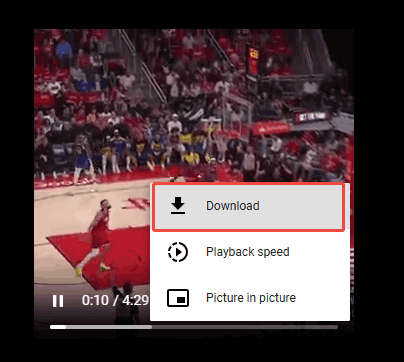
Click on the bottom-right More icon and select the Download option to start the download.
Step 5. Check the Output Video
When the download process ends, go to the Downloads section of the web browser to check the saved video.
Undoubtedly, Online Video Downloader is a top-grade choice to save Twitter video high quality without downloading or installing any plug-ins or applications.

Step 2. Improve Twitter Video Quality
- Import the downloaded X video.
- Set a quality improvement mode.
- Improve the quality of the X video.
To enhance the Twitter video quality, MiniTool Video Converter can still help. It features a new video-enhancement function that enables me to get better X videos without any payment. Below is the detailed guidance on how to improve video quality using MiniTool Video Converter.
Step 1. Download and Install MiniTool Video Converter
MiniTool Video ConverterClick to Download100%Clean & Safe
Download, install, and open MiniTool Video Converter on the PC.
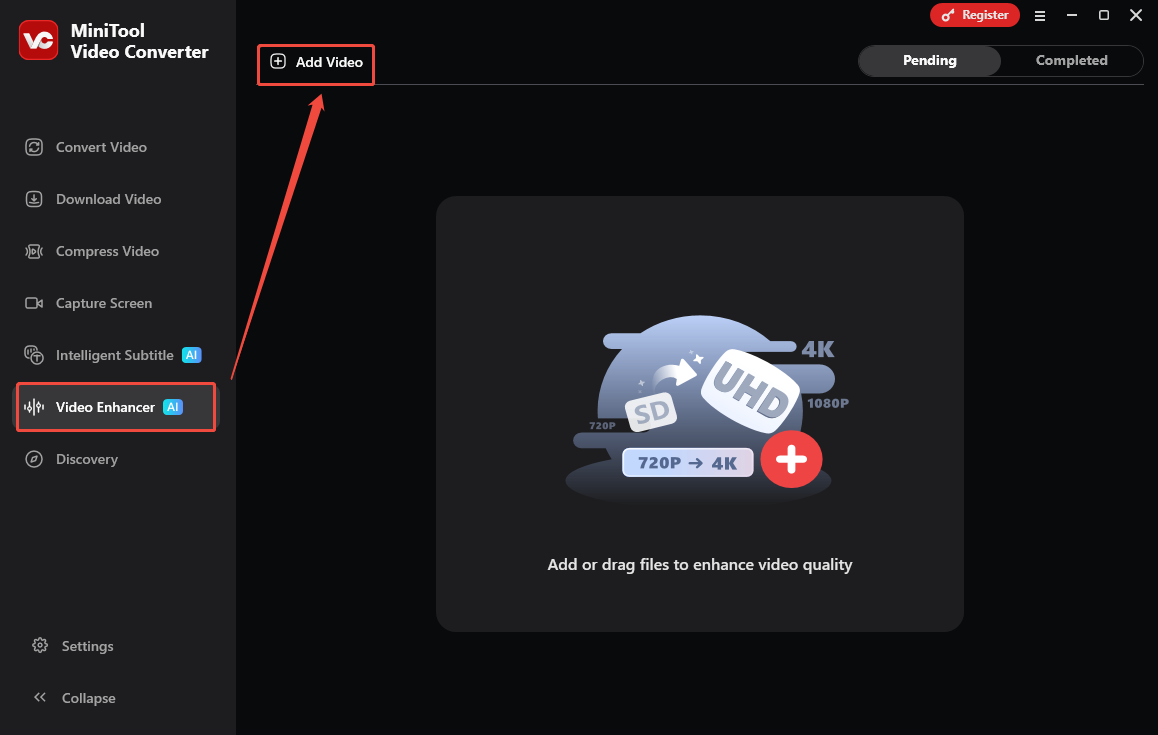
Step 2. Upload a Twitter Video
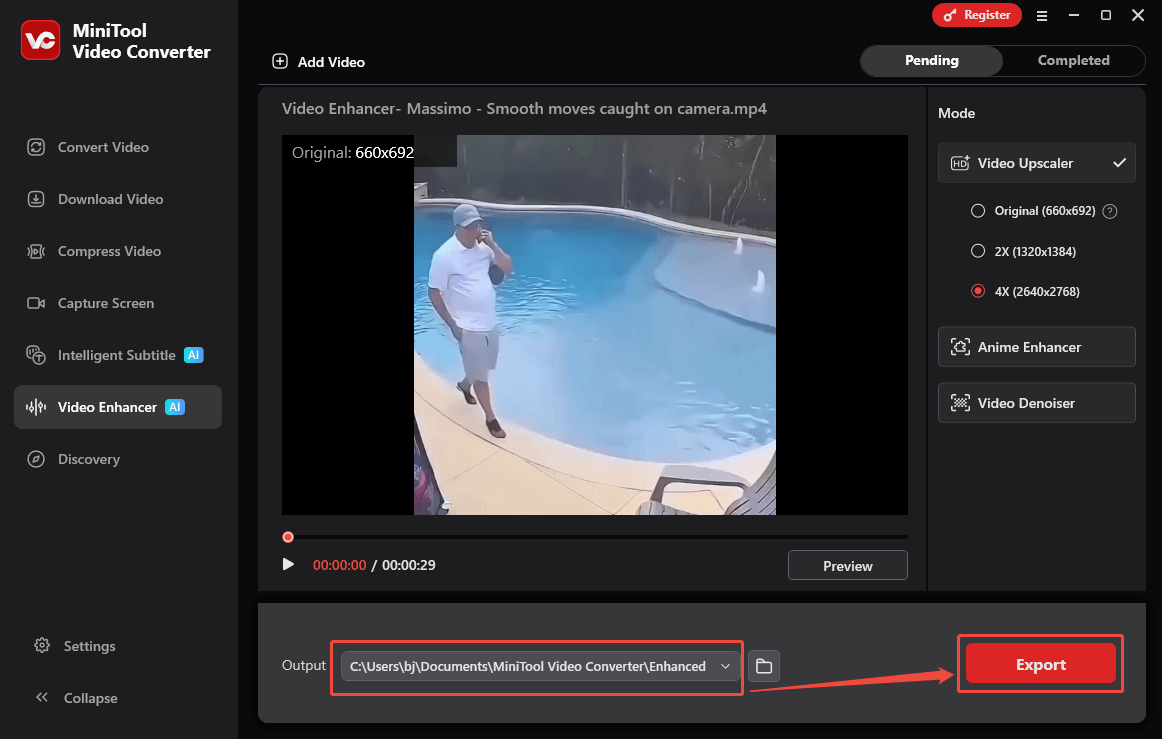
Switch to the Video Enhancer section. There, click on the upper-left Add Video option to import the Twitter video file.
Step 3. Choose the Enhance Mode and Preview the Output Video
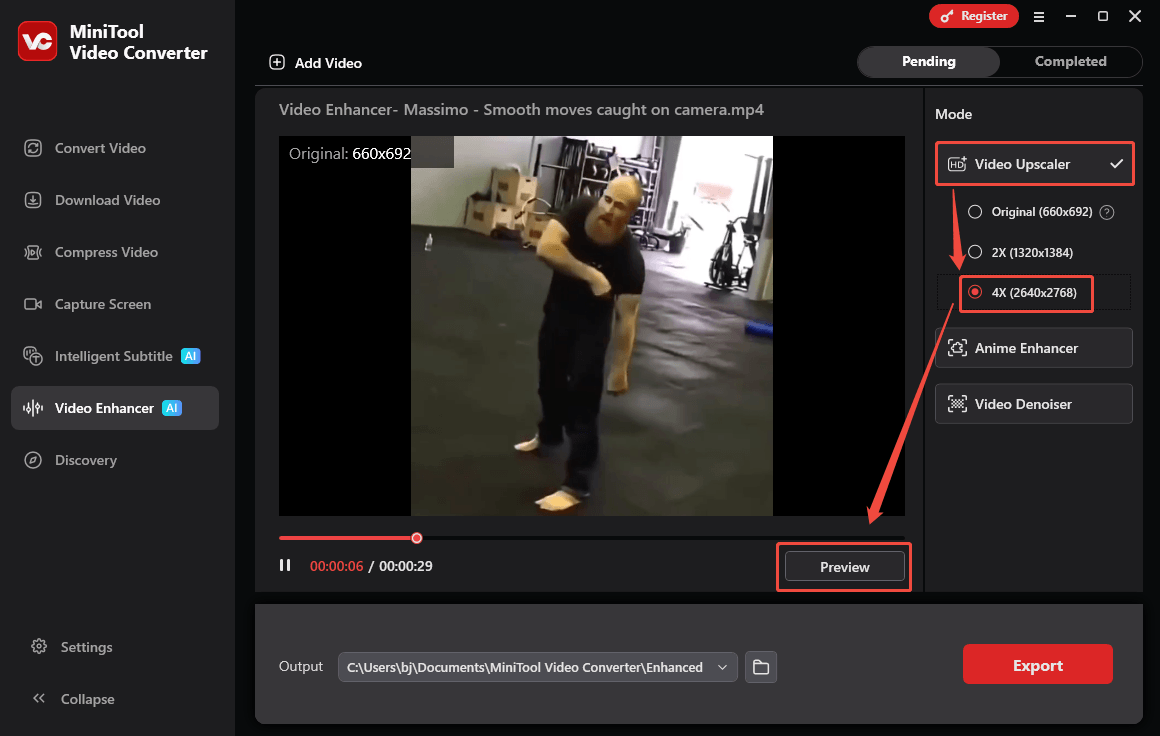
Under the Mode section, choose an enhancement mode among Video Upscaler, Anime Enhancer, and Video Denoiser. Here, I take 4X (960x640) of Video Upscaler as an example. Then, click on the Preview option to see a 10-frame before-and-after comparison.
Step 4. Set an Output Folder and Export the Video
Expand the bottom Output option to choose a destination folder for the output video. Then, click on the Export option to export the video.
Step 5. Check the Exported Video
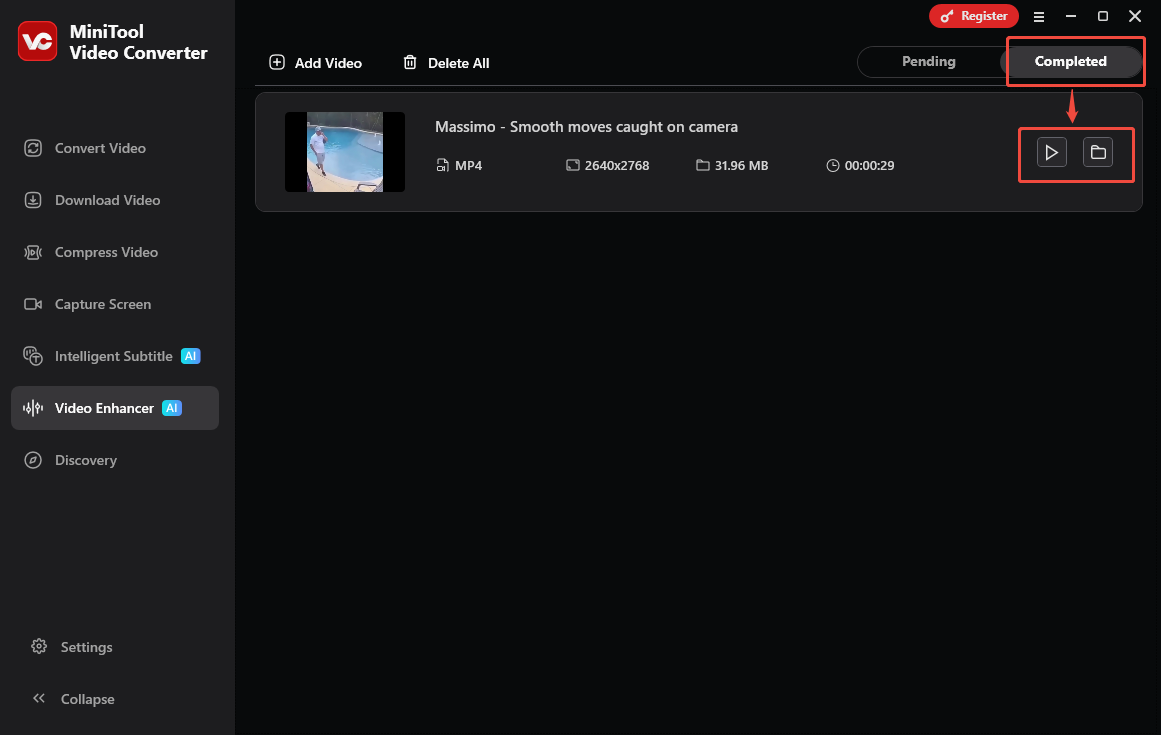
Once the video exporting ends, MiniTool Video Converter will automatically switch to the Completed section. There, click on the Play icon to view the output file. To locate the output video, click on the Folder icon.
With the above-detailed steps, it is a piece of cake to get high-quality Twitter videos.
To Wrap Things Up
Both MiniTool Video Converter and Online Video Downloader are great Twitter video downloader high quality. For those who are not satisfied with the video quality, use MiniTool Video Converter to accomplish the video enhancement. If there are any problems when using MiniTool Video Converter, just ask for help by sending an email to support@minitool.com.