

This article recommends 2 remarkable downloaders to complete the TikTok link download easily, including MiniTool Video Converter (Offline) and viddown.net (Online). The general steps include copying and pasting the TikTok URL, selecting the output format, and beginning the download process.
To view TikTok videos anytime and anywhere, I really want a method to conduct the TikTok link download easily and quickly. After reading a lot of popular articles, I have grasped how to get TikTok videos via the links. If there is a need to learn such an approach, just read the following content.
Part 1. Is It Legal to Download TikTok Videos
Before delving into how to save TikTok videos, you need to take the legal and ethical factors into consideration.
Is it legal to download TikTok videos? With the creator's permission, you can use TikTok's built-in download feature to save videos for offline viewing. But the downloaded video includes a watermark.
If you use a third-party tool to save TikTok videos without the creator’s permission, you may violate copyright laws and TikTok’s Terms of Service. You can only use third-party tools to get TikTok videos for personal use. You can’t distribute, reproduce, or monetize the downloaded videos! In addition, you need to respect content creators. When you want to share or use the downloaded content, you need to give proper credit to its creator.

Part 2. How to Download TikTok Videos with Links
- Copy TikTok URL.
- Select the output format.
- Start the download process.
Here are MiniTool Video Converter (Offline) and viddown.net (Online) that can help accomplish the TikTok download.
How to Get TikTok Videos [Offline Method]
MiniTool Video Converter is the first TikTok link downloader I want to recommend. It is a free TikTok link download tool that enables you to save TikTok videos at a fast speed. Instead of downloading videos one by one, it has a batch video downloading feature that allows you to download up to 10 videos simultaneously.
You can use MiniTool Video Converter to save videos, audio, playlists, or even subtitles from TikTok. In addition, you can choose to save videos as MP4, WebM, MP3, or WAV format. Moreover, MiniTool Video Converter is a watermark-free and ad-free tool, which means it doesn’t add a watermark to your downloaded videos.
Step 1. Download, Install, and Launch MiniTool Video Converter
If you have installed MiniTool Video Converter, you can launch it and proceed to the following steps. If not, you can simply click the button below to get the installation package of MiniTool Video Converter and then follow the on-screen instructions to install it on your PC. Then run it.
MiniTool Video ConverterClick to Download100%Clean & Safe
Step 2. Customize the Download Settings
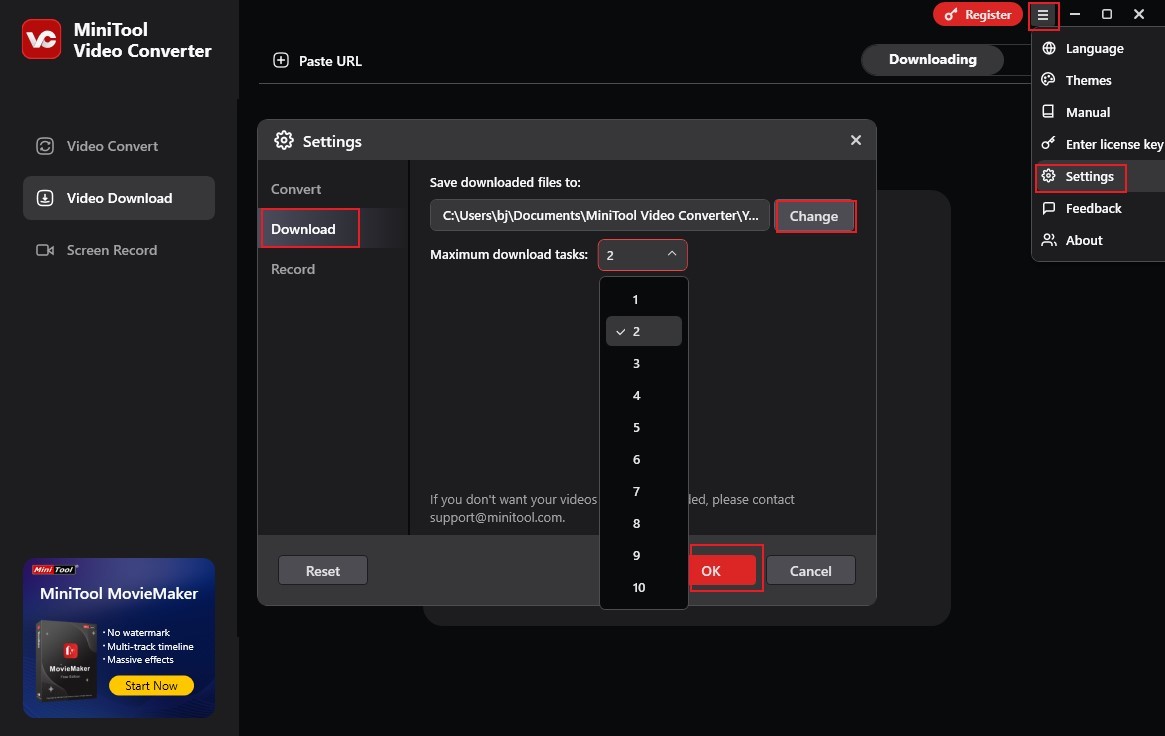
Click the Hamburger icon at the top-right corner, select the Settings option, and click the Download tab. If you want to change the saving path, you can click the Change button and then choose another folder to save the downloaded files. By default, MiniTool Video Converter saves 2 files simultaneously. You can open the Maximum download tasks list to choose the value you need. Then don’t forget to click OK to confirm the operation.
Step 3. Copy and Paste the Target TikTok Video URL
Go to TikTok to find the video you want to save and copy its URL.
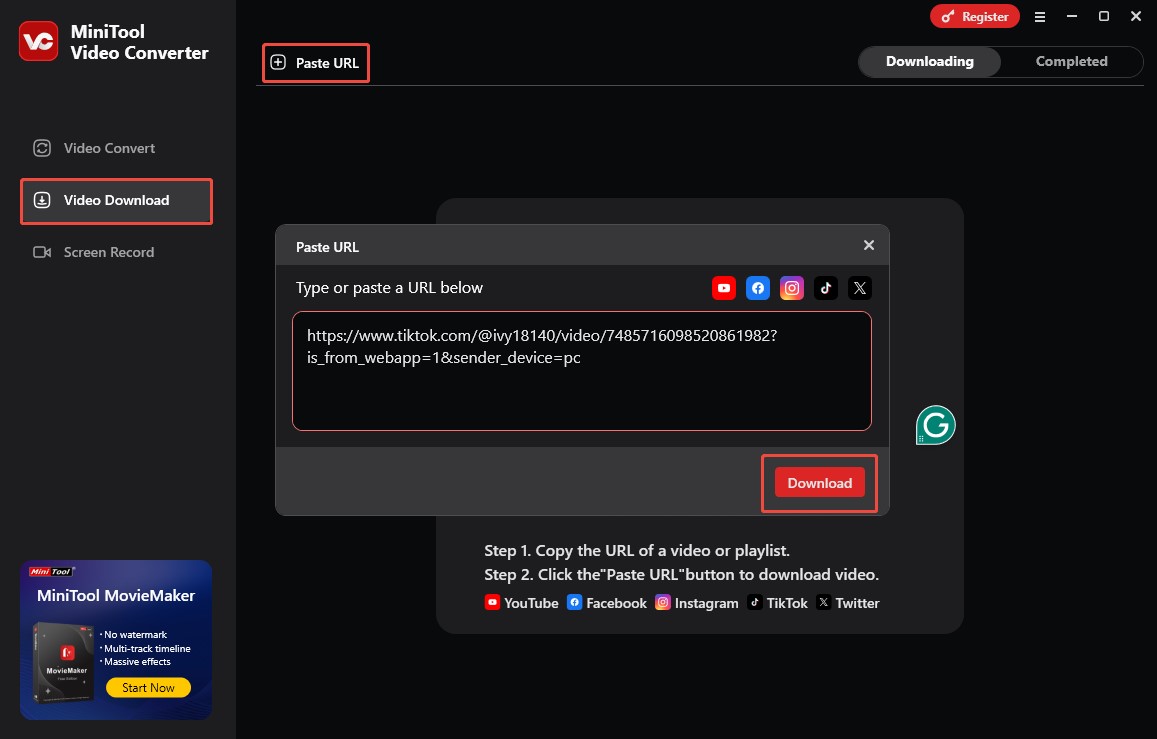
Return to MiniTool Video Converter, switch from the Video Convert section to the Video Download section. Click the Paste URL option, paste the copied TikTok URL into the pop-up window, and click the Download button. Then, you need to wait for a few seconds for this program to analyze the copied TikTok URL.
Step 4. Select the Output Format and Quality
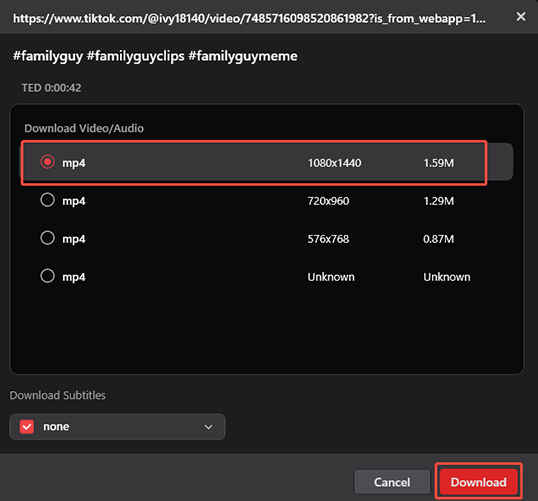
A window will pop up showing the available output formats and qualities. You can choose a proper format and quality that you need. Here, I take MP4 1080X1440 as an example.
Step 5. Save Video from TikTok
Finally, click the Download button to begin the downloading process. The process will finish in a few seconds. Then, you will be guided to the Completed subtab. There, you can click the Play icon to play the downloaded TikTok video. Also, you can click the Folder icon to locate the downloaded TikTok video.

How to Get TikTok Videos [Online Method]
Are you looking for a way to save TikTok videos without downloading or installing any software or plugin? If so, an online tool is your best choice. Here, I highly recommend Online Video Downloader on viddown.net.
Online Video Downloader on viddown.net is a completely free tool that enables you to get TikTok videos without watermarks and in high-definition quality. It can be used on most common web browsers and has good cross-device compatibility, which is available on Windows, macOS, iOS, Android, etc. Additionally, this TikTok download link tool supports downloading the video thumbnail.
Step 1. Open any of your browsers and visit the official website of Online Video Downloader on viddown.net. Open a new tab on your browser and go to the TikTok website. Find the video you want to watch offline and copy its link.
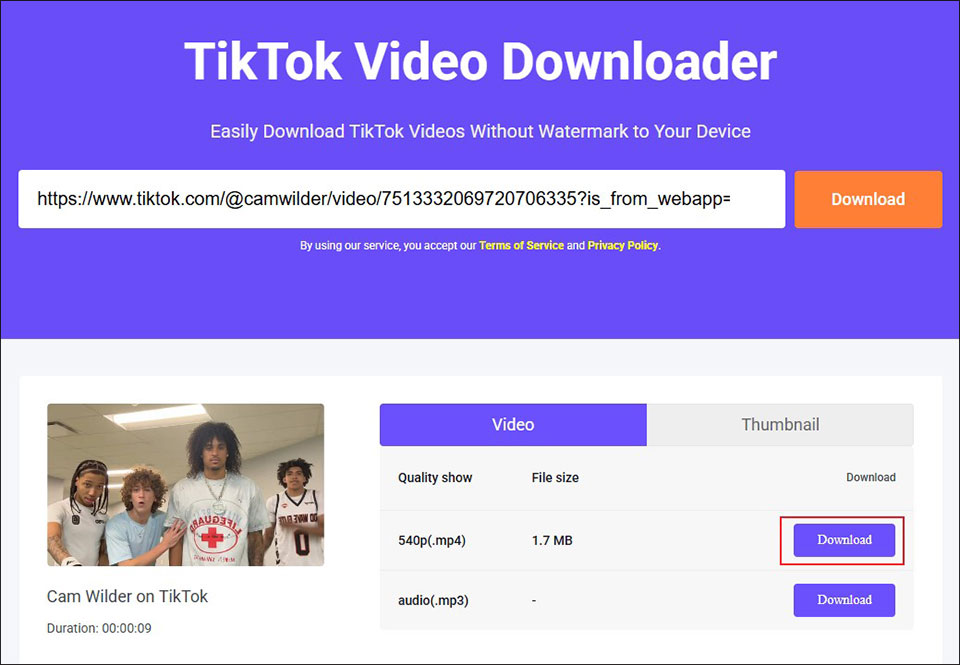
Step 2. Go back to Online Video Downloader on viddown.net, paste the copied TikTok link into the search box, and click the Download button. Then give it a few seconds to analyze the link.
Step 3. Next, choose the quality and output format you need and click the Download button. If you want to save the video thumbnail, go to the Thumbnail tab to click the Download button.
Step 4. Once the download task is finished, click the Show in folder icon to locate the downloaded TikTok video.
Part 3. To Wrap Things Up
Both MiniTool Video Converter and Online Video Downloader on viddown.net are great choices to help you complete the TikTok link download effortlessly. If you have any questions while using MiniTool Video Converter to save TikTok videos, just send an email to support@minitool.com to ask for help.