

This article recommends 2 robust tools, including MiniTool Video Converter and Online Video Downloader, to help accomplish the Instagram Reels download. The detailed steps involve copying the Instagram URL, pasting it into the video downloader, and beginning the download process.
Since its launch in 2020, Instagram Reels has quickly become one of the most popular forms of content on social media. To view various interesting Instagram Reels without an internet connection, I want a method to complete the Instagram Reels download. After reading many relevant articles, I have grasped the method. Next, I will introduce this method to you.
Why Download Instagram Reels on Windows
Most Instagram users interact with Reels on their mobile devices. However, there are plenty of scenarios where you may want to download them to a Windows computer:
- Content Creation
- Offline Access
- Better Storage Management
- Cross-Platform Use
How to Download Instagram Reels with an Offline Downloader
- Copy and paste the Instagram URL.
- Select an output format.
- Start the download process.
MiniTool Video Converter could be one of the most reliable and safe Instagram Reels downloaders. With it, you won’t see any ads, and it doesn’t add any watermarks to the downloaded Reels. MiniTool Video Converter supports downloading videos from several trending online video platforms, including Instagram, YouTube, Facebook, TikTok, and Twitter. What's more, up to 10 videos can be saved simultaneously.
How to download Reels from Instagram on Windows? You can follow the guide step by step:
Step 1. Download and install MiniTool Video Converter
Click the button below to download this Instagram Reels downloader and install it on your computer.
 MiniTool Video Converter
-
 Download YT videos for offline playback.
 - Save Instagram Reels to watch privately.
- Get online TikTok clips for remake or combination.
- Download Facebook and X videos easily.
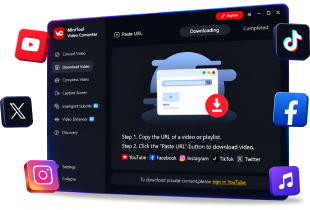
Step 2. Launch and go to Download Video
After installing, launch MiniTool Video Converter, and then navigate to the Download Video tab on the left-hand menu.
Step 3. Copy the link to the Instagram Reels video
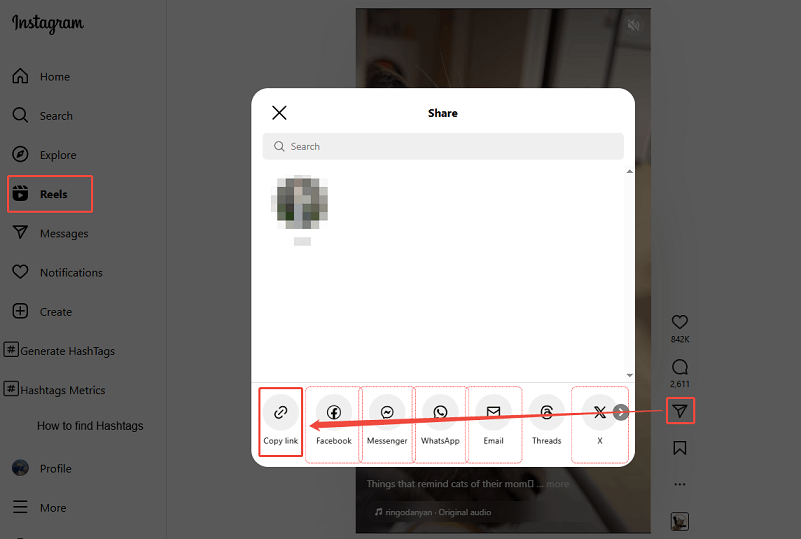
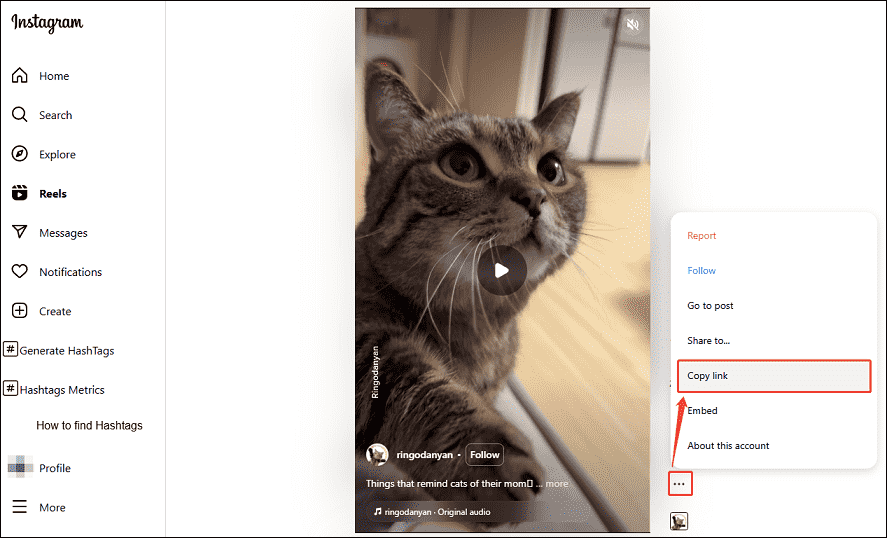
Go to Instagram on your browser and click on the Reels tab. Then, try one of the following three ways to get the video link:
1. Copy the link on your browser’s address bar.
2. Click the Share icon and select Copy link.
3. Click on the More icon and choose Copy link.
Step 4. Paste the Instagram Reels video link
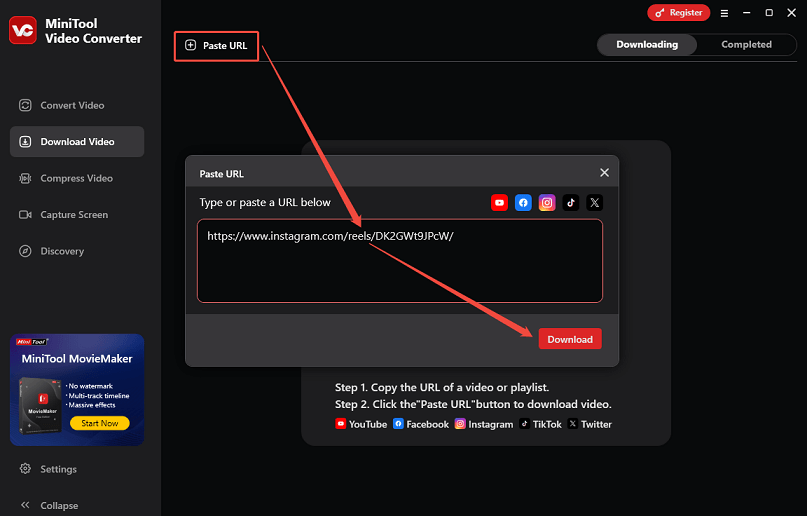
On the interface of MiniTool Video Converter, click on Paste URL. In the pop-up window, paste the copied Instagram Reels link into the input box and click on Download.
Step 5. Download Instagram Reels to MP4/MP3
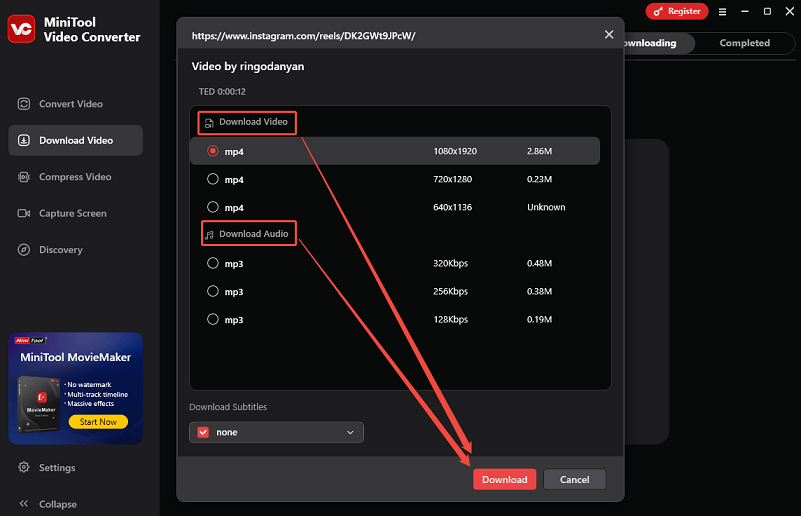
If you want to save the Reels video in MP4, choose a quality option under Download Video. Or, choose a quality option under Download Audio to extract an MP3 file from the video. Then, click the Download button to begin the download process.
Step 6. Play or find the downloaded Instagram Reels
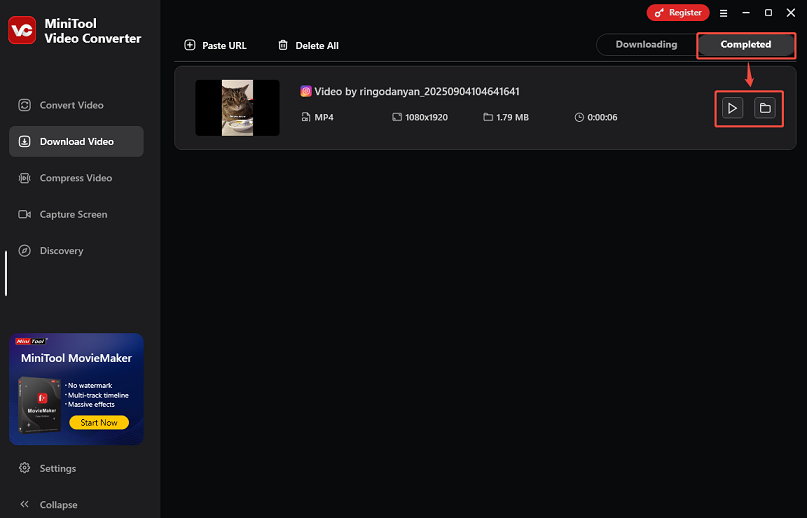
You can track the download progress in the Downloading tab. You have the option to pause or resume the download at any time. When it finishes, it will automatically move to the Completed tab.
To play the downloaded Instagram Reels video, click the play icon, or click the folder icon to locate the file location.
Just repeat the similar steps if you want to save videos from other platforms with this powerful video downloader!

How to Download Instagram Reels with an Online Downloader
- Copy and paste the Instagram URL.
- Choose an output format.
- Begin the download process.
I highly recommend Online Video Downloader. As an online downloader, this tool works well on most common web browsers, whether it’s Chrome, Firefox, Edge, Safari, or Opera. As long as your device (desktops, smartphones, laptops, or tablets) has a browser, you can access this tool easily. Here’s how to download Reels from Instagram with this online Instagram video downloader:
Step 1. Visit Online Video Downloader
Open your web browser and go to the online Instagram video downloader.
Step 2. Analyze Instagram URL
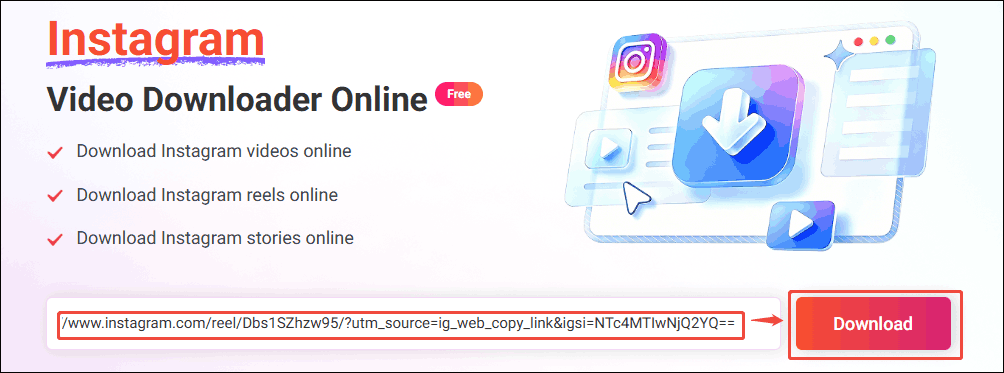
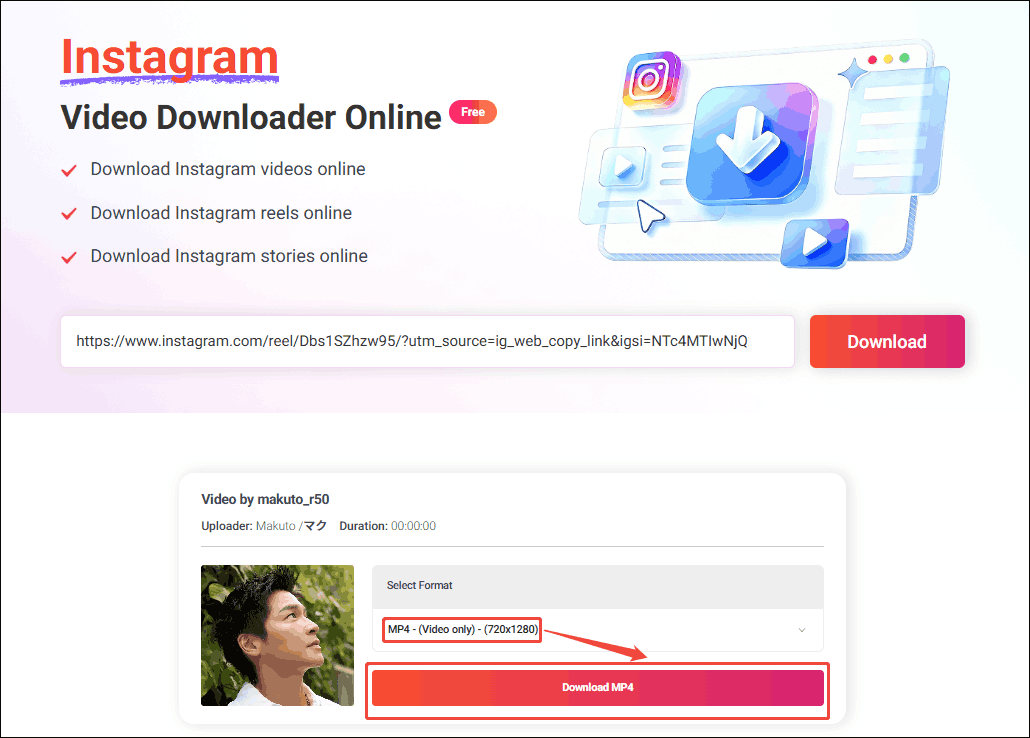
Open a new tab on your browser to go to Instagram and copy the URL of the Reels video you want to save. Next, paste the Instagram Reels video URL you just copied into the address box and click on the Download button to analyze the Instagram URL.
Step 3. Set the output format
Select the desired resolution and click on the Download MP4 option to preview the output video.
Step 4. Download the Instagram Reels
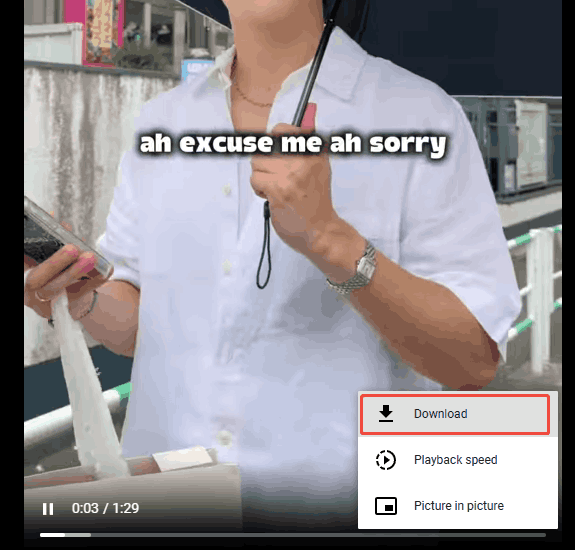
Click on the bottom-right More icon and choose the Download option to start the download process.
Step 5. Locate the downloaded Instagram Reel video
After downloading successfully, you can go to your browser’s Downloads section or the folder you chose before to locate the downloaded Instagram Reel video.
Undoubtedly, Online Video Downloader is a great choice for you.
How to Save Instagram Reels by Screen Recording
If you don’t want to use any third-party Instagram Reels downloaders, a fallback solution you can try is to record the Reels video while playing it. To record the Reel, you need an easy-to-use Windows screen recorder. As we mentioned earlier, MiniTool Video Converter is also a powerful screen recording tool.
MiniTool Video Converter lets you record any area on your screen. You can choose to record the entire screen or just a portion of it. This feature is perfect for recording the desired Reels video vertically in a selected region. To record your wanted Reels and save them as MP4 videos, follow the step-by-step instructions:
Step 1. Install and open MiniTool Video Converter
Install MiniTool Video Converter on your PC by clicking its download button. Then, open it.
MiniTool Video ConverterClick to Download100%Clean & Safe
Step 2. Initiate MiniTool Screen Recorder
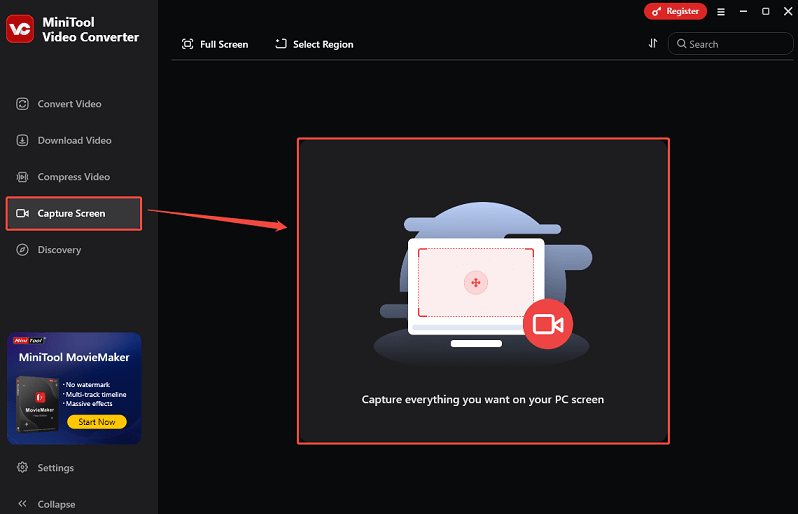
Switch to the Capture Screen module and click anywhere within the marked area to initiate the MiniTool Screen Recorder.
Step 3. Navigate to the wanted Reels video
Visit the Instagram website and locate the Reels video you want.
Step 4. Customize recording settings
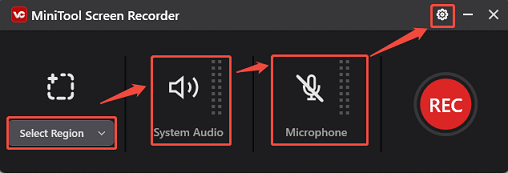
In the small window, choose Select Region to record the Reels in a selected region. Then, decide whether to record your system audio and microphone. Click the Settings icon to adjust other settings, like output folder, frame rate, quality, etc.
Step 5. Start recording the Reels
Click on the REC button or press F6 on your keyboard to start capturing the Reels video. It will have a three-second countdown. At this time, go to your browser and play the Reels video.
Step 6. Stop the recording
When the video play finishes, press the F6 key again to stop recording.
Step 7. Find the recorded Reels
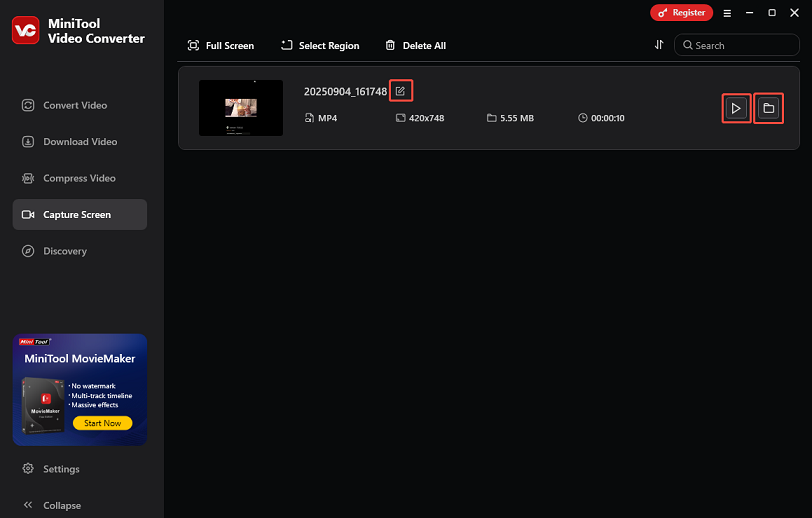
After that, the recorded video will be listed on MiniTool Video Converter’s interface. You can click the edit icon to rename the video, click the play icon to play it, or click the folder icon to find its save folder.
To Wrap Things Up
Both MiniTool Video Converter (Offline) and Online Video Downloader enable you to accomplish the Instagram Reels download. If you encounter any problems while using MiniTool Video Converter to download or record Instagram Reels, just send an email to support@minitool.com to ask for help.