

YouTube demographics is a key factor for precisely targeting channel viewers and optimizing channel content. This article provides a detailed explanation of its definition and offers a comprehensive approach to obtaining such data.
What Is YouTube Demographic
YouTube demographics refer to statistical analyses of data related to viewers watching YouTube videos. This information effectively helps creators identify their target audience, enabling them to further optimize video content based on audience analysis.
Key factors in YouTube audience demographics:
- Age and Gender: YouTube displays the age range and gender distribution of a creator's video audience. This effectively helps creators identify their target audience.
- Device Types: YouTube audience demographics also reveal viewers' device preferences, enabling creators to adjust their video aspect ratios better and ensure optimal visual presentation.
- Geographic Distribution: The primary geographic regions of YouTube's audience reveal the main origins of video viewers. This information significantly impacts content localization strategies and the optimal posting times for creators.
- Peak Viewing Times: YouTube also tracks the times when a creator's audience is most active. Scheduling content releases during these peak hours makes it easier for YouTube's algorithm to recommend videos, thereby attracting more traffic and increasing viewership among the target audience.
Why the YouTube Demographics Matter for Creators
Therefore, based on the definition of YouTube characteristics explained above, it is evident that they play a crucial role for YouTube creators in multiple aspects.
#1 Content Creation
By understanding audience demographics such as age and gender, creators can tailor content precisely to their core audience. Video themes and content tone will vary significantly based on the target audience's age group and personality traits. With audience profiling analysis, you can effortlessly craft high-quality content that meets viewer expectations and resonates deeply.
#2 Audience Expansion
By analyzing where viewers come from, creators can target potential audiences in specific regions or countries. At this point, creators can produce localized content to attract these groups or add subtitles in local languages to their videos, thereby drawing in a broader international audience.
#3 Boost Monetization Rates
Analyzing a channel's specific audience demographics can significantly influence a creator or business's YouTube advertising strategy, including ad types, duration, and content themes. Furthermore, creator audience analysis is a key factor for sponsors when deciding whether to collaborate with you.
#4 Optimize Upload Timing
Through audience activity reports, creators can pinpoint peak traffic periods for their videos. Therefore, aligning video release times with peak audience engagement periods can significantly boost video exposure.
MiniTool Video ConverterClick to Download100%Clean & Safe
How to Check YouTube Demographics
You can follow the two methods below to learn how to check YouTube video demographics for optimizing video content.
#1 Use YouTube Studio
YouTube Studio provides creators with built-in audience demographic analysis data. Here are the detailed steps on how to check them:
Step 1: Launch YouTube Studio
Launch the browser on your PC and go to YouTube Studio.
Step 2: Go to the Analysis Section
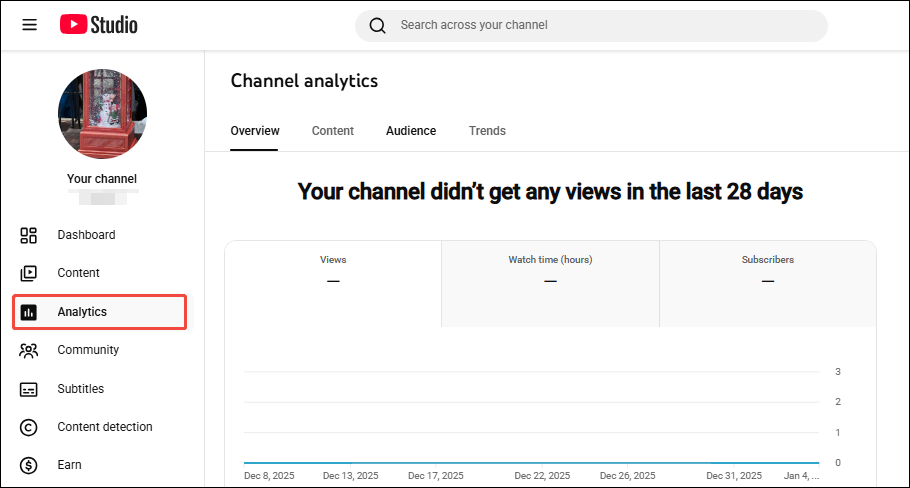
1. Click the Analytics option in the left-hand menu bar.
2. Then, the Channel analytics interface will open.
Step 3: Explore the Demographics Sections
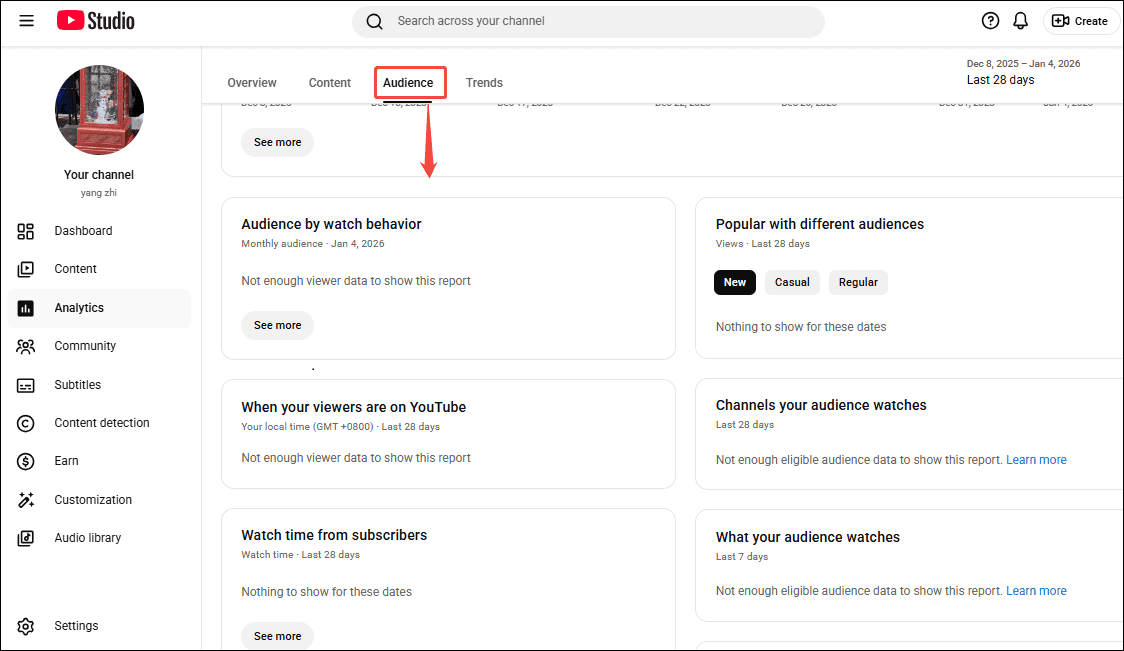
1. In the Channel analytics interface, click the Audience option in the top menu bar.
2. Then you can scroll down to view your channel's audience demographics.
#2 Use the YouTube Demographics Checker
Creators can also access data and detailed analytical reports through YouTube's audience demographics checkers. Below, I've curated two premium tools for your reference.
OutlierKit
OutlierKit is a comprehensive YouTube SEO tool designed specifically for analyzing channel data and tracking channel growth. Users can view foundational metrics such as audience age, gender, geographic location, and peak viewing times. And it also provides an in-depth analysis of audience preferences based on this data, covering dimensions like content format and language style.
Additionally, OutlierKit serves as an exceptional YouTube competitor analysis tool. It enables users to analyze the audience demographics for any channel and provides proven competitive strategies and content optimization solutions based on these insights.
HypeAuditor
For businesses or brand agencies seeking to conduct influencer marketing campaigns more efficiently and manage channel accounts, HypeAuditor is worth considering. It not only supports analyzing YouTube channel audience demographics but also identifies fake followers within channels.
Additionally, HypeAuditor's influencer database provides users with a source for competitor data analysis, helping creators optimize channel content more effectively.

Bottom Line
YouTube demographics serve as a compass for YouTube creators crafting content. By regularly reviewing audience demographics and analyzing the data, YouTube creators can consistently produce high-quality content that resonates with viewers, thereby driving sustainable growth for their channels.
About The Author

Position: Columnist
Jade is an experienced multimedia tech writer who has authored hundreds of guides on screen recording, video editing, and software troubleshooting. Dedicated to bridging the gap between complex technical concepts and user-friendly solutions, she specializes in providing clear, actionable advice.