

VOD simply means Video on Demand, which refers to a media distribution system that allows users to access videos, TV shows, and films digitally, whenever they choose, without adhering to a traditional broadcast schedule. How about VOD on YouTube? Continue to read.
What Does VOD Mean on YouTube
What does VOD mean on YouTube? According to the description above, you can know that VOD on YouTube specifically refers to the standard long-form videos. Unlike live streams that happen in real time, YouTube VOD videos are prerecorded and stored on YouTube’s servers, including user-generated videos, tutorials, music videos, and professional productions.
YouTube VOD videos are available 24×7 and you can watch them anytime, anywhere, and on any device according to your preferences.
What Are the Benefits of VOD on YouTube
On YouTube, a vast library of content is provided in VOD format. For example, YouTube automatically archives live streams as VODs, making them available on your channel. Why do people need VOD on YouTube? Several reasons are listed below.
Firstly, YouTube video on demand is convenient because it allows creators to share content with global audiences without time constraints. Secondly, it gives viewers more flexibility when they watch videos, and viewers have complete control over what they watch and when they watch it. For example, viewers can pause, play, rewind, fast forward, etc.
Additionally, using VOD on YouTube caters to diverse viewing habits beyond live streams. Finally, VOD video has great accessibility that allows you to access videos on a variety of devices, including TVs, computers, smartphones, and tablets.
What Does YouTube VOD Work
YouTube supports many VOD (Video on Demand) formats, but MP4 with H.264 video codec and AAC audio codec is the highly recommended standard for its compatibility. Are you curious about how does YouTube VOD work? The answer is below.
YouTube VOD works by storing pre-recorded videos on servers. Users can access and watch these videos anytime, anywhere, with full playback controls. When there is a playback request from the user, the device requests the compressed video file from YouTube's global servers, which delivers it in segments to match your internet speed, giving you a smooth and uninterrupted experience.
Up till now, I believe you have a comprehensive understanding of YouTube VOD. Want to save some VOD videos on YouTube for free if you are not a subscribed user? The next part solves your problem.
How to Watch YouTube VOD Videos Without Ads
Most YouTube VOD content is free to watch but includes ads. How to watch YouTube VOD videos without ads for free? You can use a free video downloader to save your favorite videos on your device so that you can enjoy them offline. For me, I use MiniTool Video Converter frequently, because it is stable and versatile.
MiniTool Video Converter is an all-in-one application, including video downloading, video conversion, video compression, video screen, and text extraction. For the video downloading function, it supports downloading videos, music, movies, Shorts, and more from YouTube in multiple formats. Up to 10 files can be downloaded at one time if you want to save a playlist.
Additionally, this strong downloader also supports downloading Facebook videos, Twitter videos, Instagram videos, Reels, and Stories, and TikTok in high-quality MP4 format, clean and without watermark.
Below is the guide on how to download YouTube VOD videos with MiniTool Video Converter.
Step 1. Install and Launch MiniTool Video Converter
1. Click on the download button below to download and install the latest version of MiniTool Video Converter and follow the on-screen instructions to install it.
MiniTool Video ConverterClick to Download100%Clean & Safe
2. Then, launch this application.
Step 2. Get a YouTube VOD Video Link
1. Open your browser and visit the official website of YouTube.
2. Find the video you want to download and copy the video link from the address bar.
Step 3. Analyze the YouTube VOD Video Link
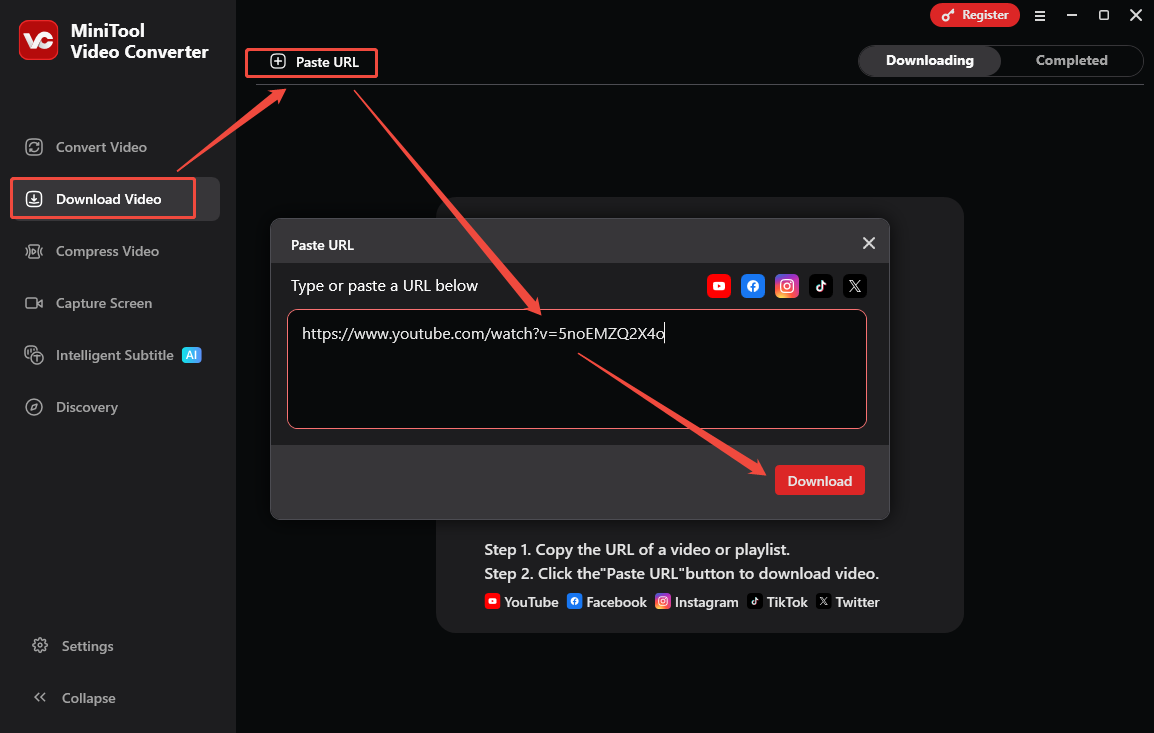
1. In MiniTool Video Converter, switch to Download Video.
2. Click on Paste URL, paste the copied video link into the given box, and click on Download.
Step 4. Download the YouTube Video
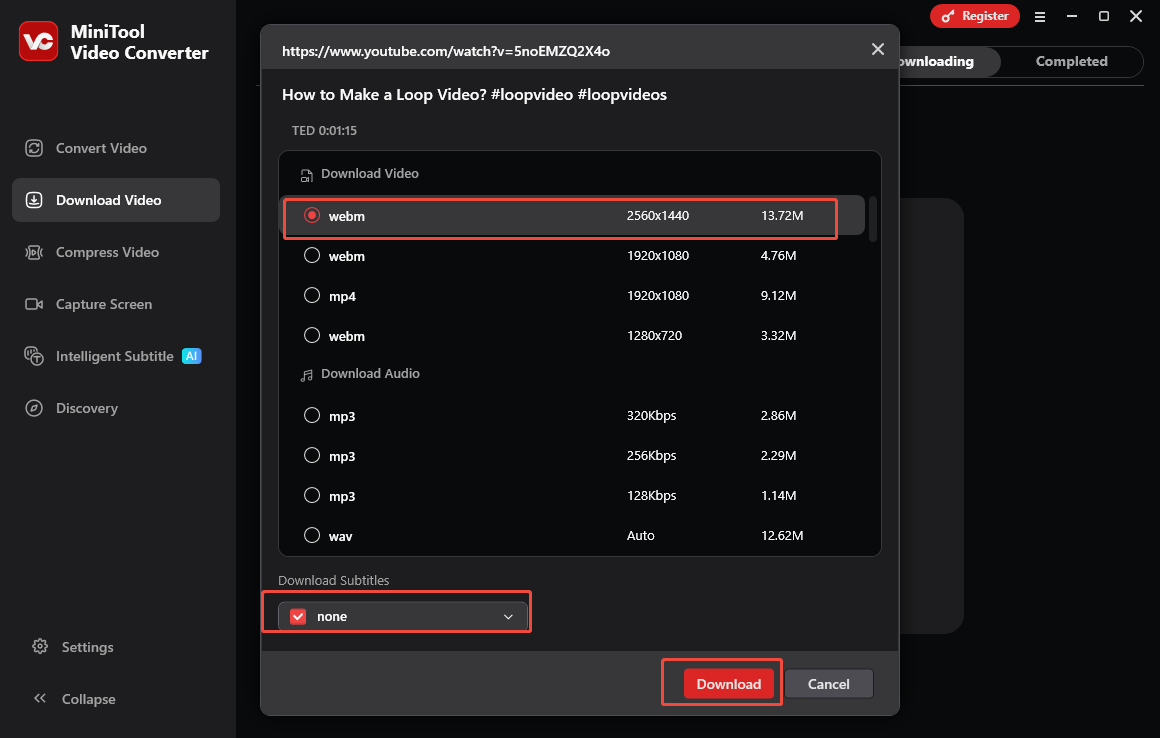
1. In the pop-up window, choose an output format and resolution.
2. Choose whether to download the video subtitles if the video has subtitles.
3. Click on Download to initiate saving the YouTube video.
Step 5. Check the Downloaded YouTube Video
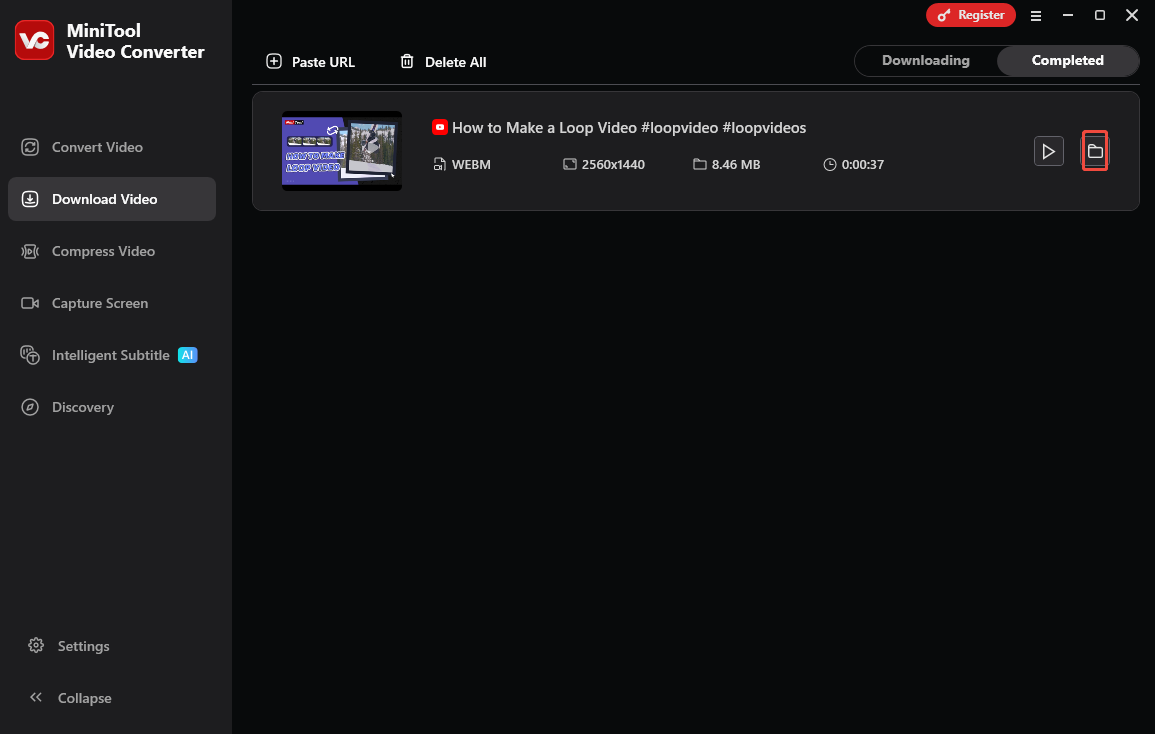
1. When the download process ends, you will be taken to Completed from Downloading.
2. Click on the folder icon to check the downloaded video’s place.
Bottom Line
What does VOD mean on YouTube? VOD stands for Video On Demand, which allows users to watch videos at any time. It makes people convenient, flexible, and accessible to YouTube content. Also, MiniTool Video Converter is a free video download tool to download YouTube VOD videos for offline enjoyment.