

Does VPN block YouTube ads? Yes, it does. This article recommends 3 remarkable VPNs: NordVPN, Surfshark, and CyberGhost to help you block YouTube ads. Finally, it shows you how to view YouTube without ads using MiniTool Video Converter.
A VPN (Virtual Private Network) refers to a service that helps you hide your IP address while surfing the internet. With it, the protection of online privacy is feasible. Recently, more and more YouTube users are asking does VPN block YouTube ads. To answer that question, the following paragraphs are written here.
Does VPN Block Ads on YouTube
Does VPN block YouTube ads? Some VPNs do, but some of them don’t. Specifically, if the VPNs you are using include built-in ad-blocking features or allow you to change your location to an ad-free place, the YouTube ads can be blocked effectively.
For example, there are some countries that currently serve advertisements, such as Moldova, Myanmar, and Albania. As long as you use a VPN to change your location to these places, you won’t be bothered by any YouTube ads.
The Best VPNs for Blocking YouTube Ads
Which VPN can be chosen to block YouTube ads? In the following section, I will recommend several VPNs that enables you to remove ads on YouTube.
VPN 1. NordVPN
NordVPN is a top-grade VPN that offers you a network of more than 7400 servers. It applies advanced DND filtering, which realizes the blocking of malware and advertisements effortlessly. In addition, it supports multiple connections, which allows for up to 10 connections at the same time. However, the cost for renewal is a little high, which makes NordVPN unacceptable for those who are on a tight budget.
VPN 2. Surfshark
Does VPN block YouTube ads? The answer is yes if you choose Surfshark. With an intuitive interface, it is very easy to use for novices. Meanwhile, Surfshark doesn’t set any limit for the number of simultaneous connections. It offers a fantastic 24-moth plan that is affordable for most users. However, Surfshark only gives a 7-day trial. There isn’t any permanent free tier.
VPN 3. CyberGhost
CyberGhost is third VPN that you can use to block YouTube ads. Its Block Content function helps filter out DNS-based advertisements easily. CyberGhost features a well-organized interface, which makes every beginner can access this VPN easily and quickly. However, when you are using a distant server on CyberGhost, the internet speed may be slow.

How to View YouTube Videos Without Ads
Does a VPN block ads on YouTube? What to do if all the VPNs don’t block the YouTube ads? You can also get YouTube videos using a third-party YouTube video downloader. This way, you can watch these videos without any advertisements.
To facilitate your video saving, I highly recommend MiniTool Video Converter. It is an easy-to-use and professional video downloader. Below are the detailed steps to get a YouTube video using MiniTool Video Converter.
Step 1. Download and install MiniTool Video Converter.
MiniTool Video ConverterClick to Download100%Clean & Safe
Click on the download button above to download and install MiniTool Video Converter on your PC.
Step 2. Copy the YouTube video link.
Go to the YouTube website and find the video you want to save. Then, copy the video URL from the address bar.
Step 3. Analyze the YouTube video link.
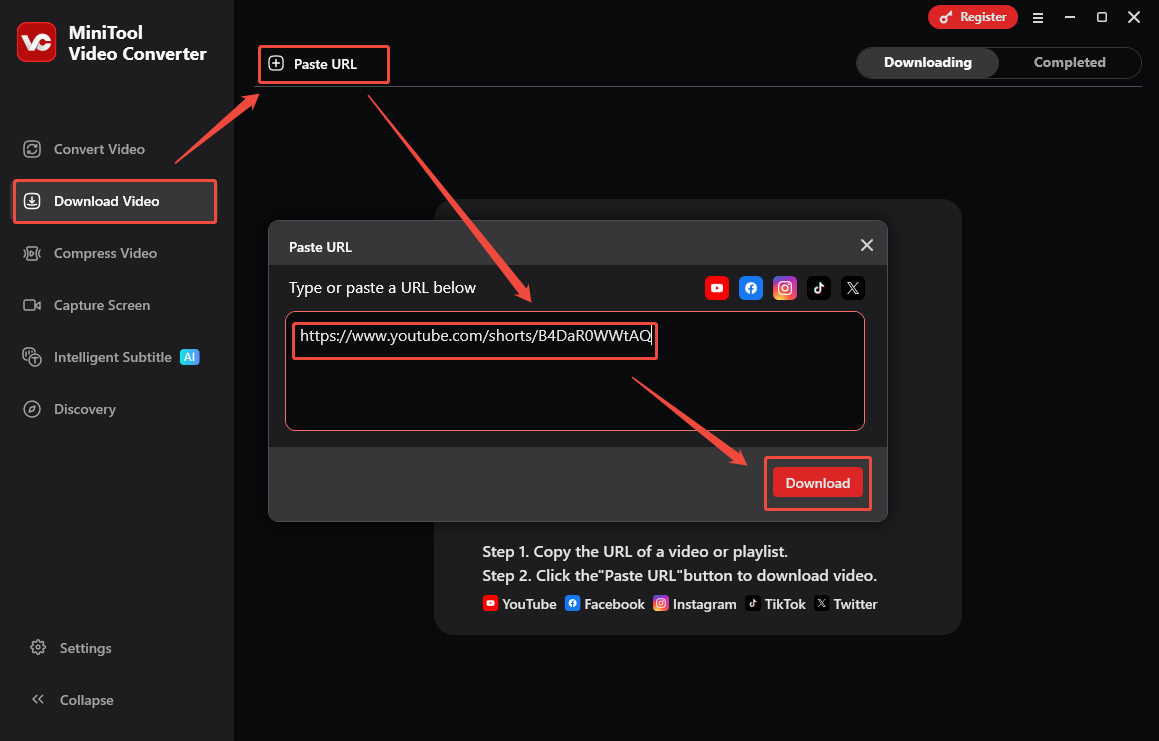
After launching MiniTool Video Converter, navigate to the Download Video section. There, click on the upper-left Paste URL option to activate to URL box. Next, paste the video link into the box. Then, click on the bottom Download option to begin the link analysis process.
Step 4. Configure the output format and start the download.
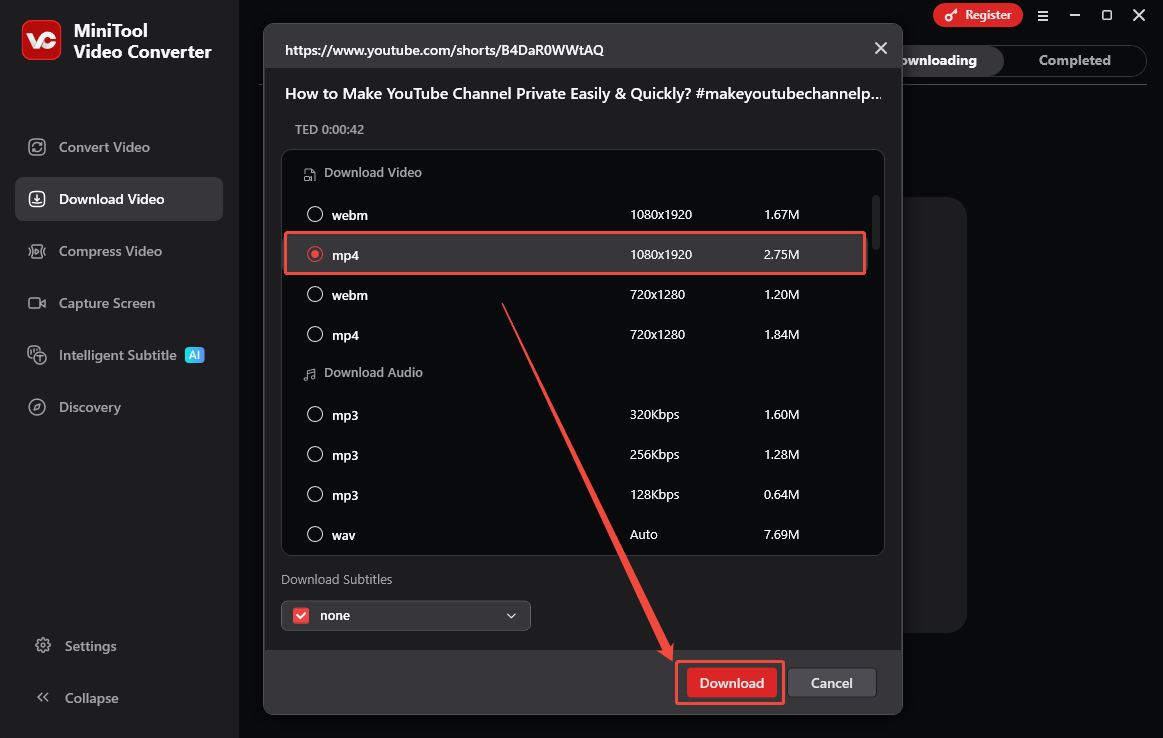
When the link analysis process completes, you will see the output format window. There, you can specify the output format of the downloaded YouTube video. Here, I select MP4 1080x1920 as an example. Finally, click on the Download option to begin the download process.
Step 5. Check the output video.
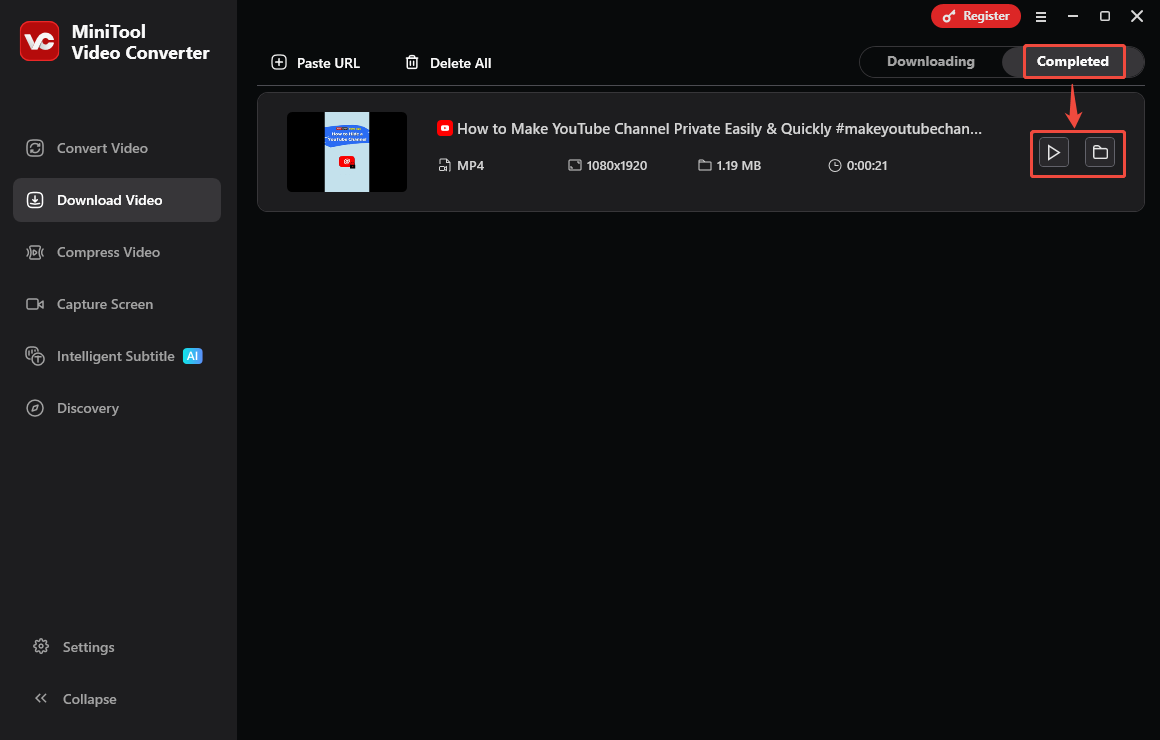
When the download process finishes, this YouTube video downloader will automatically switch to the Completed section. There, click on the Play icon to view the output file. If you want to locate the YouTube video, click on the Folder icon.
Does a VPN block YouTube ads? If it doesn’t with MiniTool Video Converter, you can effortlessly watch a YouTube video without ads.
To Wrap Things Up
Does VPN block YouTube ads? The answer is yes as long as the VPN is equipped with necessary functions. To facilitate your ad blocking, 3 powerful VPNs are recommended, including NordVPN, Surfshark, and CyberGhost. In addition, you can also download the YouTube video using MiniTool Video Converter to remove the ads.