

The YouTube subscribe button can be regarded as a visual call to action that reminds viewers to subscribe, leading to a better performance for your channel. Instead of creating the subscribe button animation manually, people often ask: Is there a place for YouTube subscribe button animation template free download? Of course! This article introduces two simple and feasible methods.
Method 1: Use YouTube’s Free Subscribe Button Animation
Can you download a free YouTube subscribe button animation on YouTube? Yes, you read that right. Many creators have made and uploaded their customized subscribe button animation templates to YouTube. They provide viewers to download and use for free.
You just search the keywords in the search box on YouTube. For example, “YouTube subscribe button animation”. And then, a large number of videos and Shorts will appear under the search box you can download. Sadly, YouTube only allows premium users to download videos from its platform for free.
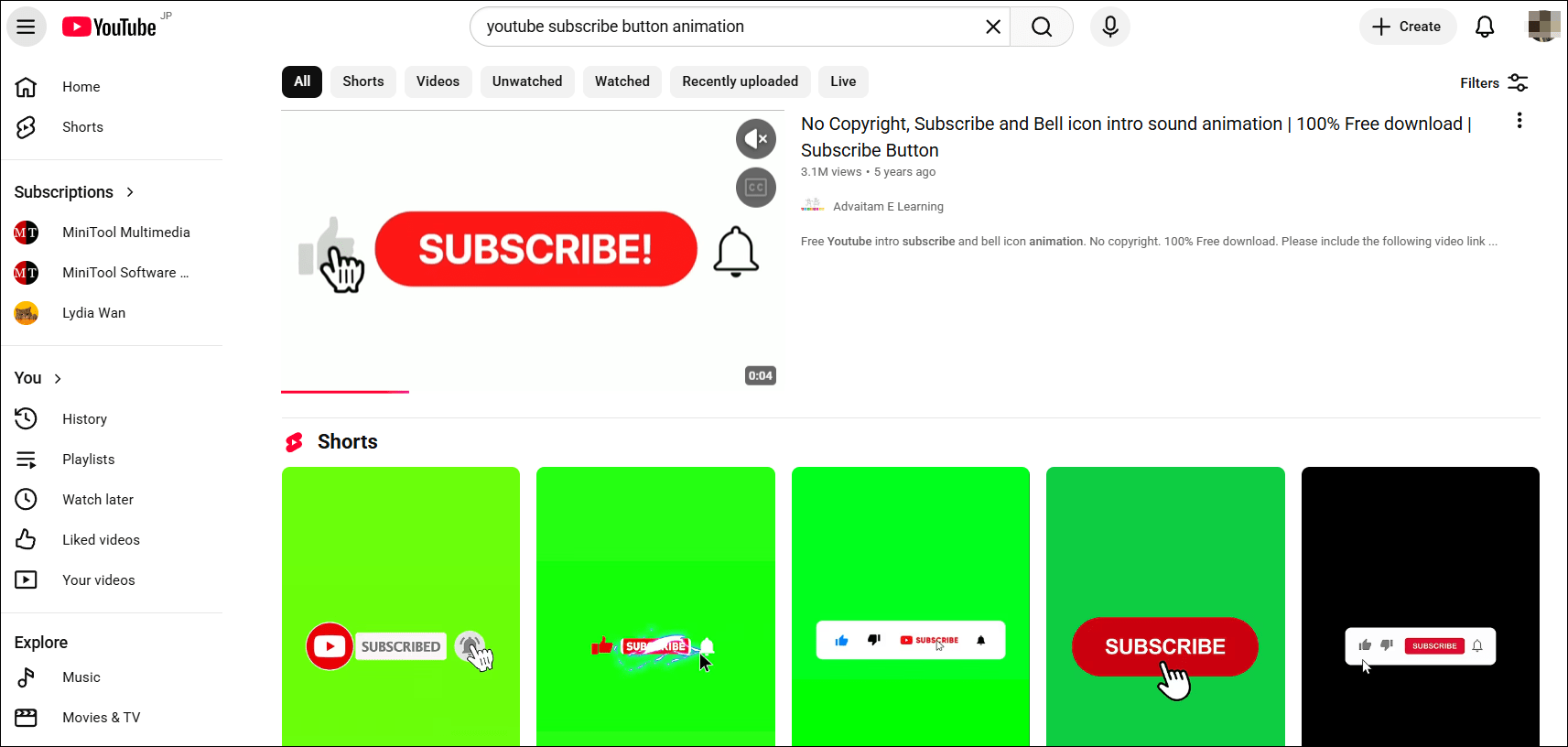
How to download your favorite subscribe button animation on YouTube if you don’t have a premium. For me, I use MiniTool Video Converter. MiniTool Video Converter is a free and user-friendly video and audio downloader for YouTube/YouTube Music.
MiniTool Video Converter enables you to download/batch download videos and music in MP3, MP4, and WAV formats without watermarks. If the video has subtitles, this free tool can also download them along with the video in SRT format.
Here are the detailed steps on how to download a YouTube subscribe button animation on YouTube with MiniTool Video Converter.
Step 1. Download and Install MiniTool Video Converter
Click on the button below to download the latest version of the downloader on your PC.
MiniTool Video ConverterClick to Download100%Clean & Safe
Step 2. Get and Analyze the Subscribe Button Animation Video Link
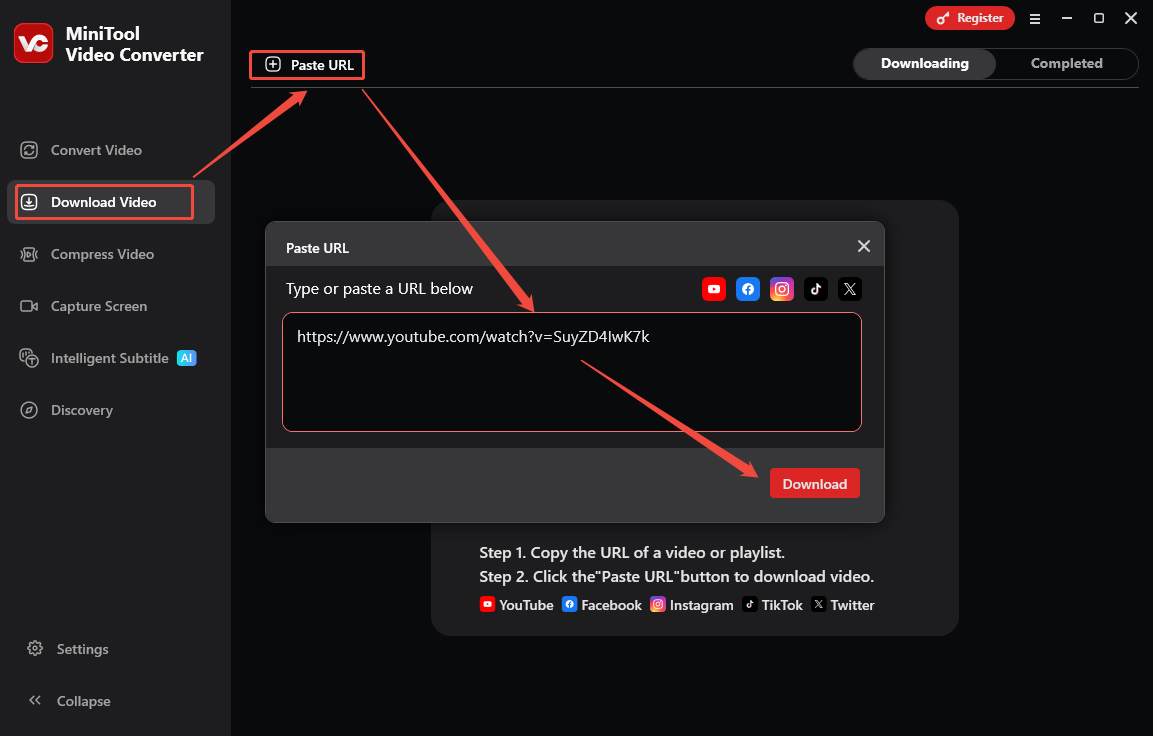
1. Go to YouTube, find one of the subscribe button animation videos without copyright, and copy the video link from the address bar.
2. Open MiniTool Video Converter, switch to Download Video.
3. Click on Paste URL, paste the copied link into the box, and click on Download.
Step 3. Download the Subscribe Button Animation Video
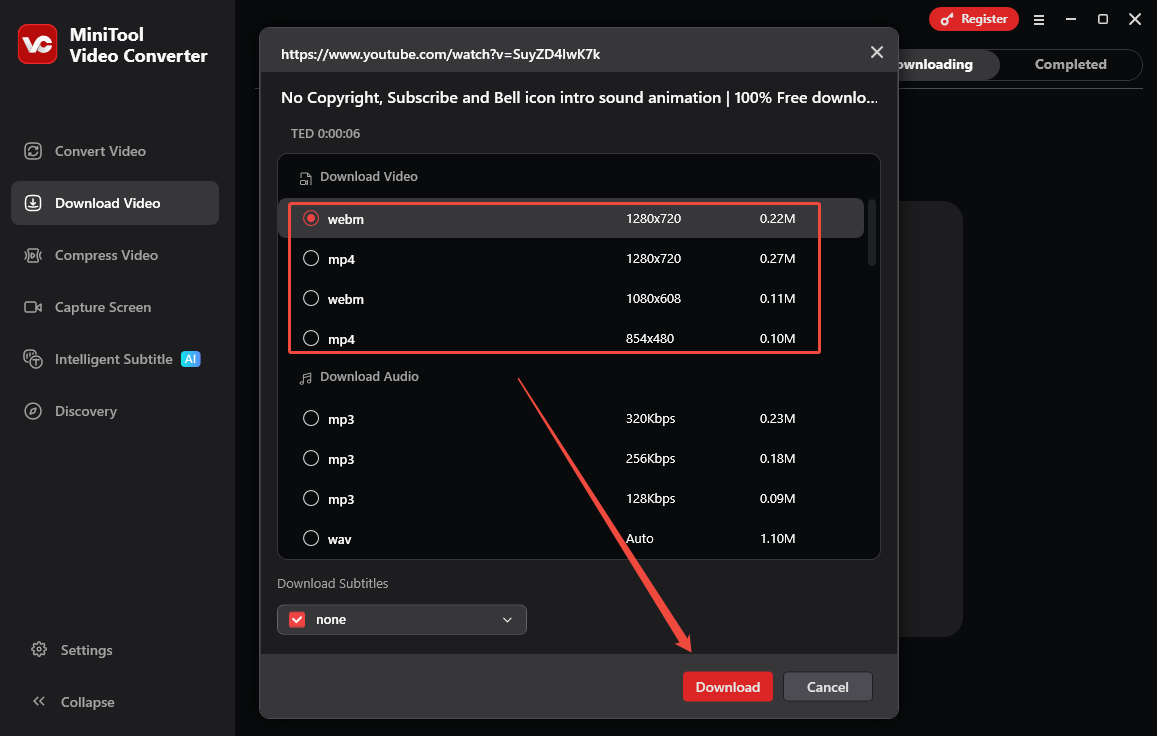
1. Choose a download video format like MP4 or WebM.
2. Click on Download to start downloading the animation video.
Step 4. Locate the Downloaded Subscribe Button Animation Video
Click on the folder icon under the Completed tab to find the downloaded YouTube video.
Method 2: Use the Online Subscribe Button Download Tools
Here are 5 free and reliable YouTube subscribe button download websites you can refer to. Then choose one of them to download templates.
1. Pexels
Website: https://www.pexels.com/search/videos/subscribe%20button/
The first YouTube subscribe animation template tool I want to share with you is Pexels. When you search for the YouTube subscribe button, there are 10K+ photos and 1.1K+ videos about this keyword. You can filter the YouTube subscribe button videos by resolution, duration, data, frame rate, and more.
Pexels is dedicated to helping designers, bloggers, and everyone who is looking for visuals to find great photos and videos that can be downloaded and used for free. Visit the website above to download the free YouTube subscribe button animation.
2. Vecteezy
Website: https://www.vecteezy.com/free-videos/youtube-subscribe-button-with-sound?page=2
As an experienced online tool, Vecteezy allows users to download a wide variety of assets, including vectors, photos, videos, motion graphics, and PNGs. For the YouTube subscribe button, Vecteezy offers 205 high-resolution, royalty-free stock videos and footage matching the topic. The selected resolution to download is from 720p to 4K.
Additionally, Vecteezy provides a large number of templates for YouTube creators, such as YouTube banners, YouTube thumbnails, and YouTube covers.
3. LottieFiles
Website: https://lottiefiles.com/free-animations/youtube-subscribe
Don’t want to create a subscribe button by yourself? LottieFiles is also a great option for creators. You can browse a vast collection of free and premium YouTube subscribe animations on LottieFiles. Then, download them in high-quality JSON, MP4, and GIF formats to effortlessly enhance your web, app, and design projects.
4. Pixabay
Website: https://pixabay.com/videos/search/subscribe%20button/
Pixabay is a free YouTube subscribe button animation download website offering stock photos, illustrations, vector graphics, videos, music, and sound effects. Of course, the YouTube subscribe button animation is also contained as a versatile website. It has over 900+ YouTube subscribe button animation free download with sound.
You can choose resolutions like HD or 4K. Plus, choose the latest YouTube subscribe button animation templates by selecting the published data.
5. IconScout
Website: https://iconscout.com/lottie-animations/youtube-subscribe
IconScout is a valuable resource marketplace that provides a wide range of materials for content creators and businesses. YouTube subscribe button animations are also included. Compared with all the YouTube subscribe button animation download tools above, IconScout provided the largest number of downloadable videos – 1980. I believe you will find your favorite one among them.
However, some of them need a premium, and you can use filters to get the free ones. These royalty-free and high-quality YouTube subscribe animations are available in Lottie JSON, dotLottie, GIF, AEP, or MP4.
In short, these 5 online websites provide free subscribe button animations to download. You can try them one by one and decide which website to use at the end.
The 5 YouTube subscribe button animation download websites offer similar steps to download, so we take Pixabay randomly as an example to show you the instructions.
Step 1. Visit the Official Website of Pixabay
Visit the official website of Pixabay and click on the subscribe button animation you’re interested in.
Step 2. Download the Subscribe Button Animation
1. Click on the Download button on the right side of the template.
2. Choose a resolution and click on Download again to start downloading.
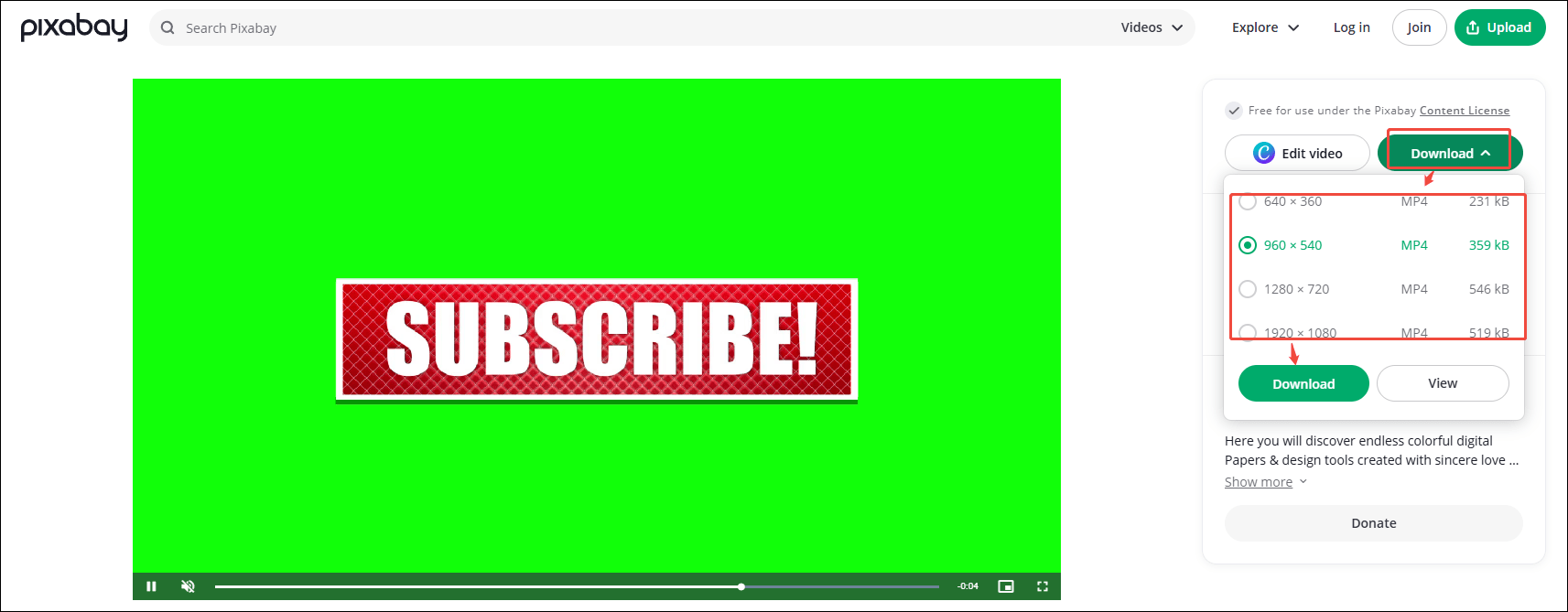
Step 3. Locate the Downloaded YouTube Subscribe Button Animation
The downloaded subscribe button animation will be saved in Downloads on your browser.
Final Words
The YouTube subscribe button added is good for increasing the channel subscribers. Here are two methods for the YouTube subscribe button animation free download, and every method offers detailed steps to find and download. Choose one of them to get high-quality and appealing animation videos for free.
About The Author

Position: Columnist
Libur is always willing to try new things and full of enthusiasm for life. At the same time, she is passionate about making fantastic movies. Now, she has become an English editor about multimedia in MiniTool. She is good at writing articles about video editing, video conversion, and screen recording. During her spare time, Libur loves climbing mountains and listening to music. By the way, her favorite singer is Taylor Swift.