

Read this article to understand the definition of YouTube display ads and how to launch your own advertising campaign easily. Furthermore, you will gain practical tips to help you create compelling display advertisements, thereby further enhancing your advertising conversion rates.
What Are YouTube Display Ads
YouTube display ads are advertisements appearing within YouTube's desktop video recommendation feeds or alongside the video player. Presented as static images or animation, this ad format enables advertisers to target audiences through Google Ads.
Upon clicking the ad, viewers are automatically redirected to the product or service detail page, thereby achieving promotional objectives or facilitating conversions.
The YouTube display ads specs:
- File size: 150KB (maximum supported value).
- Advertisement resolution: 300 × 60 pixels (banner format) or 300 × 250 pixels (rectangle format).
- Supported formats: PNG, GIF, JPG.
- Duration: For animated ads, the maximum duration is 30 seconds.
MiniTool Video ConverterClick to Download100%Clean & Safe
Why Use YouTube Display Ads
Display ads on YouTube offer significant advantages in both initial production and subsequent returns.
#1 Exceptional Presentation Format
Display ads on YouTube primarily appear outside the video frame. Unlike other video ad formats, such as YouTube pre-roll ads, they do not interrupt viewers' video-watching experience, thereby enhancing audience affinity for the brand.
#2 Low Production Costs
YouTube display ads primarily appear as images or animations, requiring less time for resource sourcing and production compared to video ads.
#3 Precise Audience Targeting
When running display ads through Google Ads, advertisers can leverage its targeting technology to achieve precise delivery. Ads are directed based on audience interests, viewing behavior, age, gender, and other factors.
Additionally, display ads on YouTube operate on a pay-per-click model, meaning advertisers only pay when interested users click on the ad. This enables advertisers to analyze core audience segments through click data.

How to Launch YouTube Display Ads
Advertisers can run display ads on YouTube through Google Ads. The specific process is as follows:
Step 1: Log in to the Google Ads Account
1. Launch your browser on your PC and go to the Google Ads website.
2. Then log in to your Google Ads account. If you don't have an account, please register in advance.
Step 2: Create a New Advertising Campaign
1. Click on the + icon under the Campaign module to launch a new ad campaign.
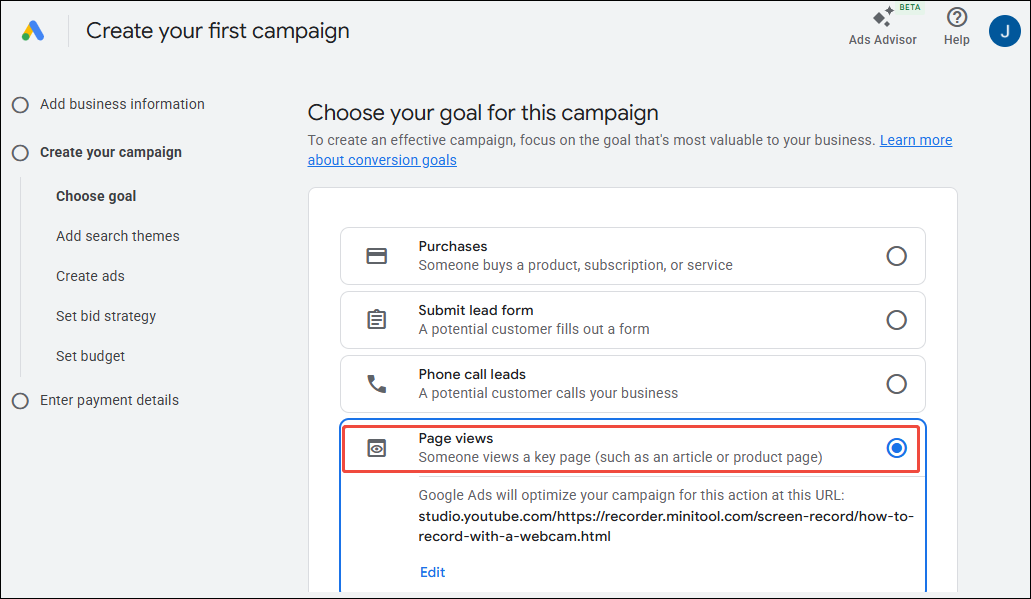
2. On the new page that appears, select your advertising goal. You can choose either Phone call leads or Page views to achieve better conversions.
3. Then, select Display ads as your advertising promotion type.
Step 3: Complete the Advertisement Information
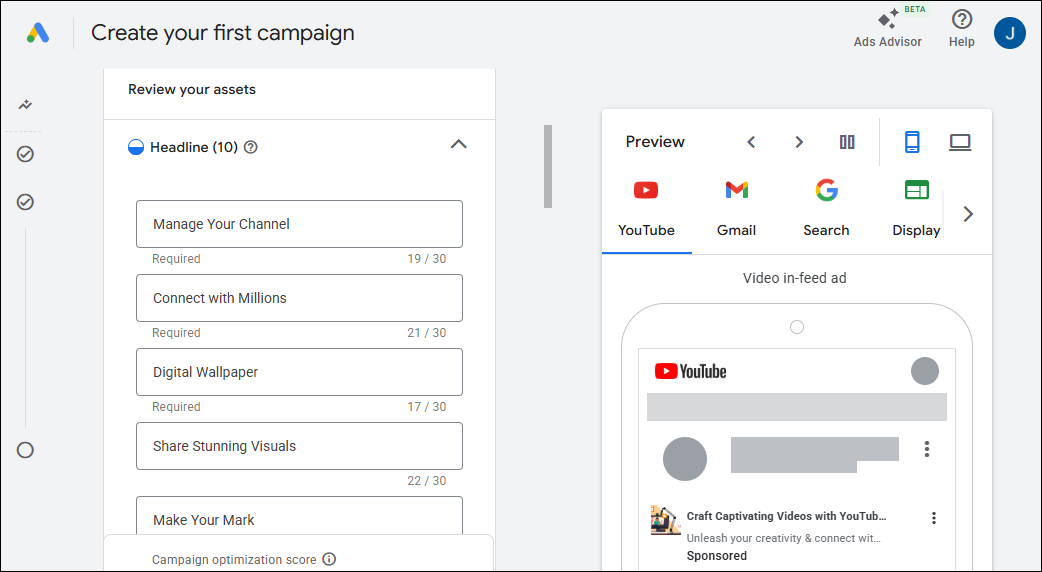
In the new pop-up interface, you can fill in detailed advertisement information in sequence. For example, you can add the ad headline, description, call-to-action, and other content. Then, you can click on Next to enter the new interface.
Step 4: Set Advertising Budget
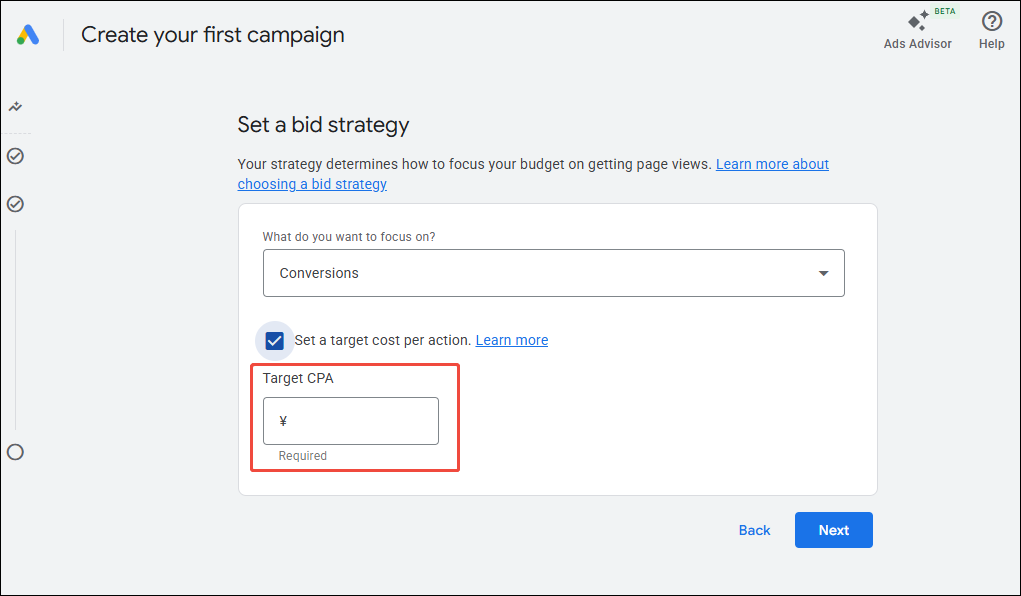
In the budget settings interface, you can set your bid amount per ad click based on your specific circumstances.
Step 5: Launch Your Display Ads
Finally, you can review the ad information you've entered once more. After confirming everything is correct, click on the Create Campaign option to publish your display ad on YouTube.
Tips for Making YouTube Display Ads
While placing display ads is straightforward, creating compelling ads is key to driving clicks and conversions. That's why we offer proven, effective ad creation strategies.
#1 Enhance Visual Appeal
To more effectively capture audience attention, advertisers are advised to use high-resolution, color-rich images that clearly convey core messages. Additionally, the layout of information within advertisements should maintain balance, avoiding excessive emphasis on secondary details.
#2 Optimize Call to Action
Unlike video content, which can directly employ explicit driving phrases like “Click” or “Follow,” calls to action in ads must communicate tangible product benefits to the audience. Therefore, it is recommended to use highly relevant, product-specific terminology that enables viewers to quickly grasp the core value proposition.
#3 Keep Content Concise
Since display ads consist solely of images or animations, they can carry only a limited amount of information. Therefore, when describing ad content, use concise language to convey the product's core value and clearly articulate its advantages, thereby quickly capturing the audience's attention.
Final Words
YouTube display ads are a powerful strategy for businesses to promote their products. By understanding their core principles, mastering detailed operational steps, and following production strategies, I hope you can create display ads that effectively engage audiences and boost conversion rates.
About The Author

Position: Columnist
Jade is an experienced multimedia tech writer who has authored hundreds of guides on screen recording, video editing, and software troubleshooting. Dedicated to bridging the gap between complex technical concepts and user-friendly solutions, she specializes in providing clear, actionable advice.