

This article explains the definition of a CTA (Call to Action) and provides practical tips for optimizing it. Additionally, it offers detailed guidance on how to add CTA to YouTube video to boost viewer engagement and drive channel growth.
What Is the Call to Action on YouTube
YouTube call to action refers to designs that guide and encourage viewers to take specific desired actions after watching a video through visual or textual prompts. These actions typically include participating in polls, subscribing to channels, completing purchases, watching other video content, and many more.
Additionally, call to action on YouTube comes in various forms, primarily including the following types:
- End screens and cards: Creators achieve their promotional goals by adding subscribe buttons, links, and other elements to YouTube end screens and cards.
- Verbal prompt: The creator directly calls on viewers to take action within the video, such as saying “Subscribe to my channel!” at the end.
- Visual call to action: Video creators incorporate directive graphics (such as boxes and arrows) into their videos to guide viewers toward taking action.
- Video description: Creators can also add elements such as links in the YouTube video description to guide viewers.
- Pinned comment: Creators can also add the call to action content to the pinned comment of their video, making it easier for viewers to discover.
Tips for Optimizing CTA on YouTube
Adding a call to action for YouTube isn't about blindly cramming in every possible format; it requires a strategic approach. Here are detailed techniques for optimizing the call to action:
Time of CTA Occurrence
The timing of the call to action in YouTube videos significantly impacts watch time. It is strongly recommended to place the call to action at the following two points:
- Mid-video: When the video reaches its midpoint, capture viewers' attention with a call to action in either voice or text format, encouraging them to continue watching until the end.
- The end of the video: Use YouTube cards and end screens to guide viewers toward actions like subscribing to the channel or watching the next video, effectively retaining audiences who have watched the entire video.
Content Should be Simple and Clear
The call to action should be concise and clear, avoiding lengthy content that prevents viewers from grasping the key points and thus losing interest in watching the video.
Employ Diverse Formats of CTA
Avoid using a single call to action format in every video. To maximize each video's effectiveness, extend your call to action beyond the video itself. For example, add links in the video description or pinned comments, allowing viewers to be drawn to click these links even before watching the video.
In summary, timing, placement, and format are all crucial when using a call to action in YouTube videos. After mastering the optimization principles outlined above, you can also refer to YouTube call to action examples to put these theories into practice.
How to Add CTA to a YouTube Video
Here are the step-by-step guides on how to add CTA to YouTube video. Now, let’s dive in.
#1 Add a Call to Action to a New YouTube Video
Here is the detailed guide on adding a call to action when uploading a video to YouTube.
Step 1: Go to YouTube Studio
Open your browser on your computer and go to the official website of YouTube Studio.
Step 2: Upload Your Video
1. In the Dashboard module, click on Upload videos.
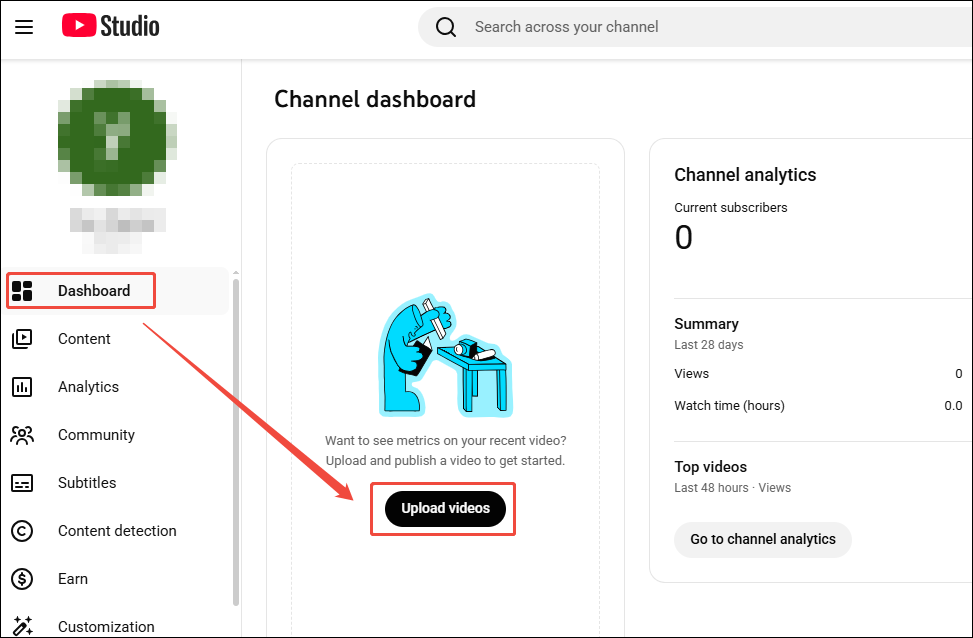
2. In the new pop-up window, click on Select files to choose the video you want to upload to YouTube.
Step 3: Add a Call to Action to Your Video
1. After adding the video title, description, and other information on the details page, click Next to continue.
2. In the Video elements interface, click the Add button to the right of the Add card to enter the editing page.
3. On the editing page, select the type of call to action you want to add, then click Save.
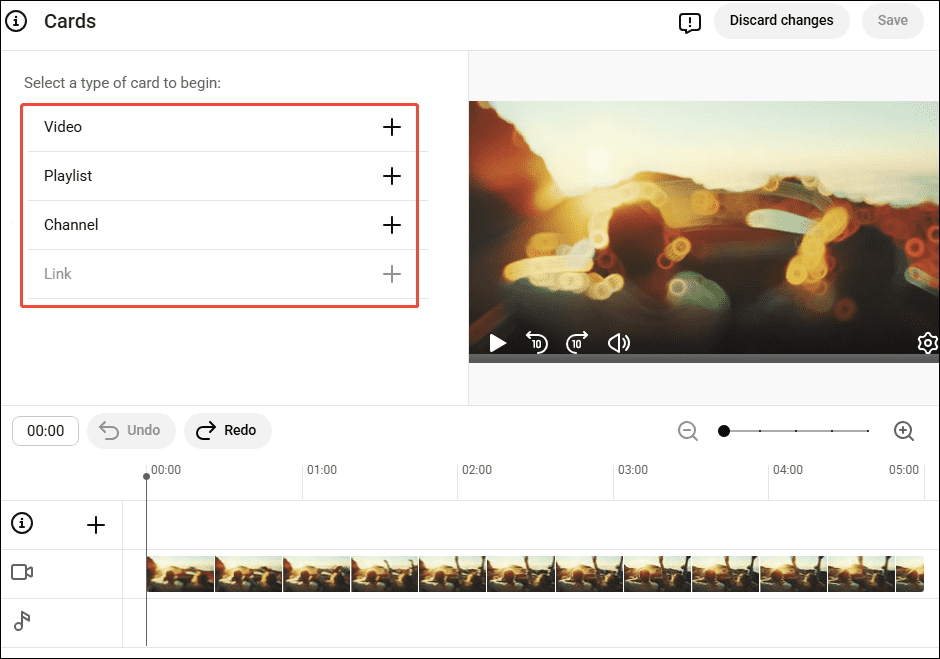
4. Finally, you can click Next to enter the Visibility page to upload your YouTube video with the call to action.
#2 Add a Call to Action to an Existing YouTube Video
In this section, you can check out the steps below to learn how to add a call to action to an existing YouTube video.
Step 1: Go to YouTube Studio
Step 2: Select the Video
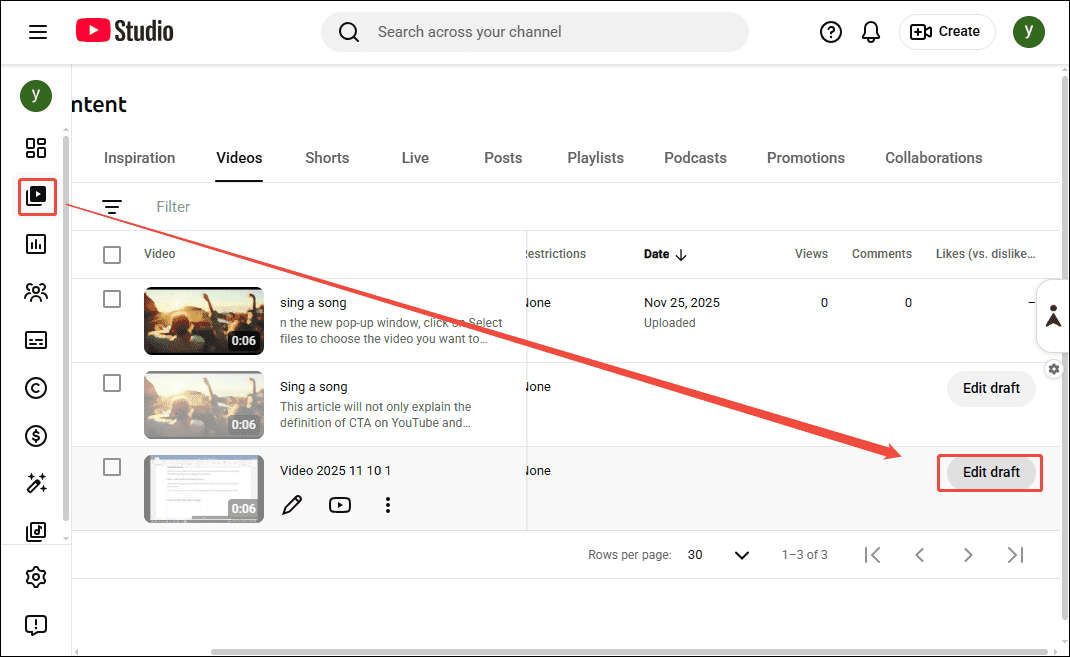
1. Navigate to the Content module in YouTube Studio.
2. Choose the existing video you want to add a call to action to, then click the Edit draft button to the right of the selected video.
Step 3: Add a Call to Action to Your Video
1. In the new pop-up page, navigate to the Video elements.
2. Then, click the Add button to the right of the Add card to add the content to the YouTube cards.
3. Finally, in the Visibility page, click on Save to save the added call to action.
MiniTool Video ConverterClick to Download100%Clean & Safe
Final Words
Call to action is a catalyst for driving channel subscriber growth. Through this article, you'll not only master effective CTA optimization techniques but also learn how to add CTA to YouTube video easily with the detailed guide provided.
About The Author

Position: Columnist
Jade is an experienced multimedia tech writer who has authored hundreds of guides on screen recording, video editing, and software troubleshooting. Dedicated to bridging the gap between complex technical concepts and user-friendly solutions, she specializes in providing clear, actionable advice.