

Does FredBoat support YouTube? The answer is negative. This article shows you how to set up FredBoat on Discord and provides a guide to save YouTube music using MiniTool Video Converter.
What Is FredBoat
With an open-source nature, FredBoat is a bot that focuses on streaming music to the Discord server. By the way, it doesn’t require any payment. With FredBoat, Discord becomes a hub full of entertainment.
FredBoat also allows for playlist creation, live-performance listening, and various music enjpyment. It supports the music collection from a wide range of platforms, such as Soundcloud, Bandcamp, Deezer, Dailymotion, and more.
Does FredBoat Support YouTube
Can FredBoat play YouTube? No, it can’t. In the end of 2022, a policy was laid, which aims to stop FredBoat from playing YouTube videos via URL. Although users may enjoy some music from other sources like Twitch and Vimeo, such a policy lets so many YouTube fans down.
How to Set up FredBoat on Discord
If you want to use FredBoat to enjoy music on Discord, ensure that you have set up FredBoat on Discord. How to do that? The following steps can help.
Step 1. Invite the bot.
Visit https://fredboat.com and click on the Invite To Server option.
Step 2. Choose the server you want.
Select the server that you want to add the bot. Then, click on the Continue option.
Step 3. Authorise the bot.
Ensure that you have checked the permissions necessary for the bot functions. Then, click on the Authorize option. Next, verify that you are a human.
Step 4. Log in and connect the bot to dashboard.
After being redirected to the Dashboard, click on the LOGIN WITH DISCORD option. Once the next page pops up, scroll down and click on the Authorize option.
Step 5. Enter the music room.
After accessing the server list, select the one you chose before and click Go to Music Room. Then, play the music you want.
With the above-detailed steps, you can set up FredBoat on Discord effortlessly.
How to Listen to YouTube Music Without FredBoat
Since FredBoat doesn't support YouTube, how can you enjoy YouTube music? MiniTool Video Converter, which is an easy-to-use YouTube downloader, can help!
MiniTool Video Converter enables you to save a YouTube video in multiple formats, including MP3 and WAV. Below is a step-by-step tutorial on how to save YouTube music with this software.
Step 1. Download and install MiniTool Video Converter.
MiniTool Video ConverterClick to Download100%Clean & Safe
Download MiniTool Video Converter by clicking on the download button above. Then, follow the on-screen instructions to install this YouTube music downloader on your PC.
Step 2. Choose a saving path.
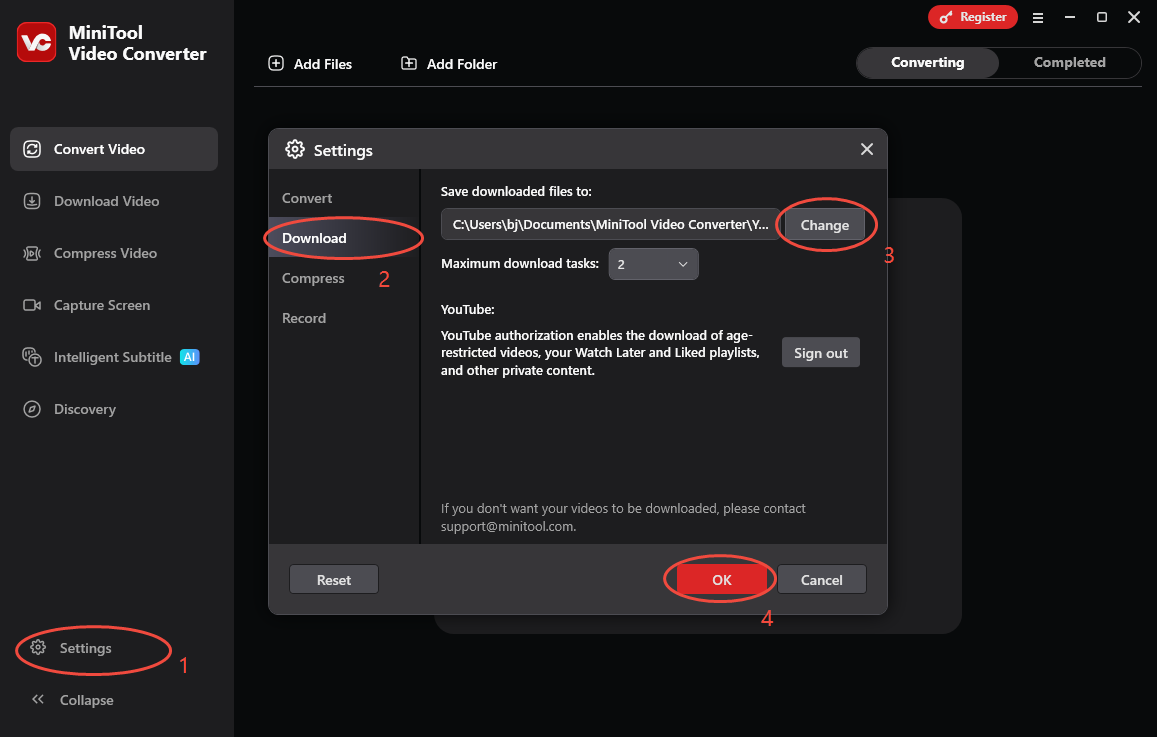
After launching MiniTool Video Converter, click on the bottom-left Settings option to enter the Settings window. There, switch to the Download tab and click on the Change option to determine where to save the YouTube music. Finally, click on the OK option to save the changes.
Step 3. Copy the target link.
Visit youtube.com and play the content that you want to get. Then, copy the video URL from the address bar.
Step 4. Analyze the YouTube link.
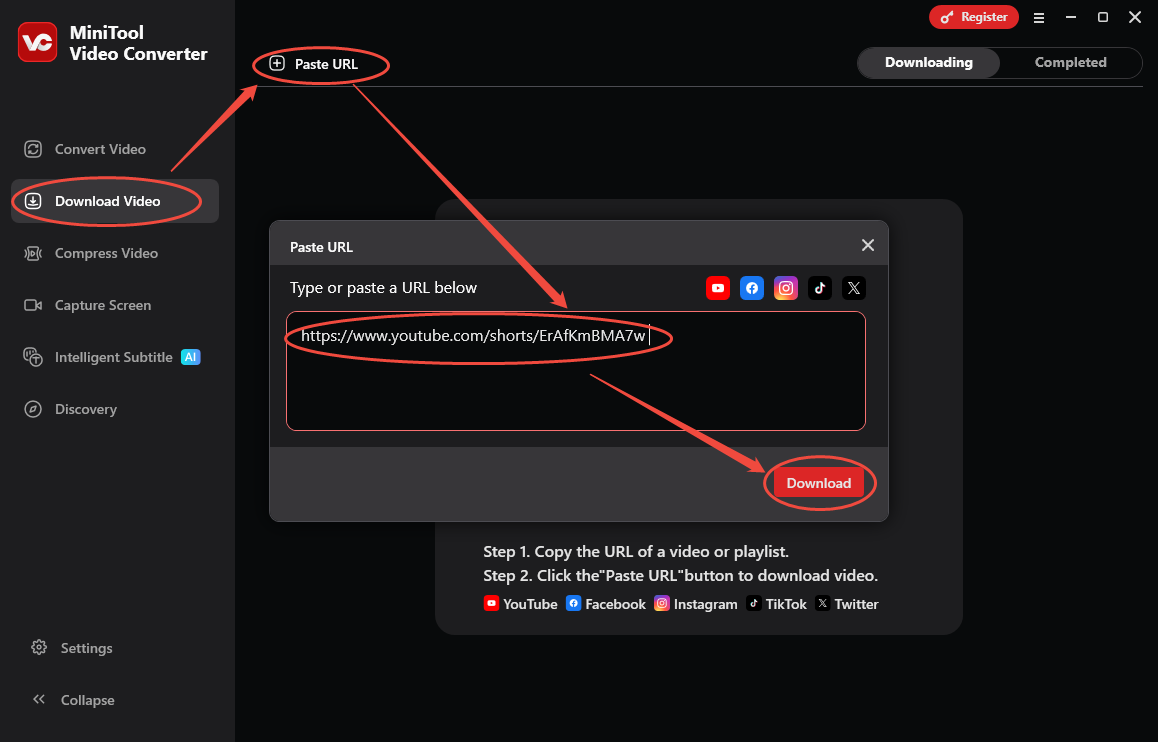
Go back to the MiniTool Video Converter interface. There, switch to the Download Video section. There, click on the upper-left Paste URL option to access the URL box. Paste the YouTube link into the box and click on the Download option to the start the link analysis process.
Step 5. Choose an output format and start download.
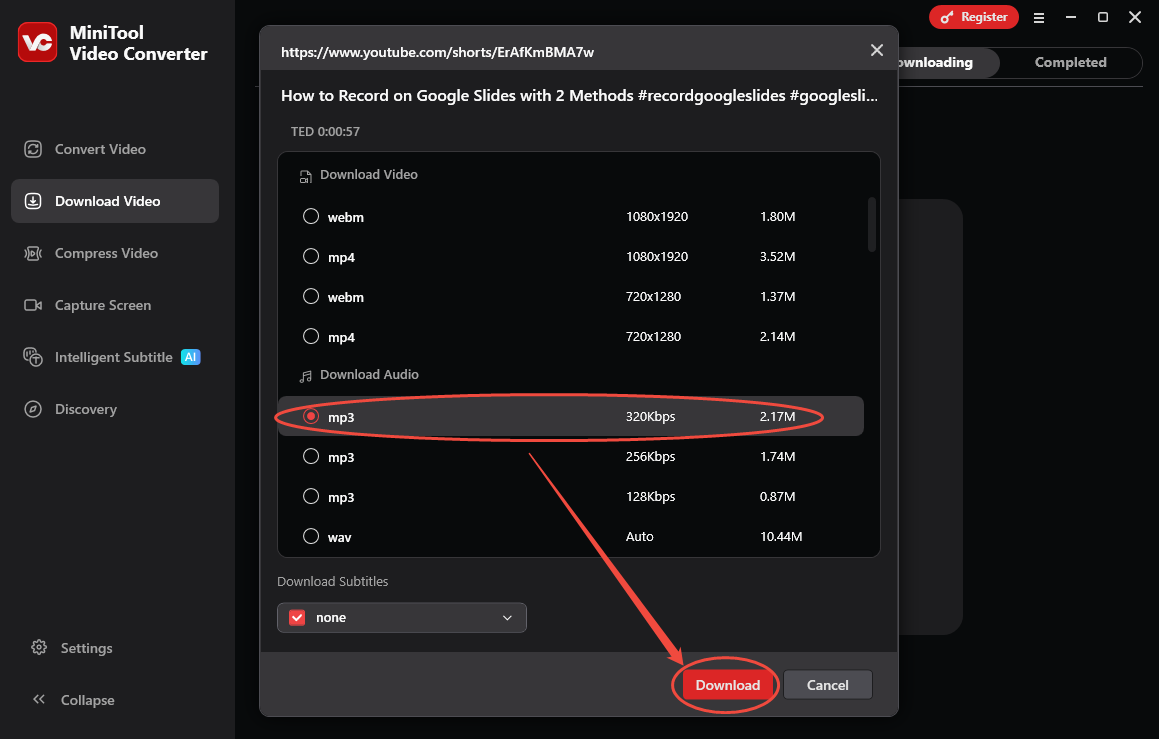
When the link analysis completes, you will see the output format window. There, choose an audio format you want. Here, I take MP3 320Kbps as an example. Next, click on the bottom-right Download option to begin the download process.
Step 6. Check the output audio.
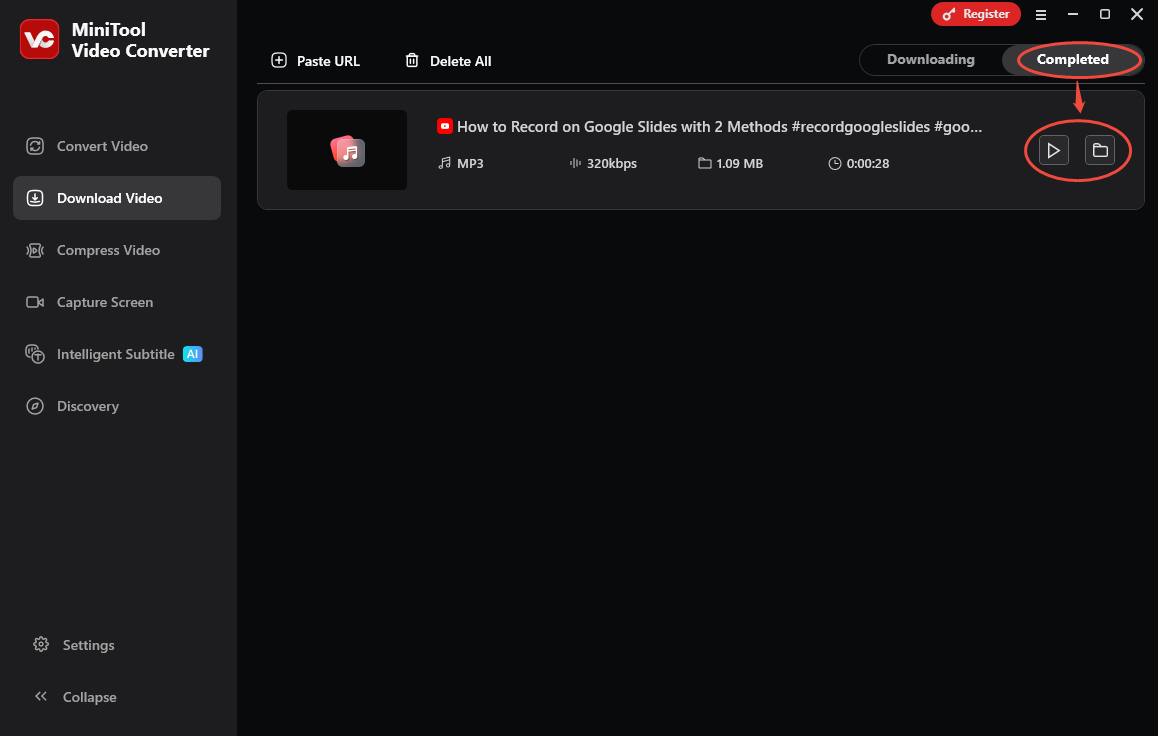
When the download process finishes, this YouTube music downloader will automatically switch to the Completed section. There, click on the Play icon to view the output audio. If you want to locate it, click on the Folder icon.
There is no FredBoat support for YouTube music. If you still want to enjoy it, never miss MiniTool Video Converter.
Final Thought
Does FredBoat support YouTube? No, it doesn’t support YouTube anymore since the end of 2022. If you want to enjoy YouTube music offline, use MiniTool Video Converter.