

Can ChatGPT play YouTube videos? It can as long as the ChatGPT desktop app has been updated to the latest version. Apart from the answer, this article also explains how ChatGPT can interact with the YouTube content. To satisfy the need to save YouTube videos for offline viewing, it also recommends MiniTool Video Converter.
Developed by OpenAI, ChatGPT is a popular artificial intelligence chatbot. It supports conversational interaction. With natural language processing (NLP), ChatGPT has offered me a lot of responses to my questions, including texts, images, code, and other content formats.
Recently, I have planned to learn some cooking skills through YouTube videos. To grasp the knowledge more quickly, I want to use ChatGPT to play the YouTube videos and transcribe them in real time. However, can ChatGPT play YouTube videos? To find the answer to this question, I have read a lot of articles and found the answer. In the following paragraphs, I will share it with you.
Can ChatGPT Play YouTube Videos
Can ChatGPT play a YouTube video? The answer is negative for some old versions of ChatGPT. Unlike a media player, such an old version is not capable of streaming YouTube videos. Fortunately, the latest version of the ChatGPT desktop app supports embedding YouTube videos in the chat window. There, it is effortless to view the YouTube videos directly.
![How to Use ChatGPT to Make YouTube Videos [Full Tutorial]](https://images.minitool.com/youtubedownload.minitool.com/images/uploads/2023/02/how-to-use-chatgpt-to-make-youtube-videos-thumbnail.jpg)
How Can ChatGPT Interact with YouTube Content
Although some old versions of ChatGPT can’t play YouTube videos directly, there are other functions of ChatGPT that help process the YouTube content. For example, ChatGPT supports video summarization, allowing for the analysis of video content as long as I provide the YouTube video URL.
How to Play YouTube Videos Without ChatGPT
Some old versions of ChatGPT won’t play YouTube videos directly, but it is feasible to save YouTube videos with a YouTube downloader. This way, I can view the YouTube videos anytime and anywhere. Meanwhile, it is easy to upload the downloaded YouTube videos to ChatGPT and analyze them.
To facilitate video saving, I highly recommend MiniTool Video Converter, which is an easy-to-use and watermark-free YouTube downloader. More importantly, it also supports 4K YouTube downloading. Below is a step-by-step tutorial on how to save a YouTube video with MiniTool Video Converter.
Step 1. Download and install MiniTool Video Converter.
MiniTool Video ConverterClick to Download100%Clean & Safe
Click on the download button above to download and install MiniTool Video Converter on the PC. Then, run this application.
Step 2. Copy the YouTube video link.
Go to the YouTube website and find the video you want to play. Then copy the link from the address bar.
Step 3. Analyze the YouTube link.
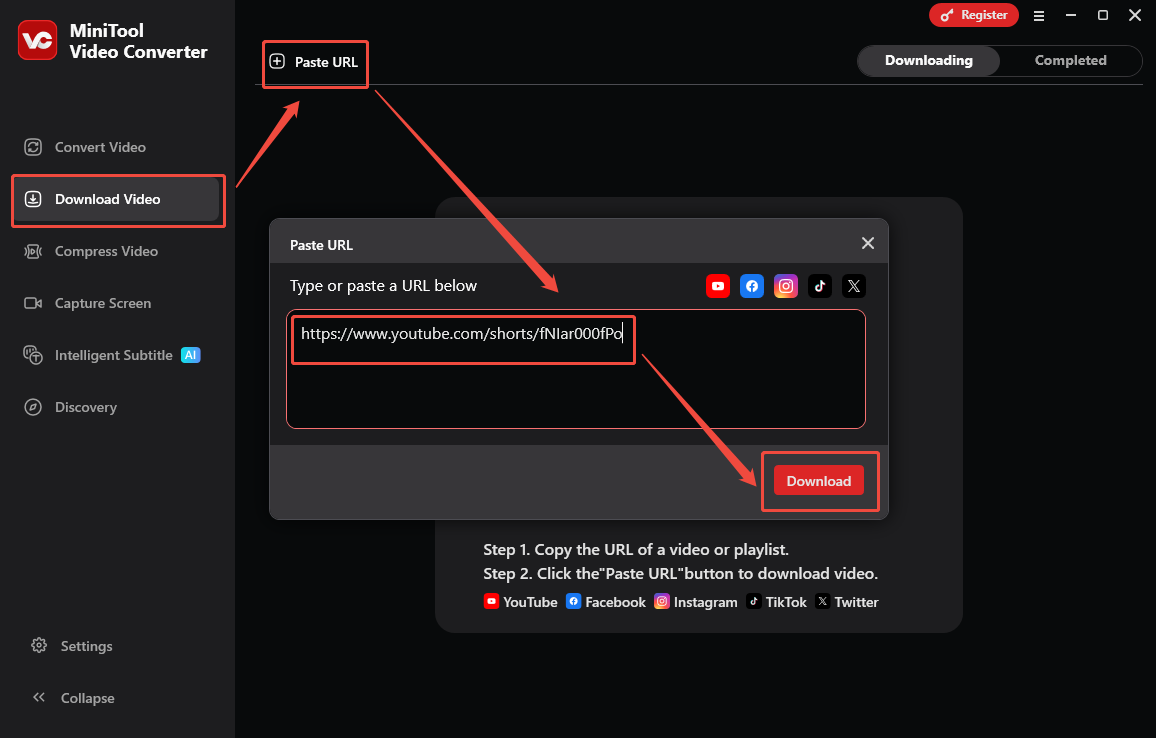
Go back to the interface of MiniTool Video Converter. Navigate to the Download Video section and click on the upper-left Paste URL option to open the URL box. Next, paste the video link into the box. Next, click on the Download option to begin the link analysis process.
Step 4. Set an output format and begin the download.
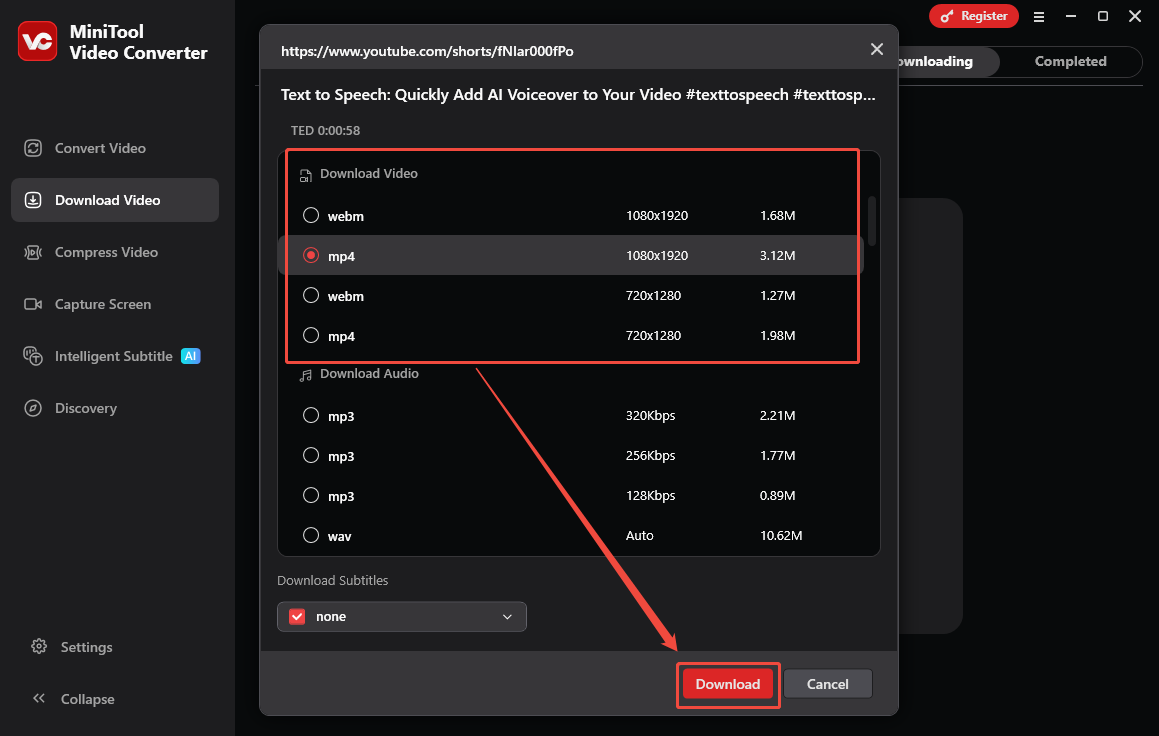
Once the link analysis is done, an output format window will appear. Under the Download Video section, choose an output format with the specific resolution. Then, click on the bottom-right Download option to start the download process.
Step 5. Check the output video.
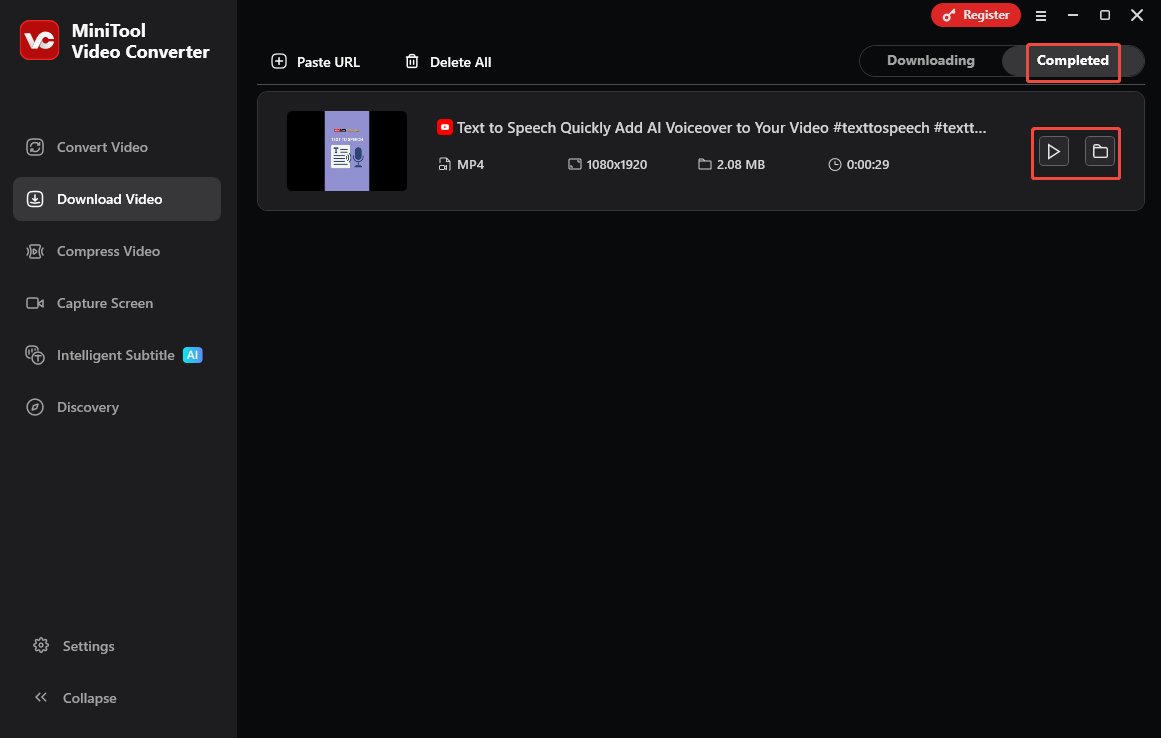
When the download process completes, MiniTool Video Converter will automatically switch to the Completed section. There, click on the Play icon to view the video directly. To locate the output video, click on the Folder icon.
More than a YouTube downloader, MiniTool Video Converter also allows for saving videos from other platforms, including Twitter, Facebook, TikTok, and Instagram, without any watermarks.
To Wrap Things Up
Can ChatGPT play YouTube videos? If you are using the latest version of the ChatGPT desktop app, the answer is yes. On condition that you are on an old version of the chatbot, there is no support for video playback. If you want to play YouTube videos without ChatGPT, just try MiniTool Video Converter to save the video content for offline watching.