

Automating YouTube video upload can significantly boost productivity and ensure consistent content updates. This article will provide two efficient methods to help you learn how to automatically upload videos to YouTube.
Maintaining consistent content updates is key to successfully operating a YouTube channel. However, this repetitive task often drains creators' energy, making automated YouTube video uploads a strategic solution. By scheduling content releases in advance, you can keep your channel consistently updated even during busy periods, thereby boosting audience retention.
Why Automate YouTube Video Upload
Beyond convenience, automated YouTube uploads offer the following practical advantages:
#1 Save Time and Optimize Your Workflow
No need to repeat the video upload process every week. Plan your video publishing schedule days with a single batch operation, helping you save significant time.
#2 Optimize Channel Algorithms and Boost Viewer Engagement
YouTube's algorithm prioritizes users who consistently update their content, providing them with more organic traffic to increase channel visibility. Additionally, uploading videos at a fixed time each day helps subscribers get familiar with your posting schedule, enabling them to watch new content promptly.
#3 Reach a Wider Audience
After analyzing your channel's target audience, schedule YouTube uploads during their peak activity periods to ensure precise engagement with your target group. Additionally, maintaining a consistent update frequency enhances your channel's credibility and reliability, encouraging viewers to stay engaged.
#4 Free up More Time for Creation
For prolific YouTube creators, video uploads consume significant time. The automated upload feature allows them to focus more energy on producing high-quality content, thereby enhancing their channel's professionalism and appeal.
#5 Optimize Global Audience Management
If your audience spans international viewers across multiple key time zones, creators schedule content in advance based on optimal posting times for local audiences. This way, you won't have to sacrifice sleep to publish videos.

How to Automatically Upload Videos to YouTube
This section provides two effective methods for automatically uploading YouTube videos: utilizing YouTube's built-in scheduling feature and employing a reliable third-party automated upload tool.
Method 1: Use the YouTube Built-in Scheduling Feature
With the automatic YouTube upload feature, you can easily schedule specific release times for your videos, and the system will automatically publish them during the designated time period. Now, you can check out the detailed guide below to automatically upload videos to YouTube.
Step 1: Log in to YouTube Studio
Go to the official website of YouTube Studio, then log in to it.
Step 2: Upload Your Video
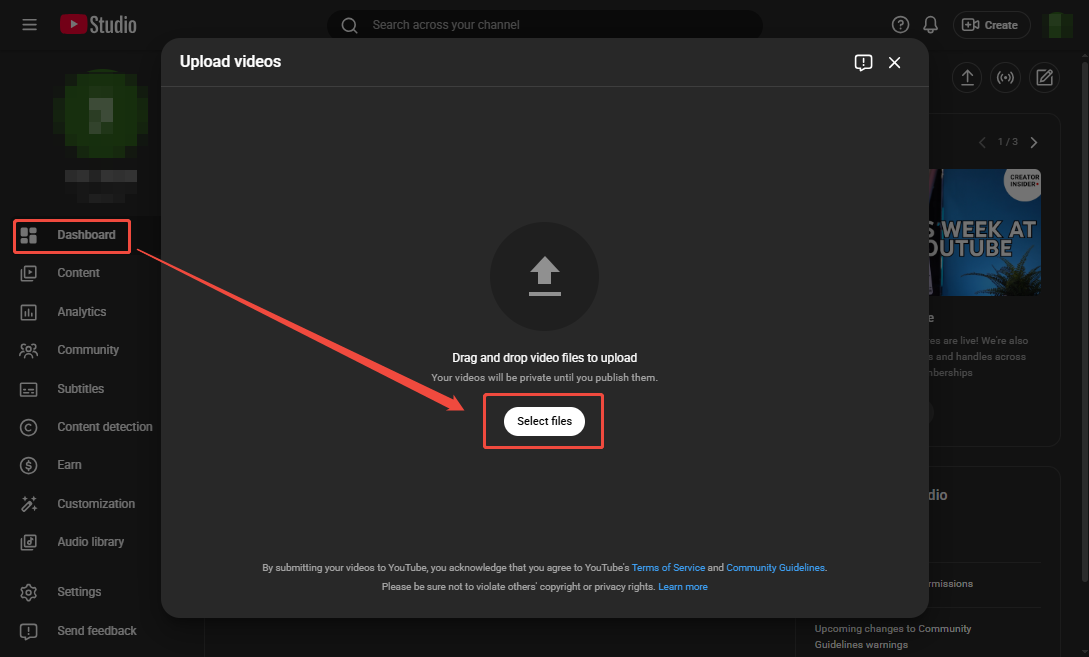
1. Navigate to the Dashboard module, then click on Upload videos.
2. In the new pop-up window, click Select files to import the video you’ve edited in advance from your device.
Step 3: Fill out Video Upload Information
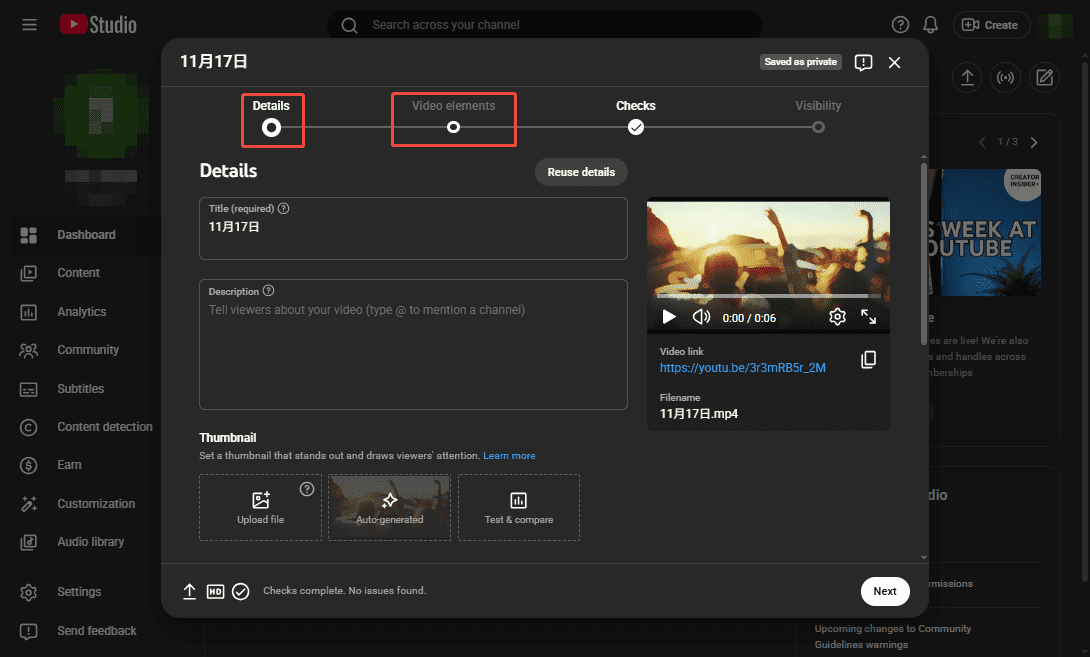
1. After the video is successfully imported, the video information editing panel will automatically pop up.
2. Then, you can add information such as the video title, description, and thumbnail in the Details section. After that, you can choose whether to add elements like subtitles and end screens in the Video elements section.
Step 4: Schedule Video Upload
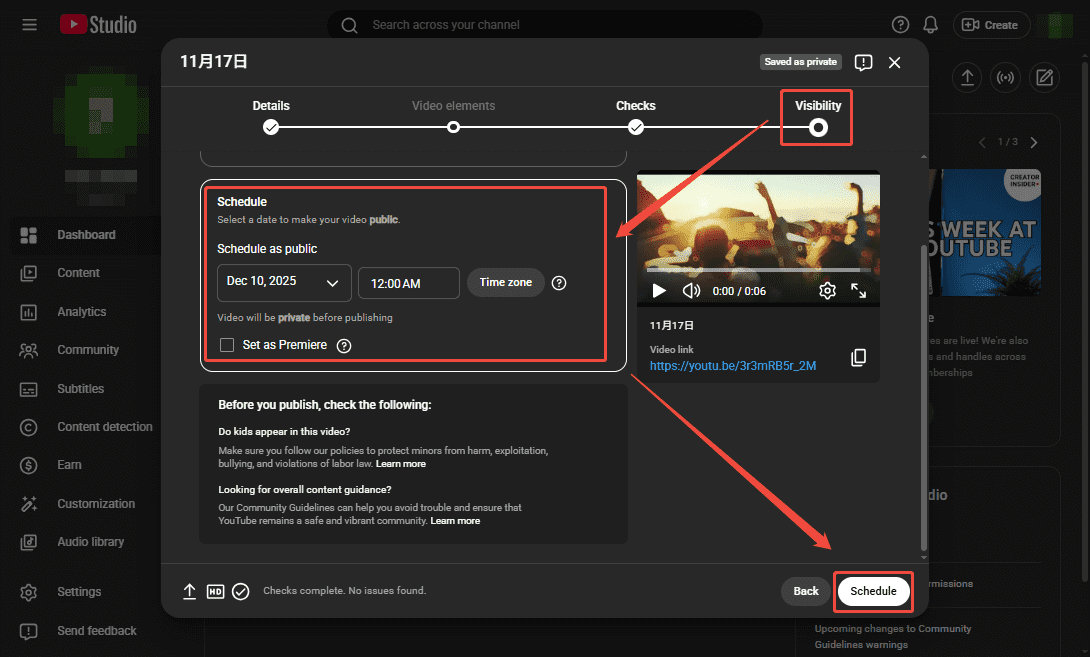
1. After filling out the video information, navigate to the Visibility module.
2. Set the video to public and specify the date and time you wish to publish it in the Schedule box, then click Schedule to save it.
Although YouTube offers built-in automatic upload features (as outlined in the steps above), some manual steps are still required. Therefore, to achieve more convenient automated uploads of YouTube videos, you can utilize the third-party automation tools recommended below.
Method 2: Use the Third-Party YouTube Auto Uploader
Here we have carefully selected two third-party YouTube auto uploaders for your reference.
#1 Zapier
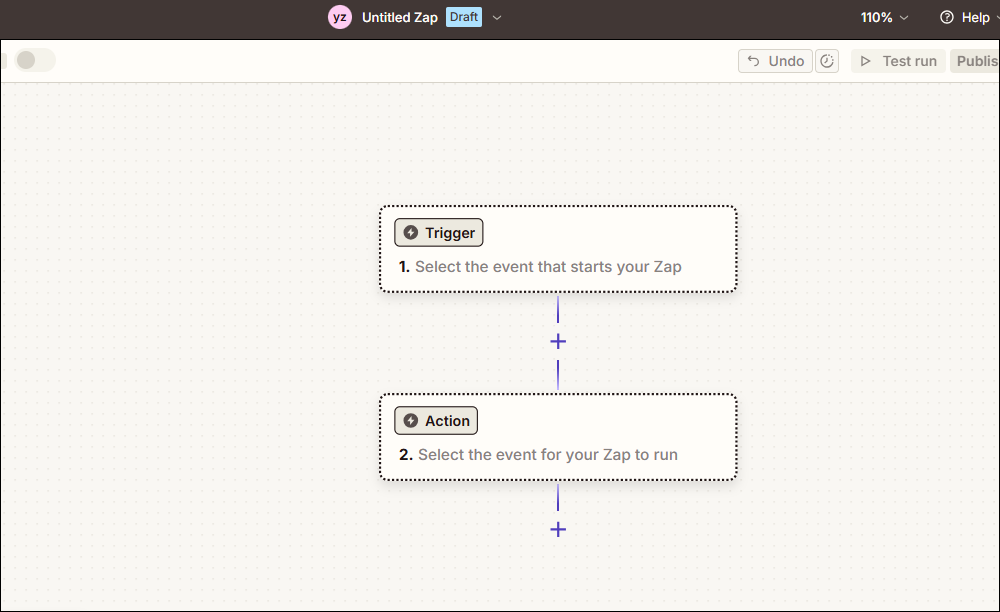
Zapier is an automation tool that helps you connect two or more different applications to automate workflows. Its operation is straightforward: after creating Zaps (automated workflows connecting two applications), you designate one as the trigger app and the other as the action app. When an event occurs in the trigger app, the action app automatically performs the corresponding operation.
To automate YouTube video uploads using Zapier, you need to connect YouTube with a cloud storage tool like Google Drive. Set Google Drive as the trigger and YouTube as the action. When you save a video to Google Drive, the system will automatically trigger YouTube to complete the video upload.
#2 Tube Buddy
Tube Buddy is a free browser extension designed specifically for YouTube automation, seamlessly integrating with YouTube. By linking it to your YouTube dashboard, you can automate video uploads. Additionally, Tube Buddy offers channel and video management tools, such as the powerful SEO optimization features, to help boost your channel's traffic and rankings.
MiniTool Video ConverterClick to Download100%Clean & Safe
Final Words
In short, whether you use YouTube's built-in upload tools or third-party uploaders, both can help you automatically upload videos to YouTube. More importantly, these methods not only boost your workflow efficiency but also optimize your channel to some extent.
About The Author

Position: Columnist
Jade is an experienced multimedia tech writer who has authored hundreds of guides on screen recording, video editing, and software troubleshooting. Dedicated to bridging the gap between complex technical concepts and user-friendly solutions, she specializes in providing clear, actionable advice.