

This article explains the concept of YouTube lower thirds and their benefits for YouTube videos. In addition, it provides a detailed tutorial on how to use them effectively, while introducing tools that allow for making lower thirds for YouTube.
What Are Lower Thirds
The lower third is an overlay displayed at the bottom of the screen that combines graphic elements with text. Commonly found in television programs or online videos, the lower third provides viewers with supplementary information such as character introductions, background details, or key points.
At the same time, these subtitles do not obstruct the main video content nor distract viewers from the core video material.
Key elements of YouTube lower thirds:
- Text content: This constitutes the core content of the lower thirds, which may include background information, channel name, speaker name, segment title, and other elements.
- Call to action: Beyond supplementary information, lower thirds can incorporate call-to-action elements to achieve promotional objectives.
- Brand identity: Adding brand logos enhances visual impact, reinforcing brand image while delivering promotional results.

Benefits of Using YouTube Lower Thirds
Adding a lower third for YouTube videos offers numerous benefits, helping to increase channel views and subscriptions.
Enhance Brand Identity
Maintaining consistency in brand elements (such as logos, color schemes, and fonts) within the YouTube lower third effectively boosts brand recognition. Over time, this deepens viewer recall, enabling them to quickly identify channel content.
Effectively Promote Your Brand
Compared to relying solely on verbal calls to action, integrating call-to-action elements, such as subscription buttons, links to other videos, websites, or products, in the lower third of your video creates a stronger visual impact and memorability. This effectively guides viewers to subscribe to your channel or purchase your products.
Strengthen Video Credibility
Providing reliable key information (such as speaker details, filming dates, and social media accounts) significantly enhances video credibility and professionalism. Simultaneously, it builds viewer trust, serving as an effective strategy to increase channel subscriptions.
Effectively Conveying Information
When viewers miss verbal cues, lower thirds provide visual reinforcement, ensuring key content is fully understood.
MiniTool Video ConverterClick to Download100%Clean & Safe
Tips for Using a YouTube Lower Third
When used effectively, YouTube lower thirds can avoid distracting viewers while efficiently conveying key information. Here are some tips for utilizing a lower third efficiently:
#1 Keep Information Concise
All text within the lower third of YouTube should be concise and easy to read, ideally confined to 1-2 lines. Avoid using lengthy sentences to prevent distracting viewers and impairing comprehension of key information.
#2 Control Display Duration
To ensure viewers can effectively read the information, lower thirds must maintain an appropriate display duration. Avoid overly brief display times that cause viewers to miss important content. An ideal display duration is 3-5 seconds.
#3 Optimize Layout
Although the YouTube lower third occupies the lower screen area, it should not be fixed within this area. They can be adjusted to appear on either side of the video or even at the top based on video content to avoid obscuring key visuals. Ensure texts remain away from screen edges, as display standards across devices may cause text truncation.
#4 Visual Consistency
The font and color scheme for lower thirds must align with brand identity, channel banners, or thumbnail styles. Meanwhile, it’s necessary to select highly legible fonts to enhance viewer recognition efficiency.
Bonus: Add Lower Thirds to Your Video with MiniTool MovieMaker
After gaining a thorough understanding of the concept of lower third and mastering efficient techniques for its use, you can add lower third to your videos using the editing software MiniTool MovieMaker.
MiniTool MovieMaker is a professional yet user-friendly video editor that creators of all skill levels can easily master. It not only supports powerful editing functions like trimming, flipping, and rotating videos, but its extensive media library also allows you to add transitions, filters, text, effects, and more to your videos. Of course, adding lower thirds is a breeze. Here are the simple steps:
Step 1: Create Lower Thirds
You can visit websites offering YouTube lower thirds templates, such as the Artist and Profounder, to create or download lower thirds that match your brand style.
Step 2: Install MiniTool MovieMaker and Launch It
1. Click on the button below to install and download MiniTool MovieMaker on your computer.
2. Then launch it on your PC.
MiniTool MovieMakerClick to Download100%Clean & Safe
Step 3: Import Footage
Click on Import Media Files to import your lower thirds and videos to MiniTool MovieMaker.
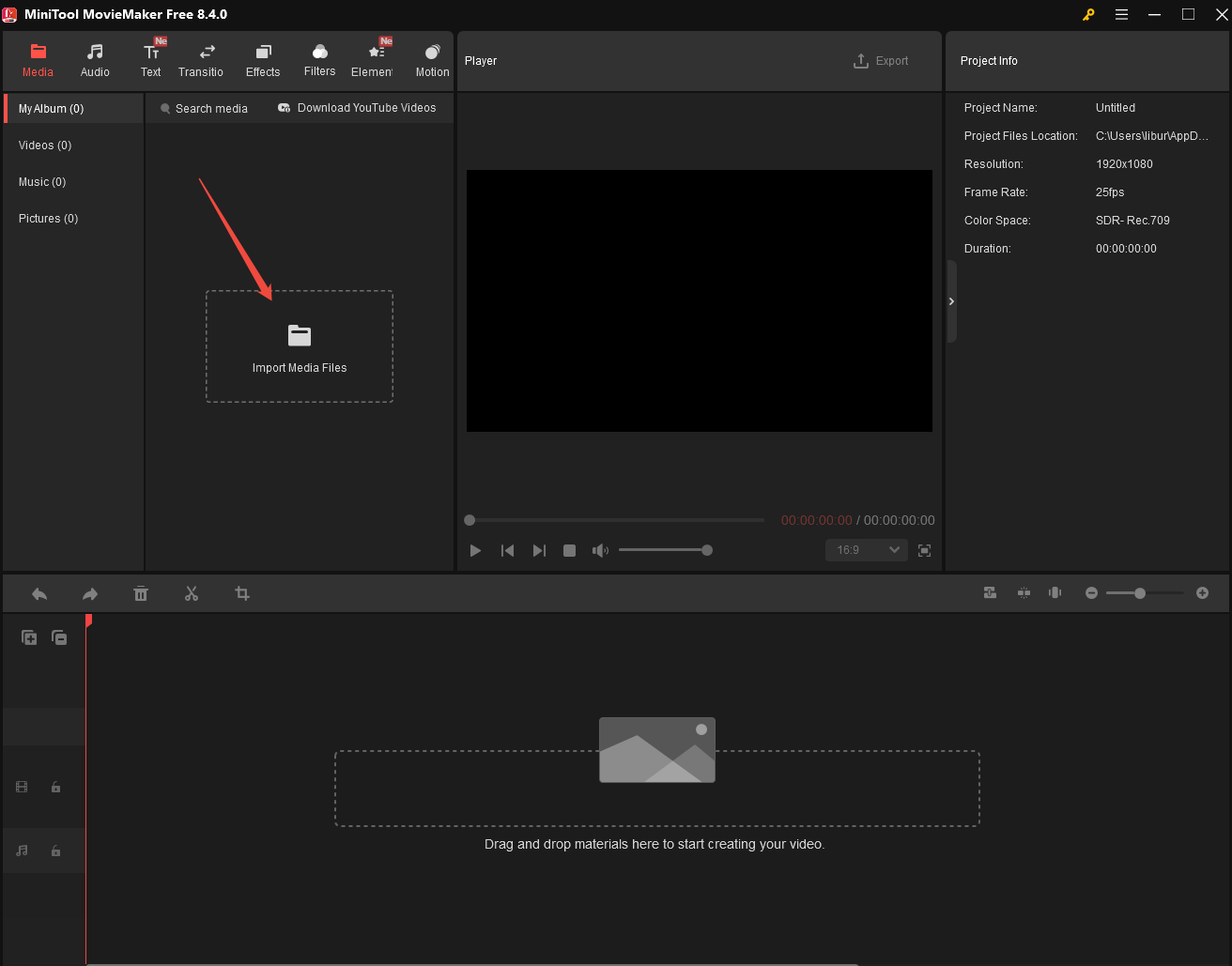
Step 4: Add Lower Thirds to Your Video
1. Drag your video file to the timeline.
2. Determine the point in time when you want the lower third to appear, then drag the added lower third to the corresponding point on the timeline.
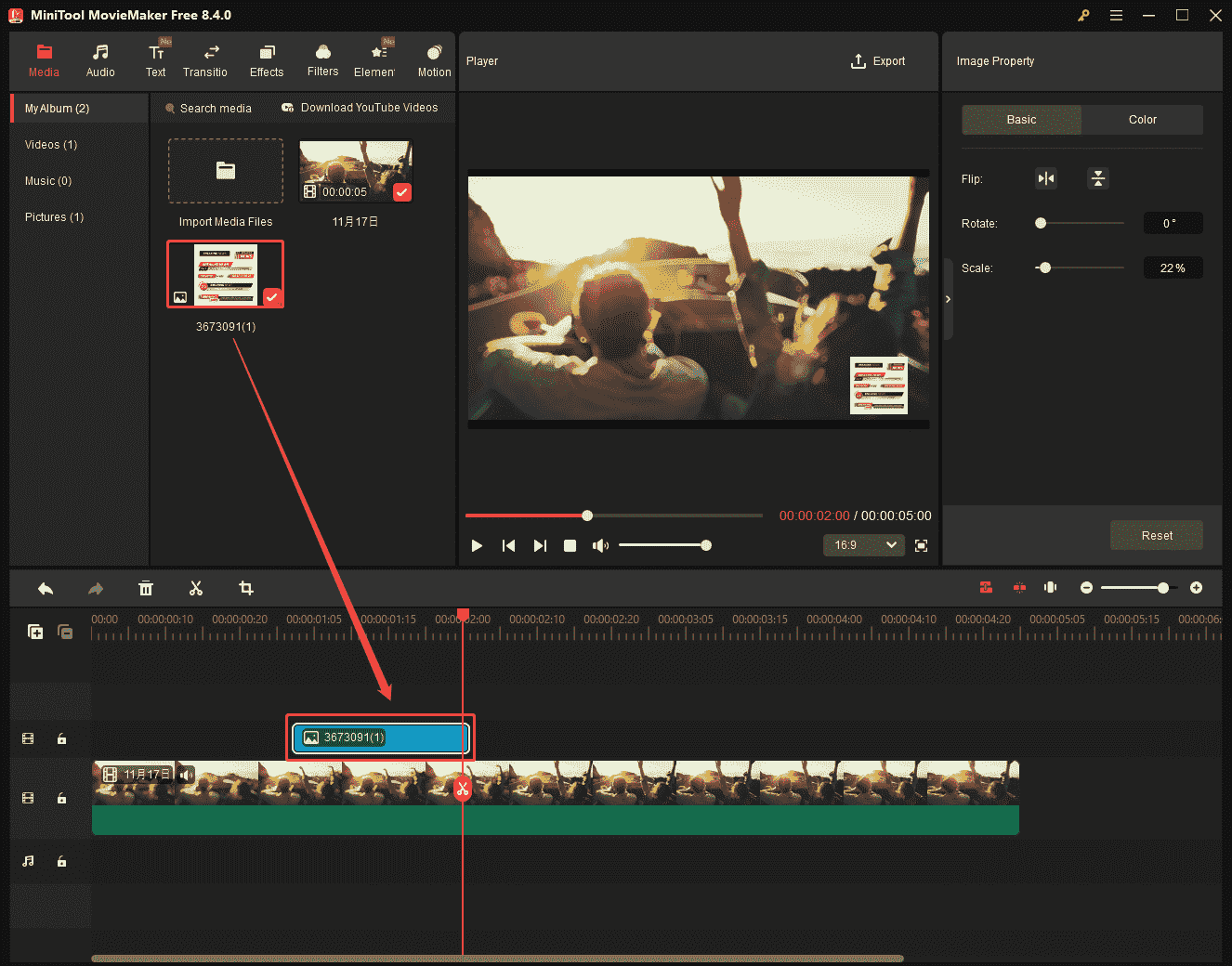
3. Then, you can flip, rotate, and scale the lower third in the Image Property box and adjust its placement.
Step 4: Export the Video with Lower Thirds
After completing the production, click the Export button at the top of the page to save the video to your device.
Final Words
In short, YouTube lower thirds are a powerful tool for enriching video content. If you wish to add such captions to your videos, the efficient usage tips and step-by-step guide on how to add them to your video above will be of great help to you.
About The Author

Position: Columnist
Jade is an experienced multimedia tech writer who has authored hundreds of guides on screen recording, video editing, and software troubleshooting. Dedicated to bridging the gap between complex technical concepts and user-friendly solutions, she specializes in providing clear, actionable advice.