

Things about YouTube Podcast Thumbnail
The YouTube podcast is essentially a series of audio or video episodes that are uploaded and organized into a YouTube playlist. For podcast creators on YouTube, the podcast thumbnail is the critical driver to increase CTR and helps their podcast stand out amidst countless options.
For a YouTube podcast thumbnail, the recommended YouTube podcast thumbnail size for video uploads is 1280x720 pixels (16:9 aspect ratio). However, YouTube recommends 1280 x 1280 pixels (1:1 aspect ratio) for a podcast playlist thumbnail.
Tips for Designing a Podcast YouTube Thumbnail
A well-designed thumbnail can significantly boost your podcast’s visibility across various platforms. How to make a well-designed YouTube podcast thumbnail? Here are some useful tips to share with you.
Upload High Quality Image
A high-quality image is the most important thing for YouTube podcast thumbnail creation. Please make sure your images are clear to maintain quality across different devices. If the image is unclear, you are likely to be considered unprofessional to viewers.
Maintain a Consistent Graphic Style
Consistency is the secret to turning casual viewers into loyal subscribers. Why? A consistent visual style across thumbnails helps build channel familiarity with your audience. When they see one of your thumbnails, they should immediately recognize that it’s part of your podcast series. For example, you can use the layout templates and use the consistent elements.
Additionally, you can use a split-screen layout. The split-screen layout is ideal for episodes involving debates, transformations, or contrasting ideas. You can divide the thumbnail either vertically or horizontally.
Use Color Contrast
Color is one of the most important ways to make your podcast stand out on YouTube. Color contrasts naturally catch people’s eyes. Also, make sure the color is aligned with the podcast tone. You can use color psychology. For example, bright and saturated colors work for energetic, comedic, or urgent podcasts, while cool and muted colors are ideal for calm, educational, or introspective podcasts.
Pay Attention to the Font
Font is a very subtle detail. Firstly, choose a font size that remains readable on digital screens even when the thumbnail is small. Secondly, use bold fonts that are clear even when scaled down. Lastly, choose fonts that align with your podcast branding for a cohesive visual identity.
After reading these tips above, do you think designing a podcast YouTube thumbnail from scratch is time exhausting? I think so too. Using a podcast YouTube thumbnail template can break the barrier.
Free Podcast YouTube Thumbnail Templates to Download
I find some free and rich websites to download podcast YouTube thumbnail templates. Now, I share some of the best ones for you. Then, I chose the first tool to show you how to use it.
Freepik
Website: https://www.freepik.com/free-photos-vectors/podcast-thumbnail
If you often find image and video material on the website for designing, I believe you have heard of Freepik. It is an all-in-one AI creative suite for designers, marketers, and content creators. Freepik offers a large amount of content to download, including templates, icons, vector graphics, videos, etc.
The podcast YouTube thumbnail templates are supported for downloading on Freepik. These templates are designed to be edited, allowing you to change text, images, and colors to match your podcast’s branding. Then, you can export the edited thumbnail in JPEG or PNG formats.
Here are the steps to use Freepik to download podcast YouTube thumbnail templates.
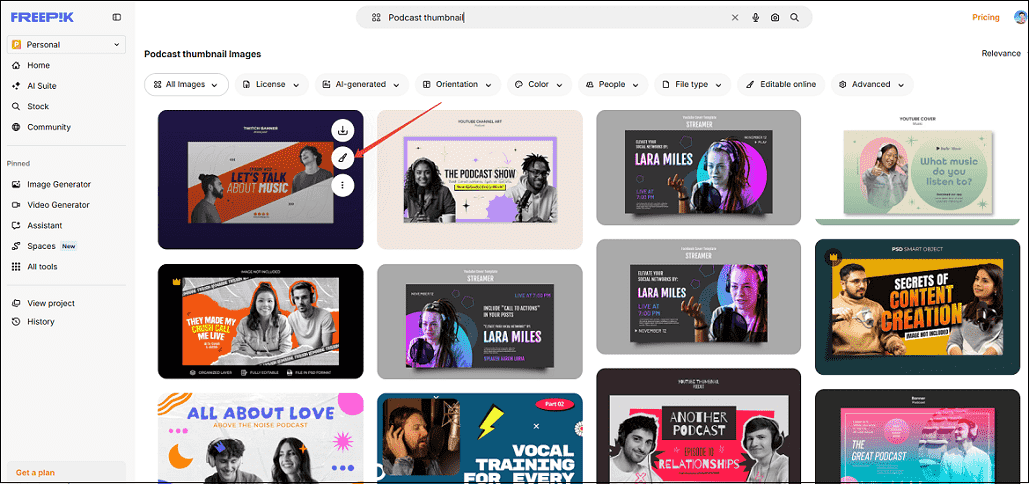
Step 1. Go to Freepik and Choose a Template
1. Go to the official website above and locate a preferred template.
2. Hover your mouse on the thumbnail and choose Edit online.
Step 2. Edit the Template
Adjust the text color, size, replace the image, and adjust the location.
Step 3. Export the Edited Podcast YouTube Thumbnail Template
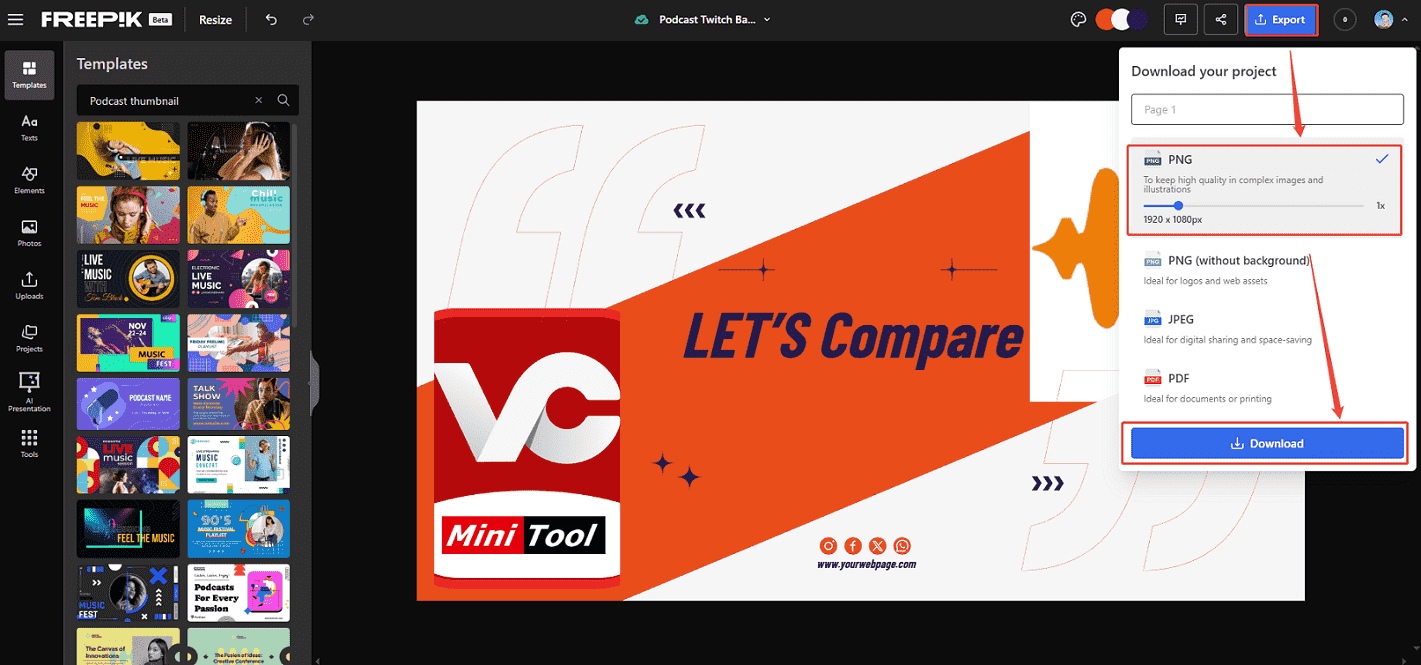
1. After editing the template, click on Export at the top right corner of the editing interface.
2. Choose a download format and click on Download.
Renderforest
Website: https://www.renderforest.com/graphic/podcast-youtube-thumbnails
One of the easiest podcast YouTube thumbnail template free download platforms is Renderforest. I have used this online tool many times and successfully designed my podcast thumbnails. You can explore a variety of designs for every topic and episode, enticing viewers to hit play.
You can select your preferred layout and personalize virtually every element, like background color, text, and image, to reflect your individual style and content. Level up your podcasts by designing clickable thumbnails from now on.
MiniTool Video ConverterClick to Download100%Clean & Safe
Bottom Line
This article introduces 4 tips for helping you make a well-designed podcast YouTube thumbnail. You can also use Freepik or RenderForest to edit and download the free thumbnail templates to keep the consistent style of your thumbnail.